

New Participant
August 14, 2016
Answered

how do i insert the registered trademark symbol into a document

  • August 14, 2016
  • 3 replies
  • 112091 views

how do I insert the registered trademark symbol into a document?

This topic has been closed for replies.
Correct answer Barb Binder

Mac: Option+R

Win: Hold the Alt key down and type 0174 on the Numeric Keypad

-or-

on either platform:
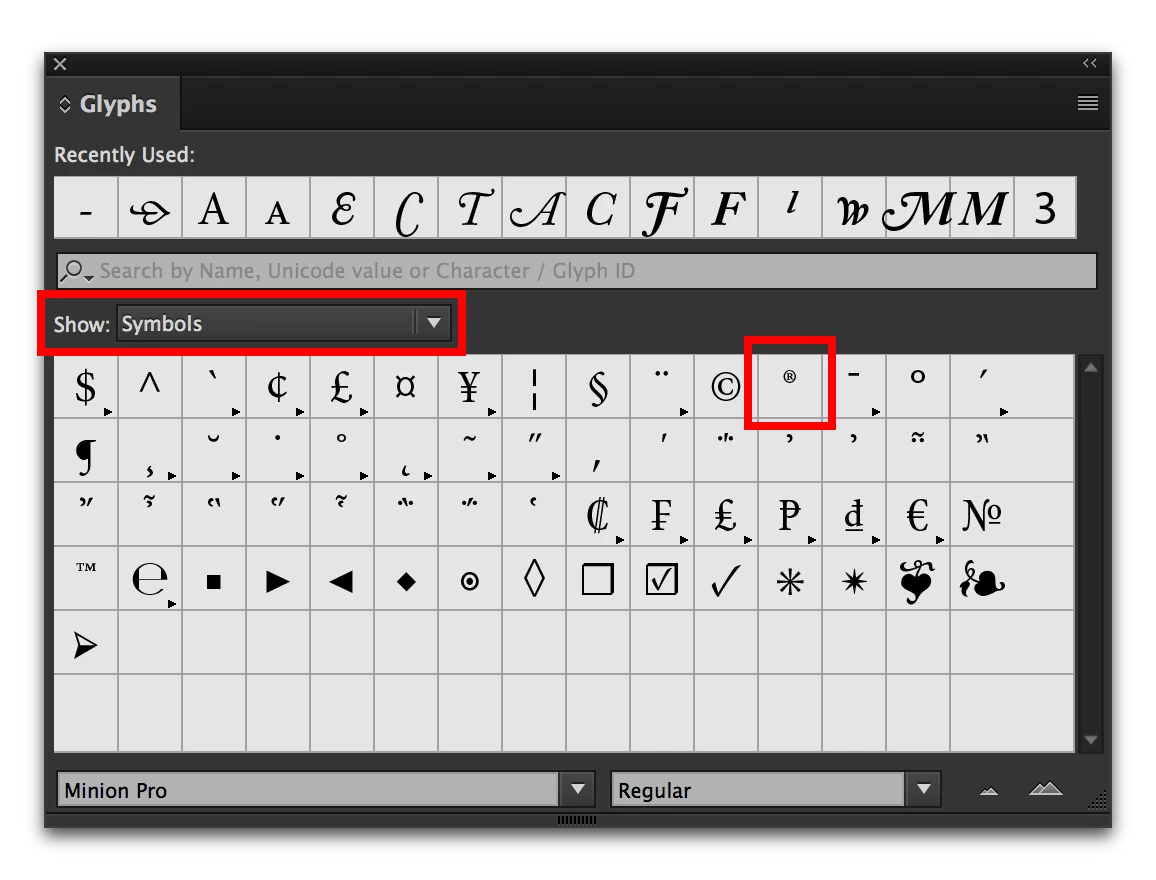
  • Type > Glyphs
  • Show: Symbols
  • Double click the symbol

3 replies

New Participant
December 13, 2018

Put your cursor where you wish the symbol to be placed.  Go to Type>Insert Special Character>Symbols>Registered Trademark Symbol and it will appear on your text line.

Barb Binder
Barb BinderCorrect answer
Community Expert
August 14, 2016

Mac: Option+R

Win: Hold the Alt key down and type 0174 on the Numeric Keypad

-or-

on either platform:

  • Type > Glyphs
  • Show: Symbols
  • Double click the symbol

~Barb at Rocky Mountain Training
Larry G. Schneider
Community Expert
August 14, 2016

Place the cursor in the text where you want the circled R and use Type>Glyphs to find the mark.

Barb Binder
Community Expert
August 14, 2016

Larry: didn't mean to duplicate your post. It literally took 19 mins for my response to post... are you having issues with Jive?

~Barb at Rocky Mountain Training
Larry G. Schneider
Community Expert
August 14, 2016

No problem. I have had no problems today.