


Participating Frequently
April 29, 2024
Answered

How to access rotation angle of group via scripting

  • April 29, 2024
  • 1 reply
  • 1407 views

How do I access the rotation angle of an object, specifically a group, via script? I've tried BBAccumRotation tag and selectedObject.rotation, but I keep getting errors. I know the value exists in Illustrator as shown in the Properties tab:
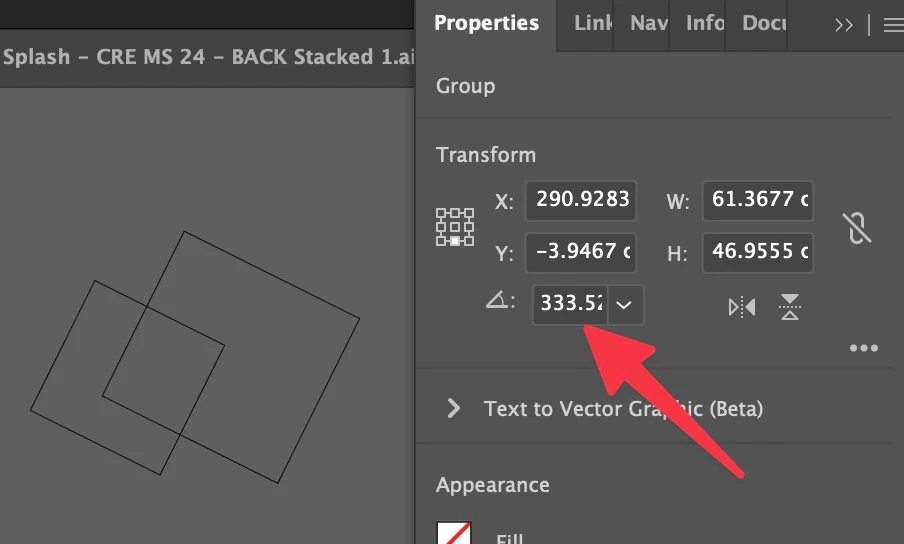


I'm trying to write a script that take the rotation value of a selected object and applies the negative of that value to the second selected object. 


All help appreciated. Thanks!


This topic has been closed for replies.
Correct answer femkeblanco

I think a group doesn't have a BBAccumRotation tag , but paths within a group do.  Assuming that paths within a group will have the same tag, you can access the first one (selection[0] is a selected group):

alert(app.selection[0].pathItems[0].tags[0].name + ": \
" + app.selection[0].pathItems[0].tags[0].value * 180 / Math.PI);


(Courtesy of Silly-V).

1 reply

femkeblanco
femkeblancoCorrect answer
Brainiac
April 29, 2024

I think a group doesn't have a BBAccumRotation tag , but paths within a group do.  Assuming that paths within a group will have the same tag, you can access the first one (selection[0] is a selected group):

alert(app.selection[0].pathItems[0].tags[0].name + ": \
" + app.selection[0].pathItems[0].tags[0].value * 180 / Math.PI);


(Courtesy of Silly-V).

skivvieAuthor
Participating Frequently
April 29, 2024

Great! That seems to return a proper value... 


Would you be so super kind as to help with the rest of the script? I'm a total scripting hack and while I can generally read what's going on I'm having a hard time getting it to work. This is what I was dealing with previously from ChatGPT:


// Check if a document is open in Illustrator
if (app.documents.length > 0) {
    // Get the active document
    var doc = app.activeDocument;

    // Check if exactly two objects are selected
    if (doc.selection.length == 2) {
        // Get the first selected object
        var selectedObject1 = doc.selection[0];
        // Get the rotation angle of the first selected object
        var rotationAngle = selectedObject1.rotation;

        // Get the second selected object
        var selectedObject2 = doc.selection[1];

        // Apply opposite rotation angle to the second selected object
        selectedObject2.rotate(-rotationAngle);
    } else {
        alert("Please select exactly two objects in Illustrator.");
    }
} else {
    alert("Please open a document in Illustrator.");
}


That's the jist of what I'm trying to do. Much appreciated!

femkeblanco
Brainiac
April 30, 2024

Note that "the first selected object" refers to the topmost of the two selected objects.  (If this doesn't have a rotation tag, an error will occur.)  If you want it the other way around, swap the 0 and 1 in doc.selection[0] and doc.selection[1]. 

// Check if a document is open in Illustrator
if (app.documents.length > 0) {
    // Get the active document
    var doc = app.activeDocument;
    // Check if exactly two objects are selected
    if (doc.selection.length == 2) {
        // Get the first and second selected objects
        var selectedObject1 = doc.selection[0];
        var selectedObject2 = doc.selection[1];

        // Get the rotation angle of the first selected object
        var rotationAngle = selectedObject1.pathItems[0].tags[0].value * 180 / Math.PI;

        // Apply opposite rotation angle to the second selected object
        selectedObject2.rotate(-rotationAngle);
    } else {
        alert("Please select exactly two objects in Illustrator.");
    }
} else {
    alert("Please open a document in Illustrator.");
}