

vinny38
Legend
February 2, 2018
Answered

How to access the Tilde key with a French Keyboard?

  • February 2, 2018
  • 13 replies
  • 46915 views

In Illustrator, "Tilde" key ~ seems to have some magical power:

According to Adobe's site, it can "transform pattern (independent of object) when using Selection tool, Scale tool, Reflect tool, or Shear tool". 

Sounds great! I wish I could play around with it, but... I use a French keyboard. No such key on my keyboard.
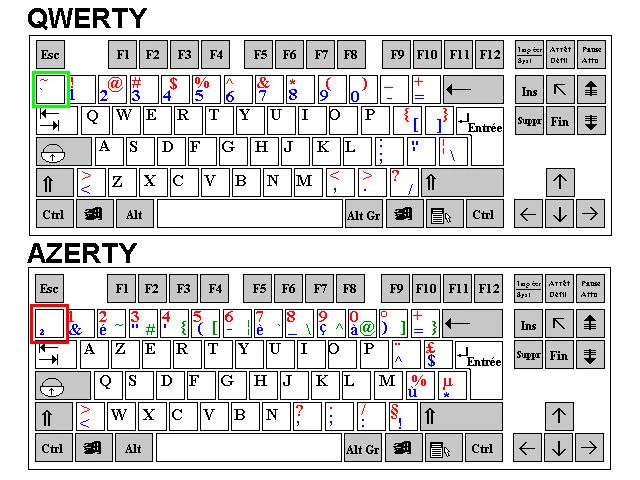
² key is not working. And to access the tilde character, I must combine alt + é/2 keys, which obviously results to a duplication of the selected object.

I know I could change my keyboard through the Windows regional settings, but maybe there's another way.

Maybe this key is hidden somewhere, or maybe I could change it through the keyboard shortcuts menu. 

Any help appreciated.

Specs: CS6 - Windows 7

This topic has been closed for replies.
Correct answer jonasdr

I've been looking for a solution myself for this after seeing a demo about the magic behind the tilde key in Illustrator. As I do not have the ² key, I've been tapping around my keyboard and accidentally found that the key left of the W (the one with an arow pointing left and on top there's one pointing to the right) does the same trick 🙂

13 replies

jonasdr
jonasdrCorrect answer
Inspiring
July 9, 2024

I've been looking for a solution myself for this after seeing a demo about the magic behind the tilde key in Illustrator. As I do not have the ² key, I've been tapping around my keyboard and accidentally found that the key left of the W (the one with an arow pointing left and on top there's one pointing to the right) does the same trick 🙂

Kat Kremser
Community Expert
Community Expert
October 30, 2023

.

Participant
October 30, 2023

Same for German keyboard 😕😕

Jacob Bugge
Community Expert
Community Expert
October 30, 2023

Frank,


How about one of these?


German: Ö (or see below)

Icelandic, Finnish, and German: < (just to the right of Shift),


Participant
October 30, 2023

Thaks, Ö ist is 🙂

Participating Frequently
March 31, 2023

I'v post a workaround that fix this problem where i explain how to remap one key to the right tilde key :

https://community.adobe.com/t5/photoshop-ecosystem-discussions/workarounds-for-the-non-working-tilde-shortcut-on-non-us-keyboard-win/m-p/13694303#M719654

Participating Frequently
March 31, 2023

don't know why my post is listed as a spam for now, but shortly, in windows : remap one key to the ` key (U+0060) wich is the output of the `~ key aka tilde ~ shortcut using Microsoft Keyboard Layout Creator !


Jacob Bugge
Community Expert
Community Expert
October 30, 2023

Aurélien,


I only just saw your post here and thread there.


It is no longer listed as spam.


Thank you very much for sharing. As just mentioned, a joint effort has been going on over some years, covering a (growing) number of different non US keyboards.


Your workarounds could make a great difference, especially in cases where no corresponding key can be found.


I have included the link to your thread in my Tilde snippet collection; maybe more posts will appear over there (the latest being in September 2023).


Participating Frequently
March 30, 2023

For windows user :

Workaround 1 : change your keyboard location (language) per application in advanced keyboard parameter. After that you have to change language once whenever you use an app then it will remember it.

Workaround 2 : remap your key using Microsoft Keyboard Layout Creator on official microsoft website. I have a french keyboard and remaped the ² key to ` key (accent grave, which unicode is U+0060)(when they say ~ it is ` cause their key is `~) . Validate layout and name it, test it, build package, open created folder, intall.exe, then log out windows, log in, change to your new keyboard layout (win+space) et voilà!!! works great and my layout still azerty ! (works with win 11 even if not mentionned on website)

And you can remap any (more or less) key you want with symbol and other not available in your language, you can use charmap.exe (included in windows) to find them and their unicode. ((!be careful, works also with windows login password)


(but sadly workaround 2 does not work with tourbox, so still waiting for a proper fix...)

Participant
February 17, 2022

I was looking for this on a UK keyboard, and for me it is the @ key!

Known Participant
October 26, 2021

Currently, the tilde key on an AZERTY (French) keyboard is "Option" key + N.  The easiest way I've found to identify the special keys and symbols is to click your keyboard icon ("flag" icon) in the upper right side of your menu bar and select "Show Keyboard Viewer".  While the viewer is open, when you hold your "Option" ky on the real keyboard, you'll see the viewer toggle between the normal and special characters. NOTE:  If you don't see your flag icon in the menu bar then you should go to your System Preference > Keyboard > Input Sources tab and check "Show input menu in menu bar". 


See here for how to see the special charcters on the Keyboard Viewer:

 Hope this helps as every few years I have to look this up.  It keeps changing as the keyboards and usage change.

Participant
April 13, 2021

I´v struggled with this for years my self on my Norwegian keyboard. Today I did some more testing and suddenly found out that it actually works with the "<" key! Huge timesaver for me. Might be the same for french keyboard?

meganchi
Legend
November 15, 2018

Actually, I found this online...

Tilde - Wikipedia

Roger Breton
Legend
October 19, 2019

FWIW, I've been plagued with this "Tilde" problems for years too, living on a French-Canadian PC QWERTY keyboard.

While experimenting, on my "French" keyboard, with accented characters, on the second row, starting with the letter "A" on the left, the keys goes like this: ASDFGHJKL, and then, it is followed by the semi-colon ";", and then, this key, which create the "e accent grave" or "è". Holding this key while drawing any of the geometric shape will do the equivalent of the "tilde" key on the Mac *BUT* it does not woek with "moving patterns" interactively inside a shape 😞 
I may find that magic key later... But that's a step in the right direction.
Thanks to all of you who contributed to this thread!

meganchi
Legend
November 15, 2018

Have you tried typing Ctrl + Shift + 2 (pressing all of these keys at the same time)?

Monika Gause
Community Expert
Community Expert
November 15, 2018

meganchi  schrieb

Have you tried typing Ctrl + Shift + 2 (pressing all of these keys at the same time)?

In this case you need the tilde as a modifier key. And then this shortcut won't work.

Participant
January 11, 2019

I found !!!! Key combination AltGr + ù. It works perfectly