



vinny38
Legend
February 2, 2018
Answered

How to access the Tilde key with a French Keyboard?

  • February 2, 2018
  • 13 replies
  • 46915 views

In Illustrator, "Tilde" key ~ seems to have some magical power:

According to Adobe's site, it can "transform pattern (independent of object) when using Selection tool, Scale tool, Reflect tool, or Shear tool". 

Sounds great! I wish I could play around with it, but... I use a French keyboard. No such key on my keyboard.
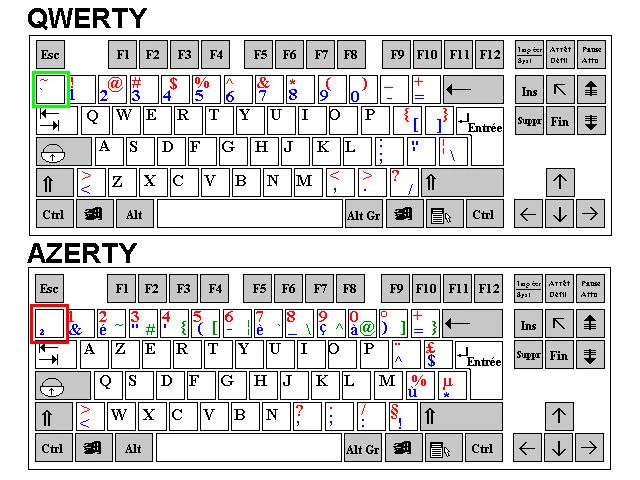
² key is not working. And to access the tilde character, I must combine alt + é/2 keys, which obviously results to a duplication of the selected object.

I know I could change my keyboard through the Windows regional settings, but maybe there's another way.

Maybe this key is hidden somewhere, or maybe I could change it through the keyboard shortcuts menu. 

Any help appreciated.

Specs: CS6 - Windows 7

This topic has been closed for replies.
Correct answer jonasdr

I've been looking for a solution myself for this after seeing a demo about the magic behind the tilde key in Illustrator. As I do not have the ² key, I've been tapping around my keyboard and accidentally found that the key left of the W (the one with an arow pointing left and on top there's one pointing to the right) does the same trick 🙂

13 replies

Participant
November 15, 2018

So I have a french-Canadian QWERTY keyboard, live in Quebec.. I am able to move patterns within and object with both selection and direct selection tool and alt+the u accent to the left of the z, when I  press shift and that same letter I get the Tilde ~......Hope this helps

vinny38
vinny38Author
Legend
November 15, 2018

Thanks for your suggestion, unfortunately not working with an AZERTY keyboard...

Monika Gause
Community Expert
Community Expert
November 15, 2018

Please post this on http://illustrator.uservoice.com

There the engineers will read it. And they are the only ones who can fix it.

Legend
February 2, 2018

Surely not Alt+é but AltGr+é.

vinny38
vinny38Author
Legend
February 2, 2018

Right, not Alt but AltGr, my mistake.

However both Alt and AltGr duplicate the object.

Monika Gause
Community Expert
Community Expert
February 2, 2018

It's not always the tilde key. On German keyboards it's the < resp the Ö

So you might want to just search around your keyboard.

vinny38
vinny38Author
Legend
February 2, 2018

Hey Monika

As a matter of fact, I did try every key, with no luck...

Jacob Bugge
Community Expert
Community Expert
February 2, 2018

Vinny,

Maybe too silly, but will you try once again the £ (Caps), just to the left of the Entrée key on the AZERTY keyboard?

That is the character on a French Mac keyboard with the same function as the ~ Tilde.