


mauricior6328708
Inspiring
February 3, 2017
Answered

How to add a custom color in the sample via script

  • February 3, 2017
  • 5 replies
  • 5470 views

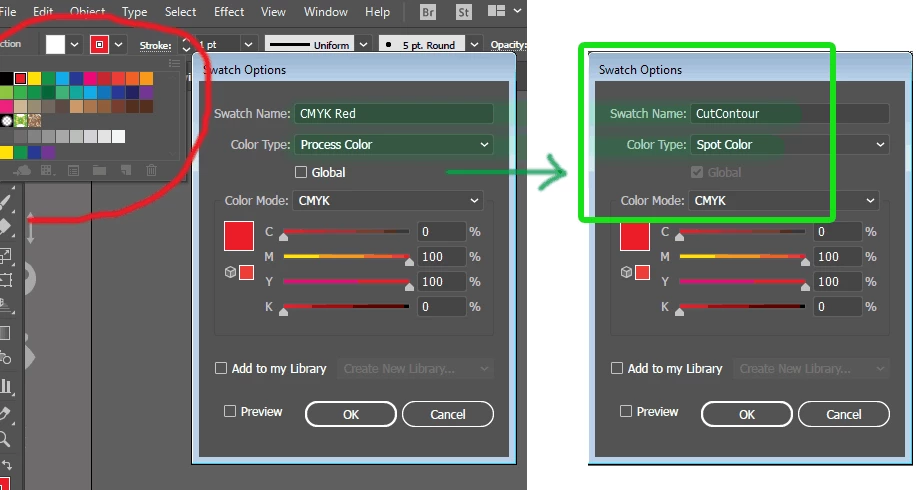
Hello! I'm looking for a script that will add a sample named "CutContour" and color type "Process Color" This is important because creating vector files that contain cut boundaries added in strokes to a Roland Printer. Thank you!
This topic has been closed for replies.
Correct answer pixxxelschubser

Hi mauricior6328708

give this snippet a try

try { var newSpot = app.activeDocument.swatches.getByName("CutContour"); alert("already here")}

catch (e) {

var newSpot = app.activeDocument.spots.add();

var newColor = new CMYKColor();

newColor.cyan = 0;

newColor.magenta = 100;

newColor.yellow = 100;

newColor.black = 0;

newSpot.name = "CutContour";

newSpot.colorType = ColorModel.SPOT;

newSpot.color = newColor;

var newSpotColor = new SpotColor();

newSpotColor = newSpot;

newSpotColor.tint = 100;

alert("done"); }

Have fun

5 replies

mauricior6328708
Inspiring
February 3, 2017

Silly-V, "Ai-fxrios-Pro" is the name of a panel that I'm creating in html 5, I'm still adding some functions. It's 90% working ... I'm thinking of making it available here for the Illustrator users here in the forum in the form of grateful beautiful support I get here!

mauricior6328708
Inspiring
February 3, 2017

Hey Silly-V,I also used this file a lot. The annoying thing is that for every open document, I'll have to get that color in the sample library ... With a script this would no longer be necessary.

Silly-V
Brainiac
February 3, 2017

Hey, what's Ai-fxrios-Pro? Where do you get this at?

Silly-V
Brainiac
February 8, 2017

I noticed in some tests I did here, and realized that the color added to the outline is not the last Spot color created.

pixxxel schubser escreveu:

Hi Silly-V

this seems to be his own panel. Looks nice.

mauricior6328708,

you can add the new created spot color like this

  1. app.activeDocument.selection[0].strokeColor=newSpot.color;
  2. app.activeDocument.selection[0].strokeWidth=10;

(but this way only works with simple paths, not with compound paths)

pixxxel schubser,I did a couple of scripts here to try to automate the process however the color added to the outline was not exactly the Spot collor created "CutContour" ... How to fix this bug? Thank you!

#target illustrator

// Select Stock

function test(){

     var doc = app.activeDocument;

          for(var i=0; i<doc.pathItems.length; i++){

               doc.pathItems.selected = doc.pathItems.stroked;

          };

};

test();

// Create Collor CutContour

try { var newSpot = app.activeDocument.swatches.getByName("CutContour"); alert("A Linha de Corte j? foi Adicionada nesse Documento!")} 

catch (e)

{ var newSpot = app.activeDocument.spots.add(); 

var newColor = new CMYKColor(); 

newColor.cyan = 0; 

newColor.magenta = 100; 

newColor.yellow = 100; 

newColor.black = 0; 

newSpot.name = "CutContour"; 

newSpot.colorType = ColorModel.SPOT; 

newSpot.color = newColor; 

var newSpotColor = new SpotColor(); 

newSpotColor = newSpot; 

newSpotColor.tint = 100;

}

// Add the new created spot color like this

app.activeDocument.selection[0].strokeColor = newSpot.color; 

app.activeDocument.selection[0].strokeWidth = 3;


That's right, it seems to only put the process values but not the spot!

It does so because you have "newSpotColor = newSpot" which should be "newSpotColor.spot = newSpot" and also the edit the following line to:

app.activeDocument.selection[0].strokeColor = newSpotColor;

mauricior6328708
Inspiring
February 3, 2017

I'm adding my main tools and commands to a single Panel that I'm still building, and one of the commands I'm trying to create is adding a color that contains that ID "CutContour" will be through that ID that an Action will identify that color:

I made a short video showing how this works manually:

What I would like to find is a script that automates that process from "0:57 minute to 1: 4 minute" of the video. Thanks in advance!

Silly-V
Brainiac
February 3, 2017

Hey that's really cool, I used to do this kind of thing in my past job. You probably have what I did - a decal-making action in the works - mine copied the art 3 times and made it go into separate layers, one for the bleed, one for the art and one for the cutline. Using pathfinder I'd make all the stuff - but it reminds me of the method I used to create the CutContour swatch: in my action I had a place command which placed a little .ai file on whose artboard was a shape containing my swatch. It would automatically appear in the document when placed. So the action would place and immediately delete the document but my swatch would stick around. Just reminiscing..

Silly-V
Brainiac
February 3, 2017

By the way, do you mean "Spot color" instead of "Process" ? Cause it seems like you are starting out with Process and then change it to make it Spot.

pixxxelschubser
Community Expert
February 3, 2017

Hi mauricior6328708

The forum search with search phrase "spotColor" will help you out, eg:

How to add a spotcolor to a colorgroup?

Have fun

mauricior6328708
Inspiring
February 3, 2017

pixxxel schubser, You gave me a good idea ... I'll take a lookup and then I'll come back. Thank you!