


Inspiring
May 16, 2020
Answered

How to Align text to an object in Illustrator?

  • May 16, 2020
  • 2 replies
  • 2654 views

So I am using of course the align tool, BUT I want to keep the square drawing stationary, and I want the text to align into the square without moving the square.


The problem that I have is that every time I want to align the text the square box on the back keeps on moving and I want the square to stay in place and just move the text. 


{Renamed by MOD}
This topic has been closed for replies.
Correct answer Srishti Bali

Hi there,


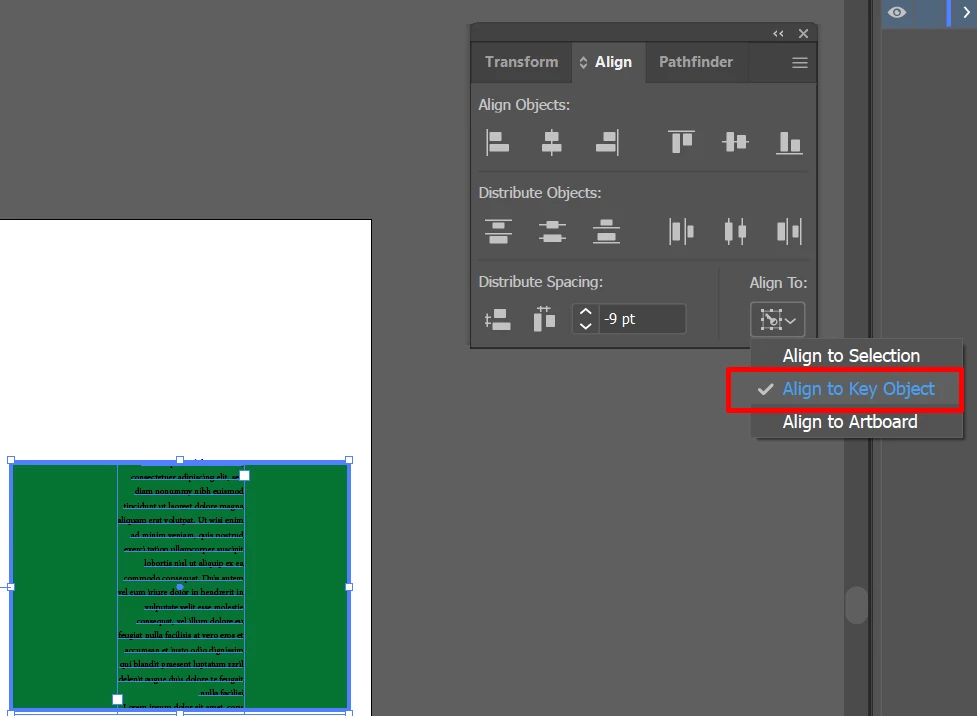
Thanks for reaching out. Did you try "Align to Key Object" in Align options? Make a Square your Key Object and then align vertically and horizontally.


For more details, you may also refer to this help article (https://helpx.adobe.com/in/illustrator/using/moving-aligning-distributing-objects.html).


Let us know if this helps or if you have any further questions.


Regards,

Srishti

2 replies

Albeitadrift
Inspiring
October 28, 2022

This short tutorial might be helpful. https://youtu.be/Nf2cWd1ENR4

Monika Gause
Community Expert
October 28, 2022

This "tutorial" has no explanation in it and is not related to the question.

Albeitadrift
Inspiring
October 28, 2022

Wow ok, passive aggressive much. 

Srishti Bali
Community Manager
Srishti BaliCommunity ManagerCorrect answer
Community Manager
May 16, 2020

Hi there,


Thanks for reaching out. Did you try "Align to Key Object" in Align options? Make a Square your Key Object and then align vertically and horizontally.


For more details, you may also refer to this help article (https://helpx.adobe.com/in/illustrator/using/moving-aligning-distributing-objects.html).


Let us know if this helps or if you have any further questions.


Regards,

Srishti

elindo586Author
Inspiring
May 16, 2020

Thank you!