Inspiring
December 10, 2021
Answered

How to change a sublayer to a layer?

  • December 10, 2021
  • 4 replies
  • 4288 views

Hi all,

I'm trying to do something that I would think would be very simple, but I've walked a couple of videos now and have scoured the forum and have come up empty-handed. How can I change a sublayer to a layer and then have it in the correct order? Here's a screenshot:
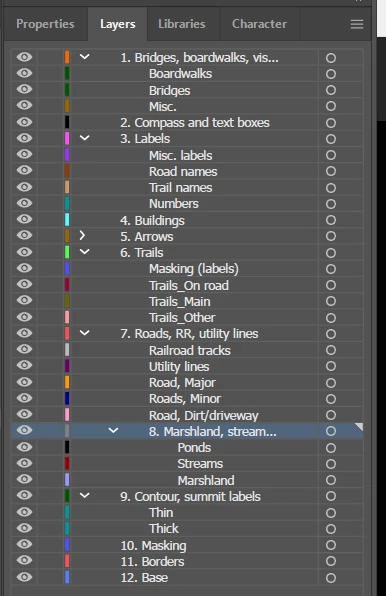
I'm trying to get layer 8. Marshland so that it will be under layer 7. Roads but not nested under 7. Roads. I would think that would be really easy to do, but I've spend half an hour so far, fruitlessly dragging it, using Ctrl and Shift and various combinations, but so far I can only do one of two things:

a. Move 8. Marshland to the very top of the list, above 1.

b. Make 8. Marshland a sublayer of 7. Roads.

What am I missing? I hope I don't need to install a script or something like that for what seems like such a basic thing to do. Thanks in advance!

-- Bill
Correct answer Doug A Roberts

Oops, apologies for all the typos this morning: they're now sublayers of 6, not 9.


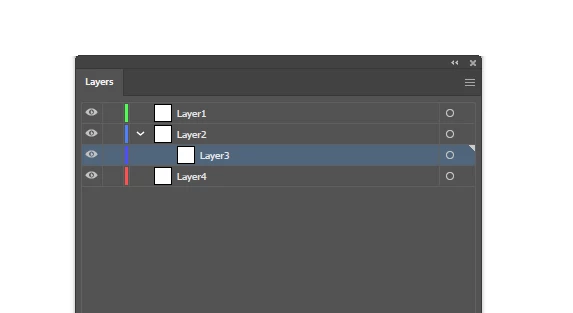
I tried to come up with a demo situation equivalent to yours. Here I want to move Layer3 from a sublayer to a main layer below Layer2:

As you said, I can only drag it somewhere away from Layer2, so I drag it to the top for simplicity. At this point, if I try and drag it to the correct position, it just becomes a sublayer of 2 again -- but not of any other layer. So I drag Layer2 out of position, in this example to the bottom:

After that, I can drag Layer3 in between Layer1 and Layer4, then drag Layer2 above it. Now I have the correct order:


4 replies

New Participant
May 9, 2025

Had the same issue. you have the layers Expanded so he thinks you want to drag it below a place inside the layer. to fix:

  1. move the layer to the top or bottom. 
  2. Collapse all layers by using the arrow button so it hides the content inside the layers. 
  3.  move the layer to the position you want. 


all actions are in the layer tab from adobe illastator. 


Inventsable
Brainiac
March 4, 2022

Very easy to solve with a basic script:

var active = app.activeDocument.activeLayer,
    parent = getParent(active);
function getParent(layer) {
    if (layer.parent && /(layer|group)/i.test(layer.parent.typename))
        return getParent(layer.parent);
    return layer;
}
active.move(app.activeDocument, ElementPlacement.INSIDE);
active.move(parent, ElementPlacement.PLACEBEFORE); // PLACEAFTER if wanting it to be below parent

That way you could use Insert Menu Item within an Action and assign to a hotkey if needed, though looking at the document it'd be far better to parse through all layers and sublayers then separate any with a "\d*\.\s" prefix and automatically sort/order them at the root of the document instead of ever needing to do any manual dragging.

Inspiring
March 4, 2022

Hi Inventsable,

Many thanks for the reply, but the problem has already been solved, and I'm a beginner at AI, so I'm not ready to get into scripts just yet. Thank you, though -- I appreciate it! And I'm sure others who are more advanced than me will find that helpful.

-- Bill

Inventsable
Brainiac
March 4, 2022

Fair enough. You have the scripting tag on the thread fyi, so it looks like you're asking for scripts.

Inspiring
March 4, 2022

Hi all,

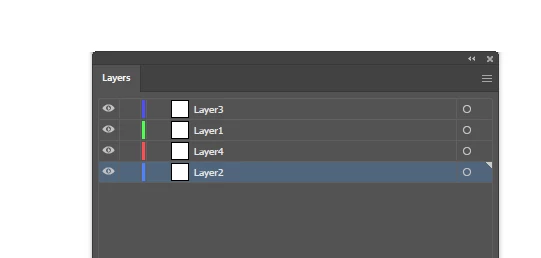
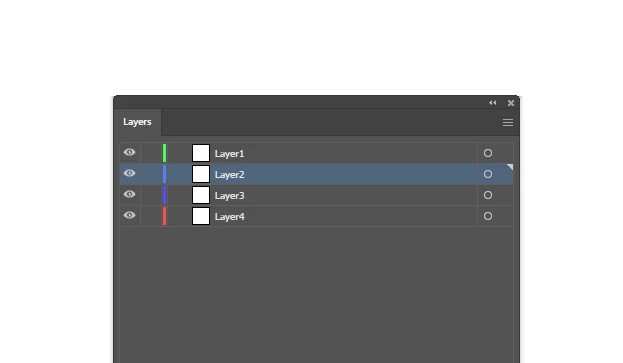
I've just discovered an easy fix to this problem I asked about a few months back, where I was trying to change a sublayer to a layer. The easy way is to lock all the other layers, then move around the offending sublayer. You can move it to the top, then move it to wherever you want it to be among the other layers. Here's a screenshot to show you what I'm talking about, with the original at the top and the new, improved layers on the bottom. I know the numbers are out of order, but that's okay.

-- Bill

Dave Creamer of IDEAS
Community Expert
March 4, 2022

If the area you want to drag the sublayer to is below an expanded layer, AI will make it a sublayer under the new location. If you collapse the other layer, it can drag it below it. 


Expanded Layer:

Collapsed Layer:


David Creamer: Community Expert (ACI and ACE 1995-2023)
Inspiring
March 4, 2022

Ah, good to know. Thanks!

-- Bill

Doug A Roberts
Community Expert
December 10, 2021

Certainly seems odd. I can (initially at least) drag a sublayer to any position except below the layer it came from -- if I do that, it becomes a sublayer again.

What I can do to get around this: Drag the sublayer to the top of the list (or anywhere else), drag layer 7 to another position (the bottom perhaps), drag the sublayer to the correct position, then drag layer 7 back into the correct order.

Inspiring
December 10, 2021

Hi Doug,

Thanks for the quick reply! Alas, I tried those instructions, but that left me with this, where 7 and 8 are now sublayers of 9:

Any other ideas out there? Thanks!

-- Bill

Inspiring
December 10, 2021

Oops, apologies for all the typos this morning: they're now sublayers of 6, not 9.