


New Participant
September 3, 2020
Answered

How to color an entire gradient mesh...

  • September 3, 2020
  • 1 reply
  • 1042 views

Hi, 

I'm working with a gradient mesh that is meant to look like a packaging bottle below...
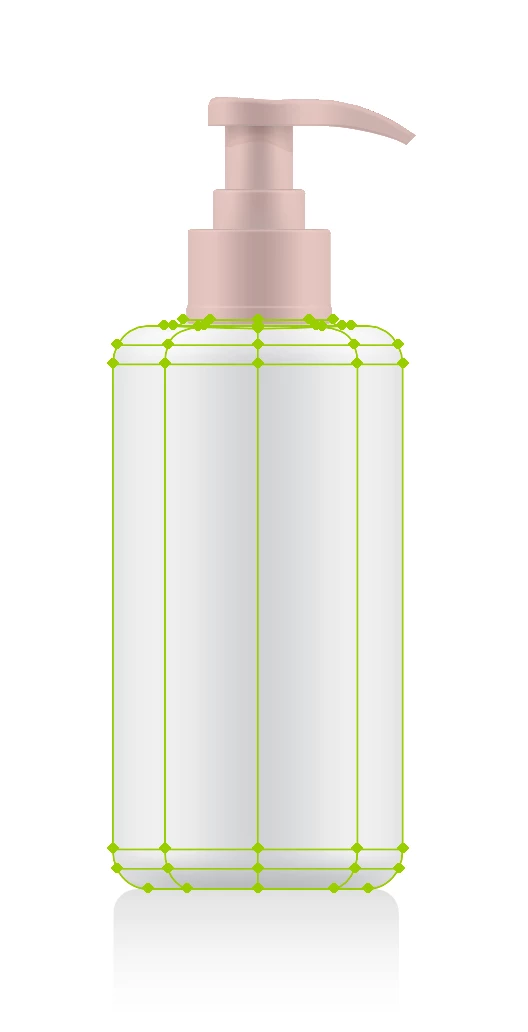
 

I would like to be able to color the whole thing at a time. However, it seems like I can only color individual sections at a time like below...



Even when I finally am able to color all the middle sections, there doesn't seem to be a way to color the top and bottom like below...



Is there a way to color the whole thing at once? 


If not, is there at least a way to make sure I can color the top and bottom sections?


Thanks! 

This topic has been closed for replies.
Correct answer Katie Houghton

Use the lasso tool to select the mesh points you want to change. With the mesh tool it is the points that define the color. If you want to color the entire thing do not use the mesh tool.

https://helpx.adobe.com/illustrator/using/meshes.html


1 reply

Katie HoughtonCorrect answer
Inspiring
September 3, 2020

Use the lasso tool to select the mesh points you want to change. With the mesh tool it is the points that define the color. If you want to color the entire thing do not use the mesh tool.

https://helpx.adobe.com/illustrator/using/meshes.html


New Participant
September 3, 2020

Thanks. Is there a way to do it while still keeping some of the lightness to it? 

Monika Gause
Community Expert
September 3, 2020

You could try Edit > Edit colors > Recolor artwork