kikkz
Participating Frequently
December 5, 2017
Answered

How to completely uninstall FilterIT 5 plugin

  • December 5, 2017
  • 3 replies
  • 2948 views

Hello guys,

I have the following problem with an illustrator plugin.

I wanted to test this plugin Filterit 5 ( https://www.cvalley.com/downloads/ ) so I downloaded the demo and install it. The installation was simple enough. I just copied the demo plugins’ files into applications/adone illustrator 2018/plug-ins folder. Everything went well I checked the plugin. It didnt do what I want so I didnt bought it. After the demo expired some messages started to pop as you can see here - https://prnt.sc/hjetrg and here https://prnt.sc/hjetyv . I went to illustrator’s plug-ins dir where I previously put them in order to erase them and to remove those annoying popups but plugin folder was empty https://prnt.sc/hjeue2 so this plugin can’t be deleted with the same ease.

Does anybody know where can find those files in order to completely remove the plugin and those annoying popups.

When I try to search my system for “filterit” here is the result - https://prnt.sc/hjev2x  . When I try to erase all these files https://prnt.sc/hjevb2  some script create them once again after illustrator is restarted. So the question is where is the script that creates that files, probably this is the plugin itself.

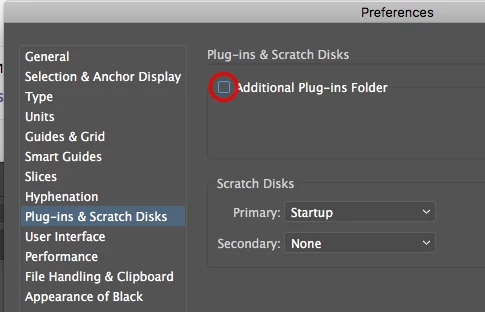
Where usually illustrator load its plugins from?

Any help shall be appreciated!
    This topic has been closed for replies.
    Correct answer Mike_Gondek10189183

    Hi Mike, Ray

    Ive uninstalled Illustrator and installed it again (via Adobe CC app) - no result. Restart the machine afterwards - no result.

    Ive search through com.cvalley and com.filterit in 2 library directories on my machine - nothing found.

    Ray obviously the file that trigger this behaviour is located someplace else - here is screenshot of my plugin dir - https://prnt.sc/hjrnjt


    Hi Kikkz,

    Make sure this is unchecked

    When exactly does the popup come about, after each boot of  AI CC2018?

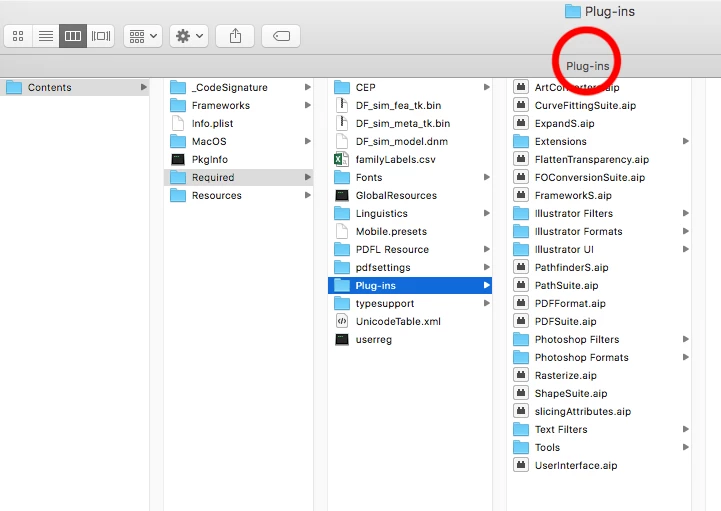
    Right click on your AICC2018app and show package contents. Compare yours against mine, do you see anything in this column? I believe spotlight misses that.

    3 replies

    Ray Yorkshire
    Participating Frequently
    December 5, 2017

    But how can the plug in folder appear to be empty ?

    There is loads of stuff that ships with Illustrator that lives there, like Photoshop filters, Extensions.Tools

    Does nothing show when you search the computer for .aip?

    Mike_Gondek10189183
    Community Expert
    Community Expert
    December 5, 2017

    You could install again, then run the uninstaller that comes with or

    Part 1. Top Level Library on Hard Disk: /Library

      1. Open the Finder, click on the Go from the Menu Bar, and select Go to Folder.

      1. Type the path of the top level Library on hard disk: /Library, and hit Enter key.

      1. Search for the items with the name of FILTERiT 4.6 in the following locations:
        • /Library
        • /Library/Caches
        • /Library/Preferences
        • /Library/Application Support
        • /Library/LaunchAgents
        • /Library/LaunchDaemons
        • /Library/PreferencePanes
        • /Library/StartupItems

    1. Right click the matched files or folders, and select Move to Trash option.

    Part 2. User Library inside Home Folder(~/Library)

    1. Head to Go > Go to Folder, type ~Library in the box and hit Enter key.
    2. Identify and delete the similar named files or folders in the same set of folders:
      • ~/Library
      • ~/Library/Caches
      • ~/Library/Preferences
      • ~/Library/Application Support
      • ~/Library/LaunchAgents
      • ~/Library/LaunchDaemons
      • ~/Library/PreferencePanes
      • ~/Library/StartupItems
    3. Empty the Trash to delete FILTERiT 4.6 leftovers permanently.

    Application components may appear in a wide range of locations, including but not limited to the aforementioned file paths. For instance, some antivirus and security software will install additional kernel extensions which are by default located in /System/Library/Extensions. For the leftovers that are not obvious to identify, you might do a Google search for the app components, and perform the removal carefully.

    Monika Gause
    Community Expert
    Community Expert
    December 5, 2017

    I could just remove it from the plugins folder. But you have what looks like High Sierra, sp maybe it's different.

    Please contact cvalley about the issue. They should know best.

    kikkz
    kikkzAuthor
    Participating Frequently
    December 5, 2017

    Hello Monica, Mike,

    1. There is no uninstaller included in the files that Ive downloaded. Probably the reason is because that is a DEMO. I tried to contacted cvalley several weeks ago but there was no answer from them.

    2. There is no file with string “filter” in its name in the folders you wrote. Neither in user library nor in system library.

    btw Im on Sierra (10.12.4)

    Do you guys have any other suggestions?

    Mike_Gondek10189183
    Community Expert
    Community Expert
    December 5, 2017

    Looking int other further you are correct there is no uninstaller. I got that from googling a page.

    Check here that you do not have anything set as login, form filer it. Then quit all apps & look for all the library items in my previous post, and delete them.