

Participant
December 6, 2017
Answered

How to covert CMYK to CMY color in Illustrator?

  • December 6, 2017
  • 5 replies
  • 7450 views

Hey guys,

Do you know how to convert "CMYK" to its closest "CMY" color equivalent?

Maybe with a script, plugin or filter?

Thank you!

Martin

    This topic has been closed for replies.
    Correct answer Ton Frederiks

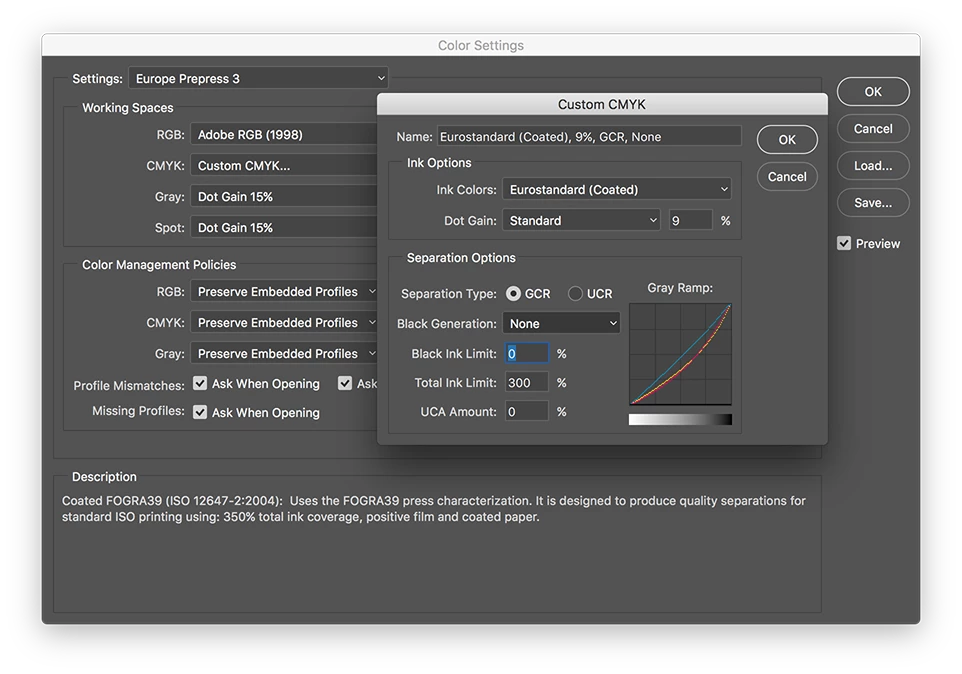
    If you know what you are doing, you can create a custom CMYK profile in Photoshop with Black Generation set to None.

    Save it and load it in the Illustrator Color Settings.
    5 replies

    Participating Frequently
    June 19, 2020

    How do I create a custom CMYK profile in Illustrator? I got to that sialog box "Color Settings" but couldnt find where to crate the CMYK PROFILE dialog box

    Ton Frederiks
    Community Expert
    Community Expert
    June 19, 2020

    "How do I create a custom CMYK profile in Illustrator?"

    You need to do that in Photoshop. See the correct answer above.

    Participating Frequently
    June 20, 2020

    Hi Ton! I managed to do that on Photoshop, and loaded it on Illustrator.
    But the colors remain using Black, even after I load that color profile.
    I loaded it on EDIT > COLOR SETTINGS 
    What am I doing wrong?
    (On Photoshop it worked)

    Participant
    March 25, 2020

    Hello,


    When I convert colours from CMYK to CMY on Photoshop and I need to import this file on ilustrator page to complete design, colors changing ang have diffrent color (looks like you delete direct black channel), I try many ways to ecport or save as but the same result.

    Do anyone knoh how can I import the image to ilustrator after I convert file from  CMYK to CMY with same color result as looks on photoshop?

    See pic first  is how looks photo when I import to AI and second is re result when I convert convert CMYK to CMY

    Ton Frederiks
    Community Expert
    Community Expert
    March 25, 2020

    What are your options in your Color Settings for Color Management Policies?

    If you set for CMYK: Preserve Numbers (Ignore Linked Profiles) it should not change in Illustrator.

    Participant
    March 25, 2020

    Thank you Sir, it was helpful.

    Ton Frederiks
    Community Expert
    Ton FrederiksCommunity ExpertCorrect answer
    Community Expert
    December 6, 2017

    If you know what you are doing, you can create a custom CMYK profile in Photoshop with Black Generation set to None.

    Save it and load it in the Illustrator Color Settings.

    Danny Whitehead.
    Legend
    December 6, 2017

    The old custom CMYK method will get you CMY values, but all bets are off regarding what they'll actually print like. To get the "closest "CMY" color equivalent", you'd need a professionally built profile.

    How to mimic FOGRA39 using a custom CMYK profile?

    Danny Whitehead.
    Legend
    December 6, 2017

    You'd need a custom profile that characterises the press/substrate, and contains no black generation.

    What is the purpose?

    Jacob Bugge
    Community Expert
    Community Expert
    December 6, 2017

    Martin,

    As I (mis)understand it:

    Literally, you may say that simply removing the K value gets you to the purest representation, though paler.

    It may be hard to keep the darkness/saturation in a better way than keeping the black.

    mindprismAuthor
    Participant
    December 6, 2017

    Yes you lose part of the saturation but my perpose here is not the best looking colors but to avoid other problems with the flexo printing.

    Danny Whitehead.
    Legend
    December 6, 2017

    Are you doing the flexo printing, or sending files to a flexo printer? If it's latter, they'd be the best people to ask for a 0% black generation profile.