Exit
  • Global community
    • Language:
      • Deutsch
      • English
      • Español
      • Français
      • Português
  • 日本語コミュニティ
  • 한국 커뮤니티
0

How to create Popup context menus for a button

Explorer ,
Sep 07, 2011 Sep 07, 2011

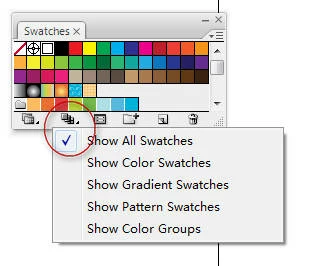
How to create  Popup context menus for a button,same as this:
2011-09-08_014151.jpg

TOPICS
SDK
1.9K
Translate
Report
Community guidelines
Be kind and respectful, give credit to the original source of content, and search for duplicates before posting. Learn more
community guidelines
Adobe
Guide ,
Sep 07, 2011 Sep 07, 2011

Windows or Mac? On Windows, you have to add a line for your button that looks like this to the DIALOG resource section for your panel:

CONTROL         "Custom1",kThisIsTheButtonId,"ADM Popup Menu Type",WS_TABSTOP,118,92,19,16

The key bit is that (a) its CONTROL and (b) the class is "ADM Popup Menu Type". Its different for Mac, but its a pain so I won't go into that unless you need it.

Regardless of platform, after that, you do something like this (I'm using hte IADM* classes, but they're just wrappers):

// this assumes you're inside an IADMDialog derivitive, so I can use GetItem()

IADMItem button(GetItem(kThisIsTheButtonId));

IADMList list(button.GetList());

// this clears the list, but you only need to do this if you're updating it based on user interaction; ignore the next

// four lines if you're just setting your list once

const int count = list.NumberOfEntries();
   
for (int i = 0; i < count; i++) {
  list.RemoveEntry(0);
}

// end of clear code

IADMEntry entry(list.InsertEntry(0));

entry.SetText("Test item");

entry.SetID(0); // pick a value for when its clicked so you know what was clicked

// you can also use SetUserData() if you want to associate it with data

Lastly, you watch for the 'item changed notifier' as usual and look for kThisIsTheButtonId. If the the pop-up menu is clicked, you'll get that as your item ID. To figure out which menuitem was clicked though, you then do something like this:

IADMItem button(GetItem(kThisIsTheButtonId));
IADMList list(button.GetList());

ADMEntryRef entryRef = list.GetActiveEntry();

if (entryRef) {
  IADMEntry entry(entryRef);

  int clickedId = entry.GetID(); // here's how you tell

}

Translate
Report
Community guidelines
Be kind and respectful, give credit to the original source of content, and search for duplicates before posting. Learn more
community guidelines
Explorer ,
Sep 07, 2011 Sep 07, 2011

thank you

Translate
Report
Community guidelines
Be kind and respectful, give credit to the original source of content, and search for duplicates before posting. Learn more
community guidelines
Explorer ,
Sep 08, 2011 Sep 08, 2011

hi,A. Patterson:

  I ran into another problem,I have successfully created  Popup context menus for a button with ai sdk,but how create menus item container ? same as:

2011-09-09_013803.jpg

Translate
Report
Community guidelines
Be kind and respectful, give credit to the original source of content, and search for duplicates before posting. Learn more
community guidelines
Guide ,
Sep 08, 2011 Sep 08, 2011

I'm not sure if its possible to do that. I can't find an API for creating a sub-menu anywhere.The example you've posted is a special case -- that actually reflects the file system (it loads a directory for pre-defined swatches).

Translate
Report
Community guidelines
Be kind and respectful, give credit to the original source of content, and search for duplicates before posting. Learn more
community guidelines
Explorer ,
Sep 08, 2011 Sep 08, 2011

There are many popup menus  whit sub-menu  in ai ,see:

2011-09-09_022543.jpg

2011-09-09_022622.jpg

Translate
Report
Community guidelines
Be kind and respectful, give credit to the original source of content, and search for duplicates before posting. Learn more
community guidelines
Guide ,
Sep 08, 2011 Sep 08, 2011

That's true, but I've still never figured out how to do that. I'm not saying its not doable, I'm saying I can see no way to do it. It'd have to be in ADMList.h or ADMEntry.h and neither seems to have anything for making an entry that is also an AMDList (or has one associated with it). There's got to be an API for it somewhere, but it may not be part of the public API. That's rare, but it does happen.

Translate
Report
Community guidelines
Be kind and respectful, give credit to the original source of content, and search for duplicates before posting. Learn more
community guidelines
Explorer ,
Sep 08, 2011 Sep 08, 2011

kADMHierarchyPopupCreateOption

This option seems to be useful,I have using it create a pop menu,but when I click the button, the system crash.

Translate
Report
Community guidelines
Be kind and respectful, give credit to the original source of content, and search for duplicates before posting. Learn more
community guidelines
Guide ,
Sep 08, 2011 Sep 08, 2011

Interesting! That's something I never discovered, so I tip my hat to you! As for the crash, I don't know, since I've never tried it. I'm leaving for the day, but I'll try and take a look at the documentation tomorrow and see if I can figure out how it would be used; we can share approaches then and see if you've missed anything.

Translate
Report
Community guidelines
Be kind and respectful, give credit to the original source of content, and search for duplicates before posting. Learn more
community guidelines
Guest
Sep 08, 2011 Sep 08, 2011

haha ,I have successfully create sub popup menus.

1: using kADMHierarchyPopupCreateOption option  create  Popup menus button.

2: set item style .sADMItem->SetItemStyle(Item,kADMPictureButtonHierarchyPopupMenuStyle);

3: ADMHierarchyListRef hierarchyListref = sADMItem->GetHierarchyList(item);

4:

ADMListEntryRef listEntryref;

listEntryref = sADMHierarchyList->InsertEntry( hierarchyListref ,0 );

sADMListEntry->SetText( listEntryref," sub menu" );

IADMHierarchyList panelMenuList1(sADMListEntry->CreateChildList(listEntryref));

listEntryref = panelMenuList1.InsertEntry(0);

sADMListEntry->SetText( listEntryref,"menu1" );

Translate
Report
Community guidelines
Be kind and respectful, give credit to the original source of content, and search for duplicates before posting. Learn more
community guidelines
Guide ,
Sep 09, 2011 Sep 09, 2011
LATEST

Ah, a Hierarchy list! Clever, that makes sense! Nice work!

Translate
Report
Community guidelines
Be kind and respectful, give credit to the original source of content, and search for duplicates before posting. Learn more
community guidelines
