

Known Participant
December 19, 2021
Answered

how to do a spiral

  • December 19, 2021
  • 1 reply
  • 2392 views

How can i make this even spiral in Illu?
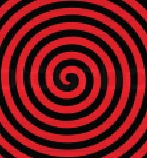
This topic has been closed for replies.
Correct answer Ton Frederiks

I have installed the script to the folder u suggested but i dont know what to do next.


@genik wrote:

I have installed the script to the folder u suggested but i dont know what to do next.


Create a document and select the script, that's it.

1 reply

Ton Frederiks
Community Expert
Community Expert
December 19, 2021

The easiest way is by using a script:

Archimedean Spiral

https://shanfan.github.io/Illustrator-Scripts-Archive/

genikAuthor
Known Participant
December 19, 2021

What about these designs, are they made by the use of scrip too?


Monika Gause
Community Expert
Community Expert
December 19, 2021

What about this design  can i do this in Illustrator, or is a 3D app needed? It does look a bit hard for Illu


Create the base shape (the rounded star)

Object > Path > Offset path (with a high value to create the outermost star)

Rotate one of the stars slightly with the transform effect

Apply an unchanged transform effect to the other one

Make a blend between them

Expand the blend

color the resulting shapes.


EDIT: Offset path won't get you far: Draw a new, larger star from scratch instead.
