


Participating Frequently
February 10, 2010
Answered

How to draw a Normal (bell-shaped) distribution curve?

  • February 10, 2010
  • 2 replies
  • 50094 views

I did a search for this and nothing came up, so apologies if it's been asked before.

How does one draw the bell-shaped or Normal distribution curve used that's widely in statistics?

Tony
    Correct answer Scott Falkner

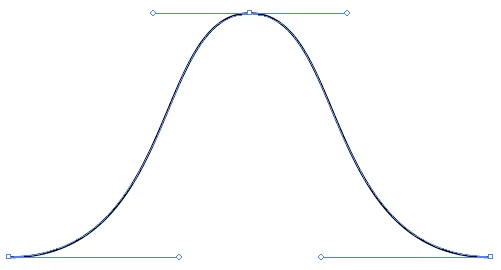
    Three curve points with the pen tool should do it. To draw a curve point, click-and-drag then release. Repeat and the next point will be joined to the first. Repeat again for the third point.

    2 replies

    New Participant
    November 19, 2023

    Another method is to use the Line Tool and then Effects|ZigZag Tool.

    Now use the Rotate option to invert the shape.

    Known Participant
    February 10, 2010

    and it needs to be mathematically accurate?

    -JM

    akilleenAuthor
    Participating Frequently
    February 10, 2010

    No, it doesn't need to be mathematically dead-on accurate. Just a vector graphic that looks like a bell curve for teaching purposes.

    Tony

    Jacob Bugge
    Community Expert
    Community Expert
    February 11, 2010

    Thanks very much for all the help. This is just what I needed!


    And, Tony, as implied by the answer James gave, and depending on the teaching purposes, no offence intended, if you wish a close resemblance it is more easily obtained with an actual curve to trace with the Pen Tool; in different cases, the triple ClickDragging is especially suited for an asymmetric shape, whereas a double ClickDragging followed by a reflexion is especially suited for a symmetric shape.