This topic has been closed for replies.
Correct answer Doug A Roberts

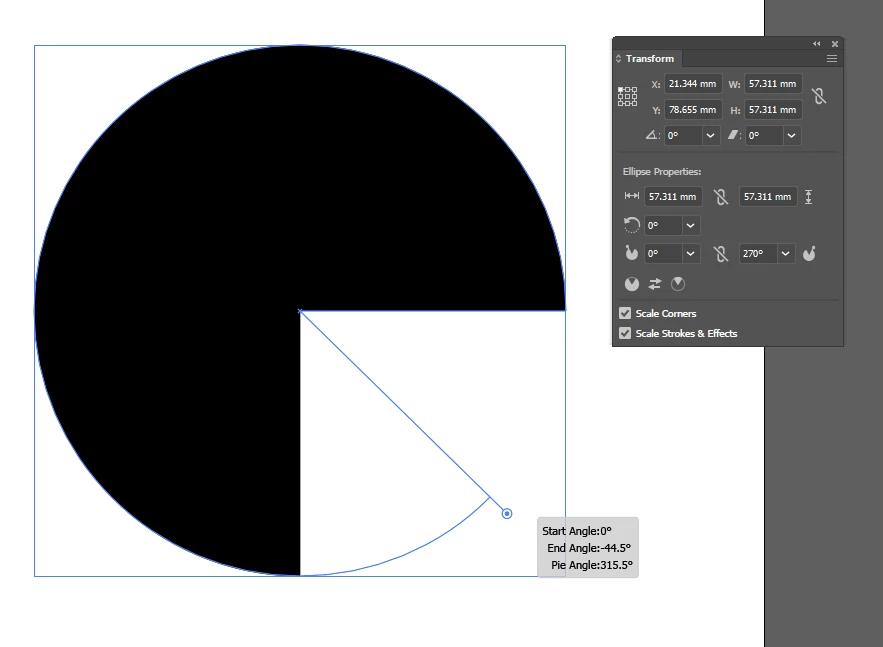
Yes, almost exactly like that:

Though only since the 2015 version I think. Which version did you stop at, Jacob?

2 replies

Doug A Roberts
Community Expert
Doug A RobertsCommunity ExpertCorrect answer
Community Expert
October 19, 2018

Yes, almost exactly like that:

Though only since the 2015 version I think. Which version did you stop at, Jacob?

Participating Frequently
October 19, 2018

Oh, you have to use the small handle sticking out the right side of the circle. I didn't notice that, my bad. Thanks for your help!

PS. I have the 2018 version, and it worked fine.

Jacob Bugge
Community Expert
Community Expert
October 19, 2018

slickboss,

I wonder whether the simple use of the Scissors Tool to cut an existing circle (and deleting the unwanted part) would do.

Or in case of half and quarter circles, to Direct Select the relevant Anchor Point(s) and just Delete.

Participating Frequently
October 19, 2018

I just put another shape where I wanted the circle to be cut and used the pathfinder. Yeah, the scissor tool would also probably work. Thanks for the suggestion!

Jacob Bugge
Community Expert
Community Expert
October 19, 2018

For my part you are welcome, slickboss.

I tend to prefer old ways, that (also) apply to any version (version rarely specified), even if smarter ways have been devised, as in this case.