


Participant
September 12, 2017
Answered

How to export JPG file without automatic file name extension -01?,

  • September 12, 2017
  • 7 replies
  • 16895 views

Hello,

I have to save my file in .ai and .jpg format with the same name. Whenever I export the file into JPG,it automatically adds an extension -01 for the file. For example "file.ai" and "file-01.jpg". How do I stop Adobe Illustrator from doing this?  Because then I have to go to every JPG file again and delete the -01, which wastes a lot of time when the quantity is big.
This topic has been closed for replies.
Correct answer Stephen Marsh

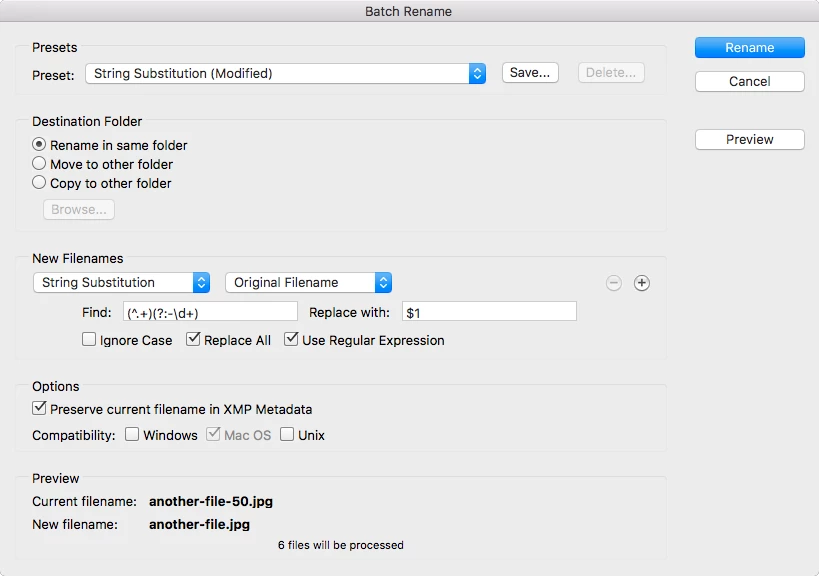
This is “easy” to handle using Adobe Bridge’s Batch Rename tool using a regular expression based string substitution, to remove the hyphen and one or more digits at only the end of the filename:

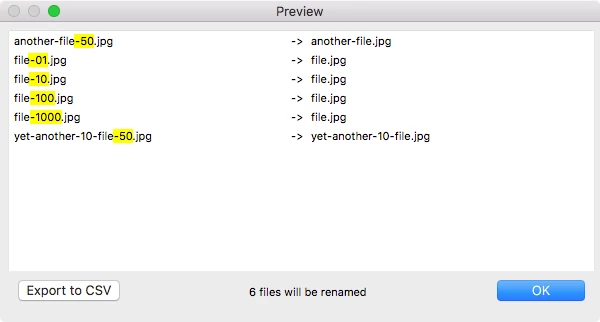
However one has to be careful not to create duplicate files in the rename (as shown above with 4 unique named files turning into a single name).

7 replies

Participant
August 2, 2022

I guess they listened to you: now (AI 26.4) when I export a single page, the page name or number is not added...

Participant
August 8, 2022

Are you aware of a way to return back to the old way?  This is causing major hiccups in my workflow.

Participant
August 16, 2022

Nope. There is so far no way to fix this problem(or is there anyway to fix this? HELP ME PEOPLE!!) and I was using artboard name for my work. This change costs also insane amout of work for me. Why Adobe still doesn't make an option to choose? 

Participant
December 28, 2021

I have no idea why this problem exists. Adobe can be really incompetent when it comes to fixing small problems that have been around for years. 


The problem with unchecking use artboards is that it changes the dimensions of the final design. My solution is to create a rectangle shape around the edges of the artboard the same dimesions that I want my final file to be. I change the stroke and fill to none and then uncheck "use artboards."

Participant
March 12, 2022

But why if you're using several artboards, still a problem. By now it seems that the only solution is to do a batch renaming.

Participant
December 2, 2020

Hi, this is a very late reply, but here's my answer to this.


Illustrator will ALWAYS append numbers to the end of exported file names if you check the "Use Artboards" option during saving. The only way to NOT have this happen is to uncheck this box.


Now, if you're like me and has extraneous design elements floating outside your main artboard for future use, my suggestion is to place these on a separate layer. Lock this layer and hide it when you're ready to export a copy of the main work. This way, you can name it whatever you want EVERY time without the offending appending number system tacked on at the end. Make sure the dialogue box for "Use Artboards" is still uncheck.


Illustrator will capture any and all currently visable elements whenever it exports. By moving extra designs onto a hidden layer when exporting, it won't "see" it and you can export only your main design.


Hope this helps!

Participating Frequently
March 2, 2021

This is the actual answer to this question. And as always, Adobe should be listening to these kinds of creative workarounds because if they really want to know what it's users need, its simple fixes like this.

Kathy5FFA
Inspiring
September 16, 2021

It would be so nice and easy if Adobe could just add a little option that gives you the choice to omit the artboard name. I wouldn't even mind it it was unchecked by default so it would add it unless you check the box. Then once you check it, it becomes checked all the time so it remembers what you want. There is no issue with replacing files when you are exporting an ai file to a jpg. One won't replace the other so there is no need to add the name to the end. It is bothersome to have to go in and keep renaming my files all the time. Please, Adobe...fix this issue!

Stephen Marsh
Community Expert
Stephen MarshCommunity ExpertCorrect answer
Community Expert
October 4, 2017

This is “easy” to handle using Adobe Bridge’s Batch Rename tool using a regular expression based string substitution, to remove the hyphen and one or more digits at only the end of the filename:

However one has to be careful not to create duplicate files in the rename (as shown above with 4 unique named files turning into a single name).

ahmed_waheib
Inspiring
September 12, 2017

If you are using Apple OS you can select all the image and right click and rename them. If not you can use it on Bridge or rename the art boards that will make it easier.

Monika Gause
Community Expert
Community Expert
September 12, 2017

Uncheck "Use artboards" option.

This might cause other issues of course.

JonathanArias
Legend
September 12, 2017

as long as there no other artwork outside the artboards that will work. i believe is when things are left out/around artboards that illustrator will want to take that along for the ride and append it to other graphics...

JonathanArias
Legend
September 12, 2017

I use adobe bridge to batch rename if i have many images

Batch renaming files in Adobe Bridge | Creative Cloud User

hope this helps

Participant
September 13, 2017

Thank you for helping!

This would be helpful if I have many files with the same name. But I have to créate many files with different names in two formats (and it's the two formats that have the same name). So I would still have to rename every file by hand.

Stephen Marsh
Community Expert
Community Expert
October 4, 2017

If there is still interest I would like to explore the options for a solution. I would need to have some precise examples of the filenames and locations of files etc.