



How to generate a curved line or closed shape via javascript?
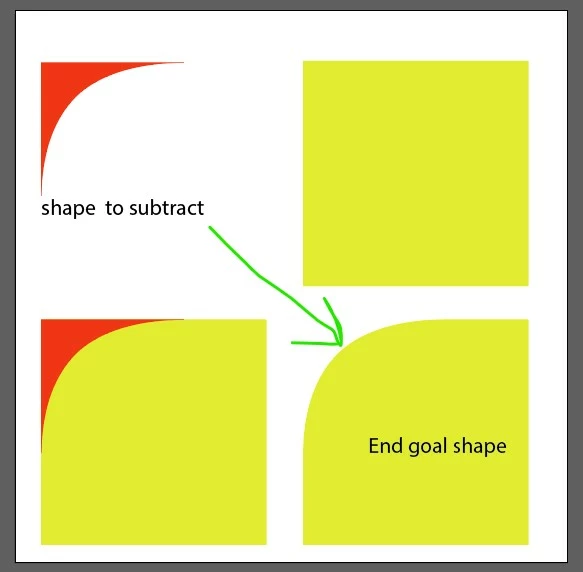
Greetings, I'm trying to generate a specific curved closed shape (it's not a perfect circle) based on the shape data that I copied and pasted into a text file. Ideally I would like to subtract this shape from a rectangle/square as shown in the screenshot 2, but I can't chatGPT to generate the correct code just to draw the shape below shown in Screenshot 1.
Any help on this problem is much appreciated 🙂
I just get this error in illustrator and ChatGPT and keeps generating the same error after it has given me a "revised" version that should work.
Error 24: pathArray[i].substr().split().map is not a function
Line: 38
var values = pathArray[i].substr(1).split(/[ ,]+/).map(parseFloat);
when running the full ChatGPT code below
Screenshot 1 from illustrator showing shaped to be subtracted

Shape data from right clicking on the shape/object above copying and then pasting into a text file:
<?xml version="1.0" encoding="UTF-8"?><svg id="Layer_2" xmlns="http://www.w3.org/2000/svg" viewBox="0 0 446.92 416.26"><defs><style>.cls-1{fill:#ed160a;stroke-width:0px;}</style></defs><path class="cls-1" d="M27.55,240.35c4.53-13.12,9.69-26.03,15.52-38.64,5.59-12.1,11.81-23.91,18.69-35.32,6.59-10.91,13.79-21.44,21.6-31.52,7.46-9.62,15.48-18.82,24.11-27.41,8.79-8.74,18.21-16.85,28.13-24.29,10.57-7.94,21.69-15.12,33.19-21.65,12.26-6.95,24.94-13.15,37.9-18.68,13.77-5.87,27.85-10.99,42.13-15.46,15.07-4.71,30.37-8.71,45.8-12.07,16.14-3.51,32.42-6.34,48.79-8.57,34.29-4.68,68.92-6.74,103.53-6.74H0v416.26c0-30.43,2.14-60.86,6.79-90.94,4.46-28.86,11.23-57.38,20.76-84.98Z"/></svg>
Screenshot 2 from illustrator showing the intened composite shape result
ChatGPT generated code for only making the curved shape from screenshot 1
// Create a new document with a 24" x 24" artboard
var doc = app.documents.add(DocumentColorSpace.CMYK);
var artboard = doc.artboards[0];
artboard.artboardRect = [0, 0, 24 * 72, -24 * 72]; // 24 inches converted to points

// Create a new layer
var layer = doc.layers.add();
layer.name = "CurvedCorners";

// Add the curved shape at position x, y = 0, 0
var curvedPathData = "M27.55,240.35c4.53-13.12,9.69-26.03,15.52-38.64,5.59-12.10,11.81-23.91,18.69-35.32,6.59-10.91,13.79-21.44,21.60-31.52,7.46-9.62,15.48-18.82,24.11-27.41,8.79-8.74,18.21-16.85,28.13-24.29,10.57-7.94,21.69-15.12,33.19-21.65,12.26-6.95,24.94-13.15,37.90-18.68,13.77-5.87,27.85-10.99,42.13-15.46,15.07-4.71,30.37-8.71,45.80-12.07,16.14-3.51,32.42-6.34,48.79-8.57,34.29-4.68,68.92-6.74,103.53-6.74H0v416.26c0-30.43,2.14-60.86,6.79-90.94,4.46-28.86,11.23-57.38,20.76-84.98Z";
var curvedShape = layer.pathItems.add();
curvedShape.setEntirePath(createPathFromData(curvedPathData));
curvedShape.stroked = false;
curvedShape.filled = true;
curvedShape.fillColor = spotColor; // Assuming you have spotColor defined

// Center the curved shape on the artboard
var centerX = (artboard.artboardRect[2] + artboard.artboardRect[0]) / 2;
var centerY = (artboard.artboardRect[1] + artboard.artboardRect[3]) / 2;
var xOffset = centerX - (curvedShape.width / 2);
var yOffset = centerY - (curvedShape.height / 2);
curvedShape.position = [xOffset, yOffset];

/**
 * Function to create a path from SVG path data
 *  {string} pathData - SVG path data
 *  {Array} - Path points array
 */
function createPathFromData(pathData) {
  var pathPoints = [];
  var pathArray = pathData.match(/[A-Za-z][^A-Za-z]*/g);

  for (var i = 0; i < pathArray.length; i++) {
    var command = pathArray[i].charAt(0);
    var values = pathArray[i].substr(1).split(/[ ,]+/).map(parseFloat);

    if (command === "M") {
      pathPoints.push({ anchor: [values[0], values[1]], type: PathPointType.CORNER });
    } else if (command === "C") {
      pathPoints.push({ anchor: [values[4], values[5]], leftDirection: [values[0], values[1]], rightDirection: [values[2], values[3]], type: PathPointType.SMOOTH });
    }
  }

  return pathPoints;
}
 AdChoices