

Known Participant
April 10, 2024
Answered

How to get each line first character position and width of each line in extendscript?

  • April 10, 2024
  • 1 reply
  • 841 views

Hi,


I need to get each lines first character position(top and left) and width of each line in textrange(text frame) using extendscript.
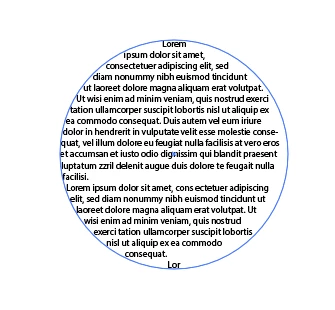
 

Please help.

This topic has been closed for replies.
Correct answer RobOctopus

Hi RobOctopus,


Thanks, I am try to recreate a new document with this type text frame in another machine using javascript api and extendscript. In this reason only i get all information of each line like left, top, width etc.,


so you want to take the information from 1 file. hold it into a script and recreate on another machine. This, i'm sure makes copy paste information unusable. I would think you would have an easier time getting the path of the object and contents (size, leading, etc) and then recreating that way

psuedo code
get text frames
 for each text frame
  get all path points along their text path (to recreate the path items, allows for irregular shapes)
  get the contents of the text frame
   for each character house loop through and save the size,leading and other pertinent styling options, along with font
all of the above information would be housed in some array format
new doc loop through array
 create path item from coordinates
  add text contents to path
  loop through all character styling and apply correct styles to each


1 reply

RobOctopus
Inspiring
April 10, 2024
Known Participant
April 11, 2024

Hi RobOctopus,


Yes, but I try to achieve the new text frame create based on the this inputs(left, top, width and height).


// select 1 textFrame
var doc = app.activeDocument;

var frames = doc.selection[0];

var getTextRange = frames.textRange;
var lineArr = [];
for (var i = 0; i < getTextRange.lines.length; i++) {
    var line = getTextRange.lines[i];
	lineArr.push(line.contents);
}
	
var replica = frames.duplicate(frames, ElementPlacement.PLACEAFTER);
var item = replica.createOutline();
var objects = [];
for (var i = 0; i < item.pageItems.length; i++) {
   objects.push(item.pageItems[i]);
}
item.remove();

var temp = [];
for (var i = 0, counter = 1; i < objects.length; i += counter) {
    counter = 1;
    var row = [];
    row.push(objects[i]);
    for (var j = i + 1; j < objects.length; j++) {
        if (horizontalOverlap(objects[i], objects[j])) {
            row.push(objects[j]);
            counter++;
        }
    }
    temp.push(row);
}

function horizontalOverlap(obj1, obj2) {
   var top1 = obj1.geometricBounds[1];
   var bottom1 = obj1.geometricBounds[3];
   var top2 = obj2.geometricBounds[1];
   var bottom2 = obj2.geometricBounds[3];
   return ((top1 >= top2 && bottom1 <= top2) || 
           (top1 <= top2 && top1 >= bottom2));
}

// "ouput" is an array of the left-most and right-most chars
var output = [];
for (var i = 0; i < temp.length; i++) {
    temp[i].sort(function (a, b) {return a.left - b.left});
	var getpos = temp[i][0];
	//$.writeln(getpos.position);
    output.push(temp[i][0]);
    //output.push(temp[i][temp[i].length - 1]);
}


var myDocument = app.documents.add();
// e.g. of using "ouput", marking the positions of its elements (with red dots)
for (var i = 0; i < output.length; i++) {
    var myTextFrame = myDocument.textFrames.add();
	myTextFrame.position = [output[i].position[0],output[i].position[1]];
	myTextFrame.contents = lineArr[i];
}


But it show empty in new document. This reason only i create the ticket. Please help.


RobOctopus
Inspiring
April 11, 2024

If you zoom out, you should see the text showing up (at least if the layer structure is showing there should be text). based on my testing, you need to change your rulerOrigin for the new document.


the script is getting the coordinates of the text frame based on 1 rulerOrigin, then the next document is using a different rulerOrigin, so the coordinates are not matching.

I added 

myDocument.rulerOrigin = [0,myDocument.artboards[0].artboardRect[1]]

to the code directly after line 55 when myDocument is added and the text was placing in the same fashion as the original document.