Known Participant
September 17, 2020
Question

How to make railway stations by script ?

  • September 17, 2020
  • 23 replies
  • 3361 views

Hello,

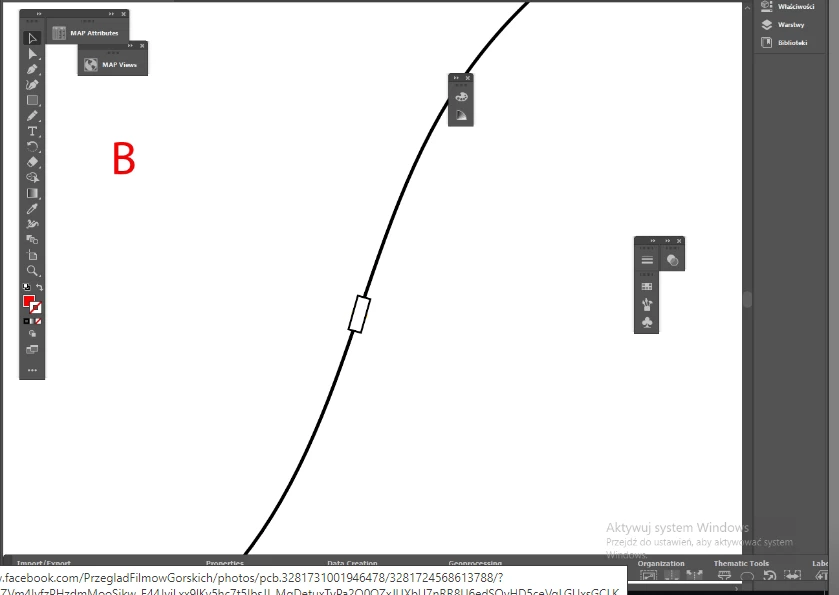
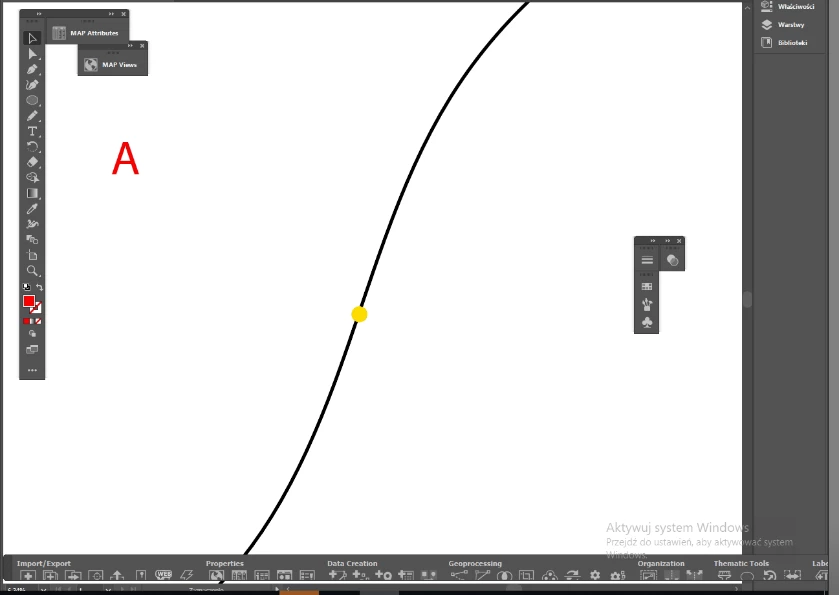
I have question: simply how having what is on pic. A to make what is on pic. B by script ?

I guess it is not so easy so I can pay for making this.


----

More explanation: I have railways as lines and railway stations as dots. I can easy make stations with a proper symbol (white rectangle), but it should to be aligned along the railway. And I have many stations like these.


Thank you,
 

This topic has been closed for replies.

23 replies

BeffAuthor
Known Participant
September 21, 2020

Here you can take a look how it looks in practice: https://opentopomap.org/#map=14/47.20289/10.68609

Move a little left / right, you will find more stations.


Please note that as for me I needn't stations to be in different sizes. All in the same size is OK.

Kurt Gold
Community Expert
September 20, 2020

René,


Jacob is saying that in "real-world" railway maps it looks more accurate and pleasing to the eye if the rails cross the stylised railway buildings exactly at the centre of their two small sides. I second that approach.


That means that the computation base for an automated (scripted) way would rather be the tilt angles of chords, and not tangents. Of course this may be pretty difficult as there can be many unknown variables (for example different dimensions of the desired stations).

BeffAuthor
Known Participant
September 21, 2020

Ough, I see I have uploaded nothing. So I repeat.

I see I gave you a nice task 🙂


And yes, it can be a part of curve. Usually the railway curves are very smooth, never sharp.

So, theoretically it can be a fragment of path, not to complicate too much.

https://we.tl/t-FBd3zfm6i1

carlosgarro
Community Expert
September 19, 2020

Hi.

Take a look at FindReplace from Astute Graphics.

This plugin lets you Locate or Select by color, size, shape, text type, image resolution, group attributes, etc. Also, you can Replace located items with any sampled artwork. Position, scale, and rotate based on the original object(s). Options to pick replacement artwork from a group randomly or consecutively, and position based on points and handles along path(s).

For more info please check the following YouTube Playlist:
https://www.youtube.com/playlist?list=PLVuiTl_w4-zAEg7ayKvExeIfTakWD87D7

Best Regards

Jacob Bugge
Community Expert
September 19, 2020

Beff,


Here are comparative views of appearances based upon the Tangent way and the suggested Two step way, for a gently curved stretch as in your screenshot and for a more strongly curved one.


The stations in the middle, including the original one, are at the inflexion.


Like Kurt, I also considered station shapes following the line shape but abandoned it, possibly wrongly assuming your preferring rectangles as specified in your explanation as opposed to a variety os shapes from straight to (more or less strongly) curved and including inflexion.


It would also be conceivable to prefer an intermediate positioning building on both ways, which would be more complicated than the sum of both single ways.


I have kept forgetting one aspect, namely that the Tangent way requires an actual Anchor Point on the line path at each station (irreversibly changing the stretch(es) in question) whereas the Two step way can be used on the line path as it is.


renél80416020
Inspiring
September 19, 2020

Bonjour,

Jacob, je n'ai pas tout compris ce que tu veux dire (problème de traduction)

Cependant je viens d'éditer un script rapide qui fait le travail suivant:

Je n'ai pas sélectionné les points extrémitées du tracé afin de montrer le sens du tracé.

Le résultat es identique si j'inverse le sens du tracé.

L'élement placé est un symbole (station mise à l'échelle 60), il peut avoir une toute autre forme..


Kurt Gold
Community Expert
September 19, 2020

That's a very good concept, femkeblanco.


I have a similar idea, but it is based on actions and graphic styles. Optionally, it may offer a way to create bended stations (which sometimes look a bit nicer depending on the curves).


I'm looking forward to Beff's sample .ai file.

Luke Jennings3
Community Expert
September 19, 2020

Type on a path, above stacked stroke graphic style.

femkeblanco
Brainiac
September 19, 2020

This is a dirty mock-up which does it.  (Dirty because it uses Divide Objects Below through executeMenuCommand to get the tangent of the curve, which—as said—is the crux of the problem.)  Be warned, there are many variables which will cause failure.  But the point is, it can be done.


// select dot
var items = app.activeDocument.pathItems;
var railway = items["railway"];
railway.locked = true;
app.executeMenuCommand("Find Appearance menu item");
var rects = [];
for (var i = selection.length - 1; i > -1; i--) {
  var x = selection[i].position[0] + (selection[i].width/2);
  var y = selection[i].position[1] - (selection[i].height/2);
  selection[i].remove();
  rects[i] = items.rectangle(y + 12.5, x - 5, 10, 25);
  rects[i].name = "station" + i;
  rects[i].strokeColor = app.activeDocument.swatches["Black"].color;
  rects[i].fillColor = app.activeDocument.swatches["White"].color;
  rects[i].locked = true;
}
for (var i = 0; i < rects.length; i++) {
  rects[i].locked = false;
  var params = [rects[i].top, rects[i].left, rects[i].width, rects[i].height];
  var tempRailway = railway.duplicate();
  tempRailway.name = "tempRailway";
  tempRailway.move(rects[i], ElementPlacement.PLACEBEFORE);
  tempRailway.locked = false;
  tempRailway.selected = true;
  app.executeMenuCommand("Knife Tool2");
  app.activeDocument.selection = null;
  if (items[1].top > items[0].top) {
    items[1].moveBefore(items[0]);
  }
  items[0].translate(0, -1);
  items[0].selected = true;
  app.executeMenuCommand("Knife Tool2");
  items[0 + 1].remove();
  var T = items[0].height / items[0].width;
  var x1 = items[0].pathPoints[0].anchor[0];
  var y1 = items[0].pathPoints[0].anchor[1];
  var x2 = items[0].pathPoints[2].anchor[0];
  var y2 = items[0].pathPoints[2].anchor[1];
  if ((x1 < x2) && (y1 > y2)) {
    var degree = 90 - (Math.atan(T) * (180 / Math.PI));
  } else if ((x1 < x2) && (y1 < y2)) {
    var degree = -90 + (Math.atan(T) * (180 / Math.PI));
  } 
  items[0].remove();
  rects[i] = app.activeDocument.pathItems.rectangle(params[0], params[1], params[2], params[3]);
  rects[i].rotate(degree);
  rects[i].move(railway, ElementPlacement.PLACEAFTER);
  rects[i].locked = true;
}
railway.move(rects[0], ElementPlacement.PLACEAFTER);


BeffAuthor
Known Participant
September 25, 2020

Almost perfect, femkeblanco 🙂

Sometimes the angle is OK, and sometimes not.

Jacob Bugge
Community Expert
September 19, 2020

Beff,


While we wait for an exquisite (version of (something with the same resulting appearance as) the suggested two step way) solution, you can compare that way to a simple/single centred rotation at a position on a normal maximally curved stretch away from an inflexion as in your screenshot B part (which is a bit overly rotated); and see how the latter will have the rectangle ends stick out of the line path, off the curve.


Kurt Gold
Community Expert
September 18, 2020

I think it is still necessary to share a sample .ai file in order to provide possible solutions. At least if pure assumptions are not desired.


BeffAuthor
Known Participant
September 18, 2020

Hello,

OK, I am uploading an .ai

I am using AI 2020

Luke Jennings3
Community Expert
September 18, 2020

This is completely off topic, but I tried this recently and thought you might be interested (stacking strokes to make railway tracks). https://www.youtube.com/watch?v=Pd5kdkSChFg


Luke Jennings3
Community Expert
September 18, 2020

You might be able to replace the dots with type on a path. Wingdings "n" will give you a solid box. Color it white and add a black stroke, scale the box width as needed. Separate the stations with a tab.

BeffAuthor
Known Participant
September 24, 2020

Thank you, Luke, for your answer. I am looking at this and the videos with interest.


You may be surprised, but I was breaking my head to solve the same problems, which they have in the videos.


Right, I may change dots with "n". But what, when the dot is not on the line, but aside ?