Yeah , I will send it in a Private message!
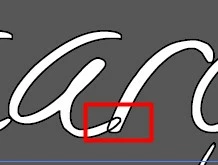
Your type in this file has a stroke at the character level. Remove it and add one at the object level, then drag it below 'Characters'.
I'll go through it on the file as it is now:
1. select your text with one of the selection tools (black or white arrow)
2. open the Appearance panel
3. Double-click on Characters.
4. select the black stroke
5. Click on the trash can to delete it.]
6. Click on Type at the top of the appearance panel.
7. Click on the Add new stroke button.
8. Drag the stroke entry so it sits below Characters.




 AdChoices