

Participant
July 21, 2023
Question

HOW TO RECOVER AI FILE FROM TEXT IMPORT OPTIONS,

  • July 21, 2023
  • 4 replies
  • 4832 views

Hi,

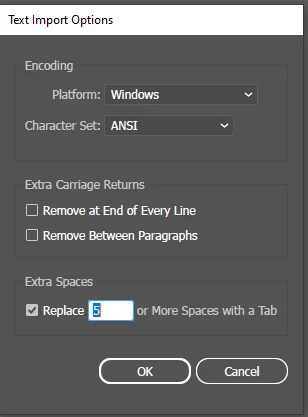
when i open the AI files,it appears text import options dialog box,and  it shows blank page

how to solve this 

want to recover the ai file,please help us

i try so many ways it couldn't help


4 replies

Participant
March 19, 2025

I'm facing a similar issue.
I had saved the file last evening and when i opened the file today, the "Text import option" came as a pop up dialogue box.
I've tried changing the extension name from .ai to .pdf but still its showing an error.
The initial file size is 22.1 MB

Please help 


Participant
March 19, 2025
Participant
February 1, 2025

Please help me, I am also facing the same problem. It is very important for me to recover this file. Please give me any suggestions to recover the file.

Participant
February 1, 2025

Please help me, I am also facing the same problem. It is very important for me to recover this file. Please give me any suggestions on how to recover the file.

Monika Gause
Community Expert
Community Expert
February 4, 2025

I would not put too much hope into it.

For next time: Save early, save often. Make backup copies.


@Anshul_Saini can you please give this one a try?

Participant
February 6, 2024

Facing the similiar issue file has size of 2.81 Mb that include cartoon illustration + linked png file. But it shows blank screen after opening and exact "Text import option" as you. Can anyone tell me its solution?

Anshul_Saini
Community Manager
Community Manager
March 1, 2024

Hello @Awais23933490h7ck,


I understand how frustrating it must be to encounter this issue with your AI file. Seeing the "Text import option" error typically indicates that the file may be corrupted or missing essential data.


To troubleshoot this problem, I recommend trying a few steps:

  • Sometimes, simply moving or copying the file to a different location on your computer, such as the desktop, can resolve issues related to file access or permissions.

  •  If you downloaded the file from the internet or transferred it from another device, consider downloading or transferring it again to ensure the file's integrity.

  • Since your AI file includes a linked PNG file, ensure that the linked file is still accessible and hasn't been moved or deleted.

  • Change .Ai extension with the .pdf extension and see if it opens up in Acrobat.

If none of these steps help resolve the issue, it's possible that the AI file is irreparably corrupted or incomplete. In such cases, you may need to consider recreating the artwork.


I hope one of these suggestions helps you recover your file. If you have any further questions or need additional assistance, please don't hesitate to ask.


Best regards,

Anshul Saini

Participant
March 19, 2025

I redraw whole artwork again. I think it's our mistake that we can't save a backup file copy of same file 😔. After this incident I always try to make copy of Ai file and save it over external HDD or Drive. That is final solution. There is none other solution. I tried everything.

Monika Gause
Community Expert
Community Expert
July 21, 2023

Do you have a backup?

Is the file size reasonable? And not 0 KB.

You can try and open it in Acrobat. If it opens, try and create a new file in Illustrator and then place this file in it.

If that does not work, then that's that. Any chance that you can use system tools to recover a recent version? But before you do that, make a copy of what is left of your file.


@Anshul_Saini can you please help?

Anshul_Saini
Community Manager
Community Manager
July 24, 2023

Hi @LAVANYABALAKRISHNAN,


We're sorry to hear that you're facing issues with opening AI files and encountering the text import options dialog box with a blank page. This problem occurs when the file is corrupted or if it was uploaded, copied, or stored on an internet server, external drive, or network drive and got corrupted during the process.


To better understand the situation and assist you effectively, could you please share the following information:


  • Where was the AI file initially saved? Was it on your local machine or an external device?
  • Where is the file currently stored?
  • Can you provide the exact versions of Adobe Illustrator and your operating system?


Regarding file recovery, I'll do my best to check if there is any data that can be salvaged. However, please note that recovery is not always possible, and there are no guarantees.


If you could upload the affected AI file to Creative Cloud and share the download link with us, it will help us investigate the issue further and provide you with appropriate solutions.


Thank you for your cooperation, and we'll do our utmost to assist you in resolving this matter.


Best regards,
Anshul Saini

Participant
July 25, 2023

Anshul_Saini,

Hi,

The AI file was currently & intially saved in my desktop

and also it was 2023 version of AI software 

the file size has been 9.4 MB

and it can't able to upload cloud, it shows error

do you have any mail id to send the files?

please share us
