

Exit
  • Global community
    • Language:
      • Deutsch
      • English
      • Español
      • Français
      • Português
  • 日本語コミュニティ
  • 한국 커뮤니티
1

How to remove border in Illustrator?

Explorer ,
Jun 24, 2020 Jun 24, 2020

Hello,

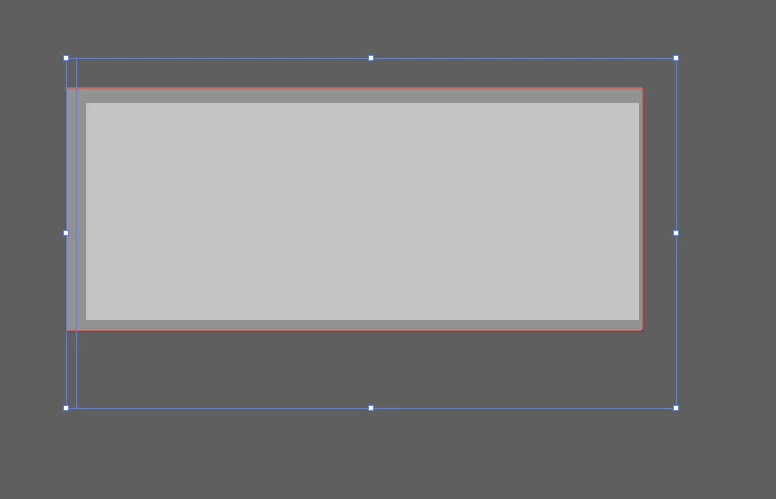
I want to remove the blue border.

I don't know from where the border comes.

What is this and how can I remove it?

Thanks
 

1.PNG


{Renamed by MOD}

4.1K
Translate
Report
Community guidelines
Be kind and respectful, give credit to the original source of content, and search for duplicates before posting. Learn more
community guidelines
Adobe
Community Expert ,
Jun 24, 2020 Jun 24, 2020

If you not need this path - hit delete.


If you need this path:

Deselect the path item.

Choice menu: View --> Presentation Mode  (leave that mode with Escape)

or

menu: View --> Trim View  (this is a "toggle button")

Translate
Report
Community guidelines
Be kind and respectful, give credit to the original source of content, and search for duplicates before posting. Learn more
community guidelines
Explorer ,
Jun 24, 2020 Jun 24, 2020

When I delete the path, then all the items are gone.

Where can I find the Presentation Mode in the View?


Unbenannt.png

Translate
Report
Community guidelines
Be kind and respectful, give credit to the original source of content, and search for duplicates before posting. Learn more
community guidelines
Community Expert ,
Jun 25, 2020 Jun 25, 2020

This is not an actual version of Illustrator?

Where the file comes from?

What file type it is?


Was that file opened from a newer version of Illustrator?

Is it a clipping mask? Or a compound path?


Sreenshot with selected path and opened Layers Panel, please.


Maybe deselect all and select one anchor point with Direct Selection Tool and hit delete two times help. But this is depend on what kind of path you have.

Translate
Report
Community guidelines
Be kind and respectful, give credit to the original source of content, and search for duplicates before posting. Learn more
community guidelines
Community Expert ,
Jun 25, 2020 Jun 25, 2020

It is a little unclear what you have here. The blue is the selection of your path - you can't delete it without deleting your object. If you don't want it to show, just deselect the object. If that is not what the problem is, then can you please take a screenshot with the interface of Illustrator with the layers panel and what exactly you are trying to do.

Translate
Report
Community guidelines
Be kind and respectful, give credit to the original source of content, and search for duplicates before posting. Learn more
community guidelines
LEGEND ,
Jun 25, 2020 Jun 25, 2020
LATEST

Hi there,


Thanks for reaching out. I agree with Michele. We'd appreciate if you can share your complete workflow so that we can understand your issue and help you out accordingly. Please share information asked by pixxxel_schubser as well. You may also share a small video of the process as well. Looking forward to your response.

Regards,

Ashutosh

Translate
Report
Community guidelines
Be kind and respectful, give credit to the original source of content, and search for duplicates before posting. Learn more
community guidelines
