


Inspiring
November 3, 2023
Answered

How to retrieve previous AI settings from old computer

  • November 3, 2023
  • 1 reply
  • 1113 views

Hi all,

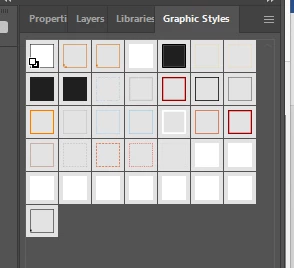
My laptop recently died, and I had to get a new one. Unfortunately, when I re-installed Illustrator, I found that all my old settings were gone. I had a million shortcuts assigned to things like Trim View and Deselecting. Also, my Graphics Styles library appears to be gone. Is there a way to import those things into the new version of Illustrator from one of my AI files, say? I use Windows 11, if that's important, and it's a Lenovo Ideapad laptop. I think the most important thing at this point is how to retrieve my Graphics Styles library. At the moment, I just have this (screenshot attached). Thanks in advance!


This topic has been closed for replies.
Correct answer BillSiever20871323

Those are your graphic styles. They display in thumbnail as a square with a stroke and fill. If you're used to displaying them another way, click on the panel's menu and select Small or Large List View. If you want to save what's there as a library, select Save Graphic Style Library.


Oh, that's it -- ha, how funny! I selected Small List View, and voila, there they are. Phew, thank you, Doug!

1 reply

Monika Gause
Community Expert
November 3, 2023

You need access to the old harddrive. And then here are your settings files:

https://www.vektorgarten.de/illustrator-settings.html 

Inspiring
November 3, 2023

Thanks, Monika. Unfortunately I no longer have the old hardrive. (My laptop was toast.) Is it impossible to do this without that?

Doug A Roberts
Community Expert
November 3, 2023

You can get any styles used in old files by opening them as a library. If you set up document profiles to store styles, they should all be in any files created from them. If they were separate library files, they are gone with the harddrive.