


New Participant
March 31, 2011
Answered

How to set up screen resolution for actual size zoom?

  • March 31, 2011
  • 5 replies
  • 44921 views

I have a monitor with 109 ppi resolution, and I`ve already set this resolution in photoshop and acrobat preferences, but i can`t find where in illustrator cs5 it can be set up, so i would be able to preview my artworks in correct actual print size.
    This topic has been closed for replies.
    Correct answer line49

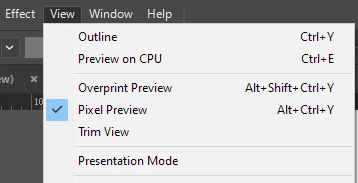
    I had trouble with this until I clicked Pixel Preview

    Maybe that's all some people finding this page actually need.

    5 replies

    line49Correct answer
    New Participant
    September 22, 2022

    I had trouble with this until I clicked Pixel Preview

    Maybe that's all some people finding this page actually need.

    Adobe Employee
    April 2, 2018

    Do vote / comment on this topic to help Ai team prioritize this: 100% size is actually actual size – Adobe Illustrator Feedback

    New Participant
    March 31, 2011

    I`am sure that there is a way to set screen resolution for correct ZOOM TO ACRUAL SIZE inside the ILLUSTRATOR CS5 preferences.

    On the screenshot below there is an example, how it is done in photoshop:

    My problem is that I can`t find where screen resolution is set in ILLUSTRATOR preferences.

    New Participant
    August 1, 2014

    Hello! I am having a problem with the screen size in Illustrator (I upload a screen shot compearing how I see Photoshop in mi PC and near how I see Illustrator).

    As you can see Illustrator looks bigger. Do you know how to change it? It is really anoying work like this and I can't find the option to change it. Please help me!

    Thanks!

    Monika Gause
    Community Expert
    Community Expert
    August 1, 2014

    I'm sorry Monika. it's the first time I post in this forum and I'm learning how to use it. Sorry.


    No need for excuses, it's just that the solution is already there.

    Larry G. Schneider
    Community Expert
    Community Expert
    March 31, 2011

    109/72 = 151.3%     To get the screen view to be at print size set it to 151%.

    Steve Fairbairn
    Inspiring
    March 31, 2011

    It's not an Illie thing. Go to System Preferences > Displays and change your screen resolution.

    (I hope you weren't fiddling with Document Raster Effects Settings. They control raster output, not screen resolution.)