


Known Participant
October 23, 2020
Answered

How to switch two colours of multiple different object?

  • October 23, 2020
  • 4 replies
  • 2326 views

I have set of different boxes with the text. Now I want to switch both colours. I want boxes colour to have text colours while text colour switch to box colour. I know I can manually change the colour of the boxes but I want to know is there is any tool or approaches which switches of the object. 
This topic has been closed for replies.
Correct answer Monika Gause

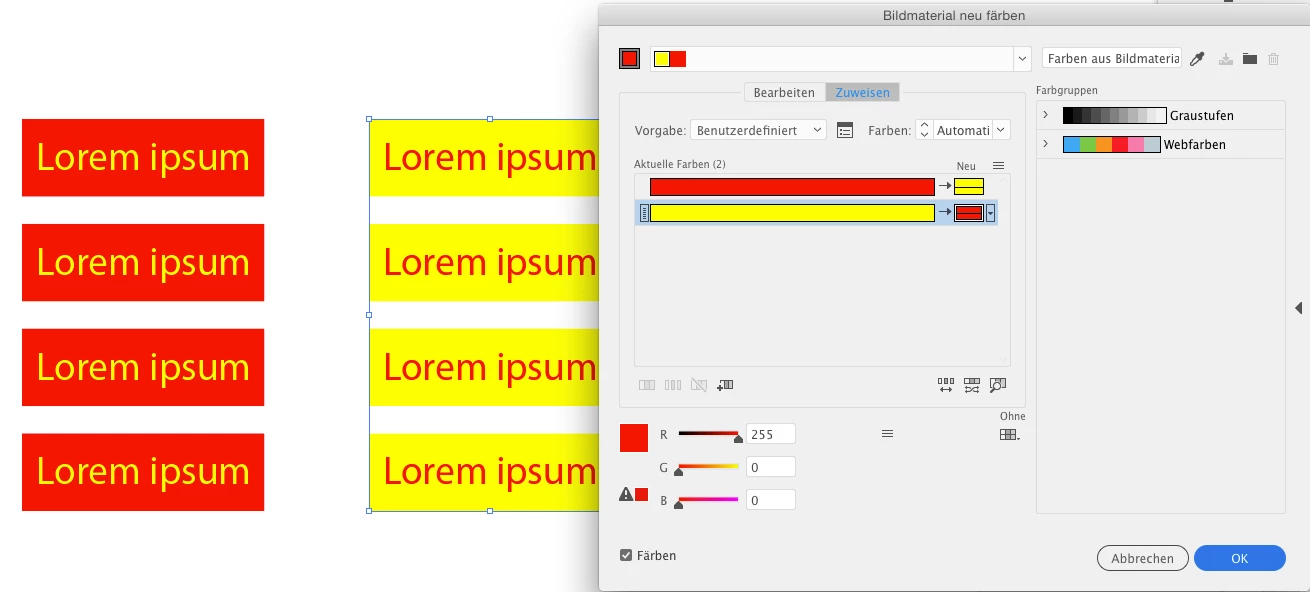
You mean like in this example?

Then Edit ° Edit colors ° Recolor artwork can do that. Just drag one color over the others. In case one of the colors is black, you need to check the recoloring options and allow black.

4 replies

pixxxelschubser
Braniac
October 24, 2020

Have you read @Monika Gause's answer? Isn't it working for you???

Haziq5DD6Author
Known Participant
October 24, 2020

@pixxxelschubser Thanks for the comment I have missed @Monika Gause answer before. Yes it work that's the feature I was looking for.

Monika Gause
Monika GauseCorrect answer
Braniac
October 23, 2020

You mean like in this example?

Then Edit ° Edit colors ° Recolor artwork can do that. Just drag one color over the others. In case one of the colors is black, you need to check the recoloring options and allow black.

Haziq5DD6Author
Known Participant
October 24, 2020

Yes that the feature I was looking for in Adobe Illustrator Thanks 👍

Kurt Gold
Braniac
October 23, 2020

Thanks for the clarification.


Probably all desired things can be done in Illustrator CS 6, but at least I (and most likely other participants as well) would still have to take a look at some real examples that may explain it better than your description so far.


Haziq5DD6Author
Known Participant
October 24, 2020

This is the just example image which might make things much clear. As I can switch/invert 2 colours manually among boxes but I want to know if there is any tool by which can automatically switch two colours among them.

Kurt Gold
Braniac
October 23, 2020

Which version of Illustrator are you using?


Also, can you perhaps elaborate a bit and show some sketches or screenshots that may explain what you are going to do?


Haziq5DD6Author
Known Participant
October 23, 2020

I am using Adobe Illustrator CS6. At the moment I cannot share the screenshot but I can try to explain as much I can, so here it goes:
I am creating the UI design of mobile application in Adobe Illustrator. Till now, I have created 8 UI design screens each screen consist of different menu like application menu, login screen, sign up screen, welcome user screen, etc. Now each screen consist of text and the box on which text is placed. Now I'm applying different colours on those boxes and text. The problem occurs as there are almost 20 boxes with text and I have to select manually each box apply colour then select all text and apply colour manually, Now I want to know two things:

1)  Is there is any way I can change the colour of all the boxes and text in the single click.
2) If I want to switch colour between box and text is there is any tool to that.