New Participant
January 28, 2010
Answered

hyperlinks in Ai

  • January 28, 2010
  • 18 replies
  • 374112 views

hello

i'm creating a .pdf from an Illustrator file.

the file has several web addresses which need to be hyperlinked for web use

i'm clueless, i have no web experience

all my work in the past has been print design

is this a novice or expert project?

if novice, please help!

Correct answer Anshul_Saini

Hi Everyone,


Over the years, retaining hyperlinks in exported PDF files has been a top user request. With Illustrator v27.6 and newer, you can now create & preserve your hyperlinks when exporting your artwork as PDF files.

For a comprehensive guide on how to create hyperlinks within Illustrator, I recommend checking out this in-depth YouTube tutorial:


Here are the steps:

  1.  Open the "Attributes" panel from the "Window" menu
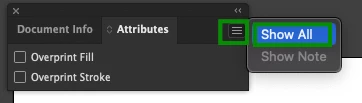
  2.  Click on the Hamburger menu > Show All
  3.  Select the object you want to assign the hyperlink on
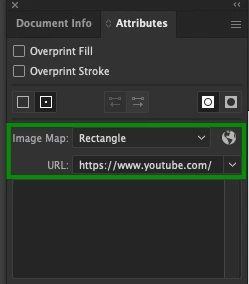
  4.  Then, in "Attributes," choose "Image Map" > Rectangle and insert your website address in the "URL" field
  5.  Save/ export the file as PDF.


Please feel free to reach out if you have further questions or need assistance.


Best,

Anshul Saini

18 replies

January 11, 2013

I have a PDF that I created and hyperlinked in Illustrator CS6 that is online HERE.

You DO NOT have to to anything special to create hyperlinks in a PDF made in Illustrator. Simply type out the URL the way you would in an internet browser (www.site.com) and when you save as a PDF a hyperlink will automatically be generated in the file.

Try it, type a random URL in an Illustrator file and save as a PDF (I always use the [Smallest File Size] preset), when you view that PDF in a browser, the URL will be clickable.

If you want to link icons/images/random words, simply make a text layer containing the desired URL, resize it to fit overtop of the area you want to be clickable, make it transparent so you can't see it, and save as a PDF. One thing you need to be cautious of when doing this is to make sure your URL is all on one line. If you make a text box, random hyphens- will appear in the address wherever the URL broke to wrap.

Example:

www.thisisaverylongURL.com

Illustrator text box:

www.thisisaver-

ylongURL.com

Renders this link in the PDF:

www.thisisaver-ylongURL.com

--

I know this post is forever old, but it took me a while to discover how stupid easy this task really is, so I thought I'd share.

New Participant
January 28, 2015

Best solution given!!

New Participant
March 31, 2016

This is so incredibly stupid by Adobe. Just allow hyperlinks to be created in the text. It is 2016.

New Participant
August 19, 2012

I've tried all of the above suggestions to no avail, but something that looks like it worked for me is to insert the link into the PDF using Acrobat (I'm using Acrobat 9 Pro), not Illustrator. I'm planning to attach the PDF I created in Illustrator to an email and want the link in it to be clickable when the recipients open the PDF.

What I found instructions online to do is to have the PDF open in Acrobat, and up on the top toolbar, click Tools > Advanced Editing... > Link Tool. Your cursor will turn into a crosshair with which you can select the area of the PDF image that you want to be a link.

Once done selecting, a dialog box will open, prompting you to choose whether you want the link area you just selected to be visibly outlined or invisible, then what you want a click on the area to do (I chose "Open a web page").

Click "Next", type or copy/paste the URL into the provided box, and click "OK". Now the link is clickable in the open PDF.

Hope this works for others (and for my recipients!).

SageofthePit
New Participant
December 7, 2010

I love how, in true Illustrator fashion, there are 12 different ways to accomplish the same end effect.

(note: this is obviously an exaggeration, there actaully 300+ ways to do the same thing in Illustrator)

Silkrooster
Braniac
December 8, 2010

I wouldn't be surprised if there were that many ways to do something. I haven't seen anybody say to edit the ai file or pdf file in notepad yet. Ooops, I just did. But then again I never tried it.

New Participant
December 6, 2010

This is a bit late, but I have found another way to attach urls to items in Illustrator (CS5).

  1. Open the 'Attributes' tool panel CTRL+F11 or Windows >  Attributes
  2. Select the item you want to add a url to
  3. Select either polygon or rectangle from the 'image map' drop down
  4. Type a url in the box below

You can test the link by clicking on the 'browser' button

Participating Frequently
December 6, 2010

Thu,

You do understand, don't you?: That's not a simple text hyperlink; it's an image map.

Bert (Plagiarized from JET's earlier post)

New Participant
June 18, 2010

Actually, I just found a slightly easier way.

Write out the URL, and highlight it. Then, in the Attributes panel choose <Image Map: Rectangle>. In the <URL> field retype your URL. When you save the document as a PDF, the written URL will then be clickable.

I'm guessing this is too late for you, but maybe it will come up for the next person.

JETalmage
Inspiring
June 19, 2010

The,

You do understand, don't you?: That's not a simple text hyperlink; it's an image map.

JET

July 18, 2011

And yet, it does not work for me with hyperlinked images on a Mac. The resulting PDF, when opened with Adobe Reader or Acrobat, contains no hyperlinks; however, if I open the PDF with Illustrator, the links are still there. So, the resulting PDF file contains the hyperlink information, but does not make it accessible to Reader or Acrobat.

How can Adobe possibly create software with such a flawed, incompatible feature?

New Participant
June 4, 2010

I found a really easy solution by mistake.

1) Create the hyperlink in Microsoft Word (like an email address or web link). Save the file.

2) Go to your open Illustrator file.

3) File --> Place

4) Select the saved Word document to place. Make sure that you do not check the "remove text formatting" box.

5) Voilà! Your hyperlinks are imported and work when saved as a PDF.

bernardoâ25569147
New Participant
September 27, 2016

It works!

Thanks a lot Juli-Jam!

JETalmage
Inspiring
January 29, 2010

Yes you can. But in typical Illustrator fashion, the interface for the whole thing is utterly ridiculous.

The resulting PDF is here. Open it and you'll find that the URL is just text (not an image) and is a functioning hyperlink.

  1. Select a text object that contains a URL.
  2. Object>Slice>Make.
  3. Object>Slice>SliceOptions.
  4. Slice Type: HTML Text. Turn on the Text is HTML checkbox. Note that the "Text Displayed in Cell" is not, in fact, the text displayed in the cell, but HTML code. Note that you can't edit the code.

If you must do this kind of thing in Illustrator, look up Slices in the online Help for more info.

If, as you say, you're not a web-head, but you want to see how easy building a perfectly sensible simple web page in a drawing program can be, download a demo of Xara Xtreme 5 Pro and try it out for a few days.

JET

New Participant
December 27, 2011

JETAlmage - great info thanks, helped alot. If you want to hyperlink a logo or an image,which illustrator doesnt allow you to do, you can do this: Place the image where you want it, lock it down. Write the URL to the page you want in a font just large enough to cover the image, if its too wide and not tall enough, make a couple lines of the same URL. Then, do what JETalmage says to do (below), then make the font 0-1% opaqe over the image (it wasnt working for me on 0% opageness.

  1. Select a text object that contains a URL.
  2. Object>Slice>Make.
  3. Object>Slice>SliceOptions.
  4. Slice Type: HTML Text. Turn on the Text is HTML checkbox. Note that the "Text Displayed in Cell" is not, in fact, the text displayed in the cell, but HTML code. Note that you can't edit the code.
January 28, 2010

You can't do this in AI. You would need to create buttons in Acrobat or Indesign.

x-o-o-x
Participating Frequently
May 11, 2016

Sometimes I think the people at Illustrator as nuts - why can't we do this simply like in InDesign?
Why is it they make us go to Adobe Acrobat?
MADNESS.

New Participant
June 20, 2022

  I'm so with you, real madness, carless folnish