


Participant
July 26, 2025
Question

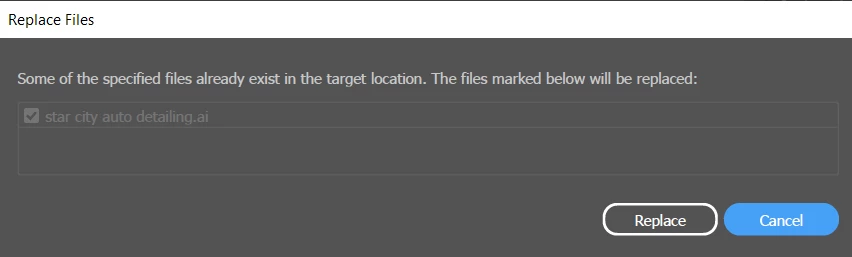
I am having error "Some of the specified files already exists in target location"

  • July 26, 2025
  • 4 replies
  • 600 views

I am having error while saving any file again after some changes. Error is "Some of the specified files already exists in target location". Even though there is no previous or existing file in the same directory. Can someone help me in this?
4 replies

A_Free_Land_73
Participating Frequently
September 23, 2025

I upgraded my Nvidia drivers today (Win 11) and I began to have this issue.  I simply turned off GPU Performace and the issue disappeared.  In my opinion Illustrator has become hot garbage in the last couple years...but here I am, still using it only because I'm a rat in a cage just getting through my 9-5.  ha ha ha.  

Pallacium
Participating Frequently
September 2, 2025

Hello,

Same thing here with the latest Illustrator update (29.7.1):
When saving (CTRL +S) Illustrator asks to replace the file, and it creates a .tmp file each time (example : ~ai-f7081c81-d802-43e6-ad06-a11251b2b4b8_-01.tmp) that stays in the folder even after quitting Illustrator, so I have to delete them.

I'm on Windows 10 (up to date with the 2025-KB5064794),
working on my usual drive locally (I don't save anything on Adobe Cloud nor do I use any file through any network) with full permissions (E:\WORK\03_Clients(...)), but I also tried the others with a file named "A" at the root of "C:" for example and same thing, even a file with a single rectangle shape in it does it. The naming of the file doesn't seem to change anything I've tried multiple ones. 

I've done the complete preferences reset too (https://www.youtube.com/watch?v=nfO7Ixi28oM), but it didn't change anything either, so I restored the previous ones. And I don't use any third-party anti-virus or any special network software installed.

Abhishek Rao
Community Manager
Community Manager
September 10, 2025

Hi @Pallacium,


Thanks a lot for the detailed description. Since the issue is still happening even with simple files and different drives, I'd suggest updating Illustrator to the latest version (29.8.1) and checking again. If it still happens, please try saving after launching Windows in Safe Mode to rule out any third-party interaction. Testing in a fresh local admin account can also help confirm if the problem is tied to your current profile.

Another thing worth trying is temporarily disabling any sync services like OneDrive, Dropbox, or Creative Cloud Sync in case they are locking the file while saving. If you have any antivirus working, then please try disabling it and then test hte issue to see if that makes a difference. Finally, if you notice Illustrator creating those temp files on every save, try resetting the Illustrator preferences and relaunch to see if it stabilizes.


Let me know how it goes.

Abhishek

Pallacium
Participating Frequently
September 11, 2025

Hello @Abhishek Rao ,

Thank you for your feedbacks.

It looks like things are a bit more complicated than I thought.

I was about to say that completely resetting the preferences worked for me.
But not exactly, it's like if the previous combination with the Windows version and Illustrator made partially corrupted .ai files or something (and I know a few that had their Windows or SSDs die with the recent update so I guess that may be related), I’ll explain in detail:

I did both the latest Windows and Illustrator updates last night, and the problem was still present this morning when opening files from the days before. (By the way, I'm not using any Cloud synchronization on my part, not even the Adobe one, only manually uploading files to clients' clouds through Chrome, nor do I use any third-party anti-virus.)

So today again I made a back-up, then removed my Illustrator Setting folder “Adobe Illustrator 29 Settings” in C/User/AppData/Roaming/Adobe, then I launched Illustrator and here I did the inner “reset preferences” in addition to that.

Then after relaunching, I created a new file and no more TMP files when saving, well they still do pop but disappear just after. So I tried with that file on all my disks, no problem. Thinking it was fixed, I opened back one of my previous files with the problem, and with it when saving, the problem is back. Once again testing on all my disks, the problem applies on all of them.

So I opened and tested a file older than the problem and that I did not open or save during that period, and here everything is fine too. But any .ai file from this ~10-day period still has the problem, making me think that maybe it’s not Preferences related.

So I went back to my Adobe folder and deleted the new “Adobe Illustrator 29 Settings” folder that was created, and copied back the one I backed up into it. Indeed, the problem still isn’t there now with the files created before or after that period, but it persists on all those created during it.

I’m joining you 2 files ( .zip here https://www.swisstransfer.com/d/ba30ded4-5d79-44a9-9f22-144f3e5d81b4 ), one brand new without the problem, and another one created a few days before with the "bug".

Thanks,

Edit : This website won't let me attache the 2 .ai files so please see the Swiss transfer link.

Abhishek Rao
Community Manager
Community Manager
August 11, 2025

Hi @x__9070,


Thanks for sharing the details. Could you confirm the version of Illustrator you're using along with your Windows OS version? Please try saving the file to a completely different location, such as your desktop, and see if it works there. You can also reset Illustrator preferences to check if that resolves the issue: https://adobe.ly/4mbjhwt, just be sure to back up your preferences before resetting. If the problem continues, try saving the file while running Windows in Safe Mode to rule out interference from third-party software: https://adobe.ly/4fs4wCC. Finally, please test the behavior in a new local admin user account: https://adobe.ly/4m7DIKp.


Let me know how it goes.

Abhishek

Ton Frederiks
Community Expert
Community Expert
July 26, 2025

Where exactly are you trying to save? And what is the name of the file?

Is it star city auto detailing.ai ?

Participant
August 11, 2025

I'm trying to save the file to drive C (in a folder I have full permissions).
The file name is star city auto detailing.ai

or rename to any other file name still get the same error.

I'm using Illustrator latest version (29.7.1) & Windows 11 24H2