


Participant
June 29, 2024
Question

Illustrator 2024 (ver. 28.5) Top menu shortens itself on my smaller screen

  • June 29, 2024
  • 1 reply
  • 560 views

I've been having issues with my top menu. Since updating my Illustrator the top menu on my 1920x1080 screen gets automatically shortened and I'm forced to clic top and bottom arrows to look through all options.
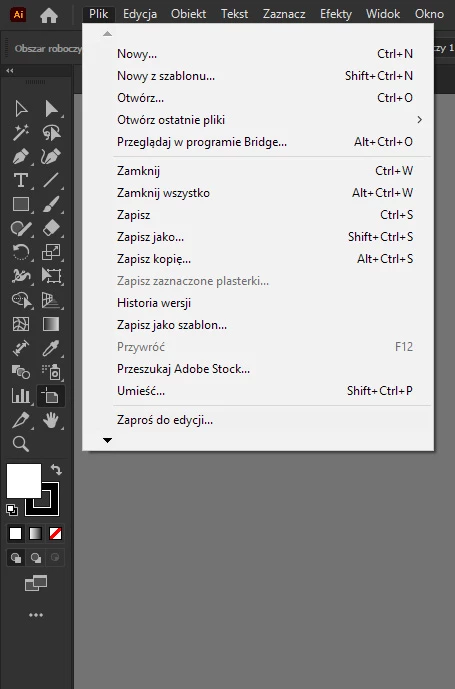
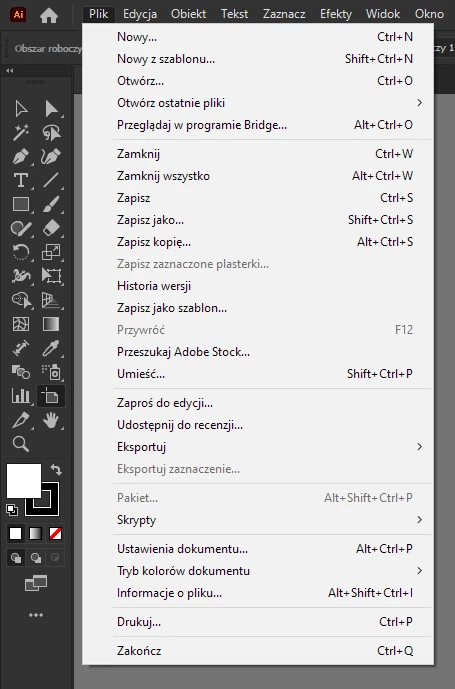
The menu looks normal when I use my 2560x1440 screen so I assume there must be some kind of option to change back the menu to normal. Does anyone know how to fix it? 
This topic has been closed for replies.

1 reply

Community Expert
June 29, 2024

Hi Kinga,
I tried to replicate your situation on my devices as well but I am not sure I encountered the same problem as you. Could you give us more information about the devices you are using (PC, desktop, and adapters)? Thank you very much 🙂

FankaAuthor
Participant
July 1, 2024

I'm using a laptop (Windows 10). I've checked today and the issue seems to only appear on my XP-Pen screen tablet. Whatever I move Illustrator to my second monitor or my main laptop screen the menu looks normal. The issue also seems to only affects Illustator, since Photoshop menu looks normal (other non Adobe programs that I've used so far also have a menu that looks normal). 

Community Expert
July 6, 2024

Hi Kinga,
thank you for providing the requested information and adding more details. Can you provide us with the model of your graphics tablet? Most likely, the problem may depend on the size and resolution of your XP-Pen.