

Participating Frequently
November 5, 2024
Question

Illustrator 2025 29.0.1 stroke color doesnt change

  • November 5, 2024
  • 6 replies
  • 2060 views

Just installed the version 29.0.1. The stroke color affects fill color as i show below.
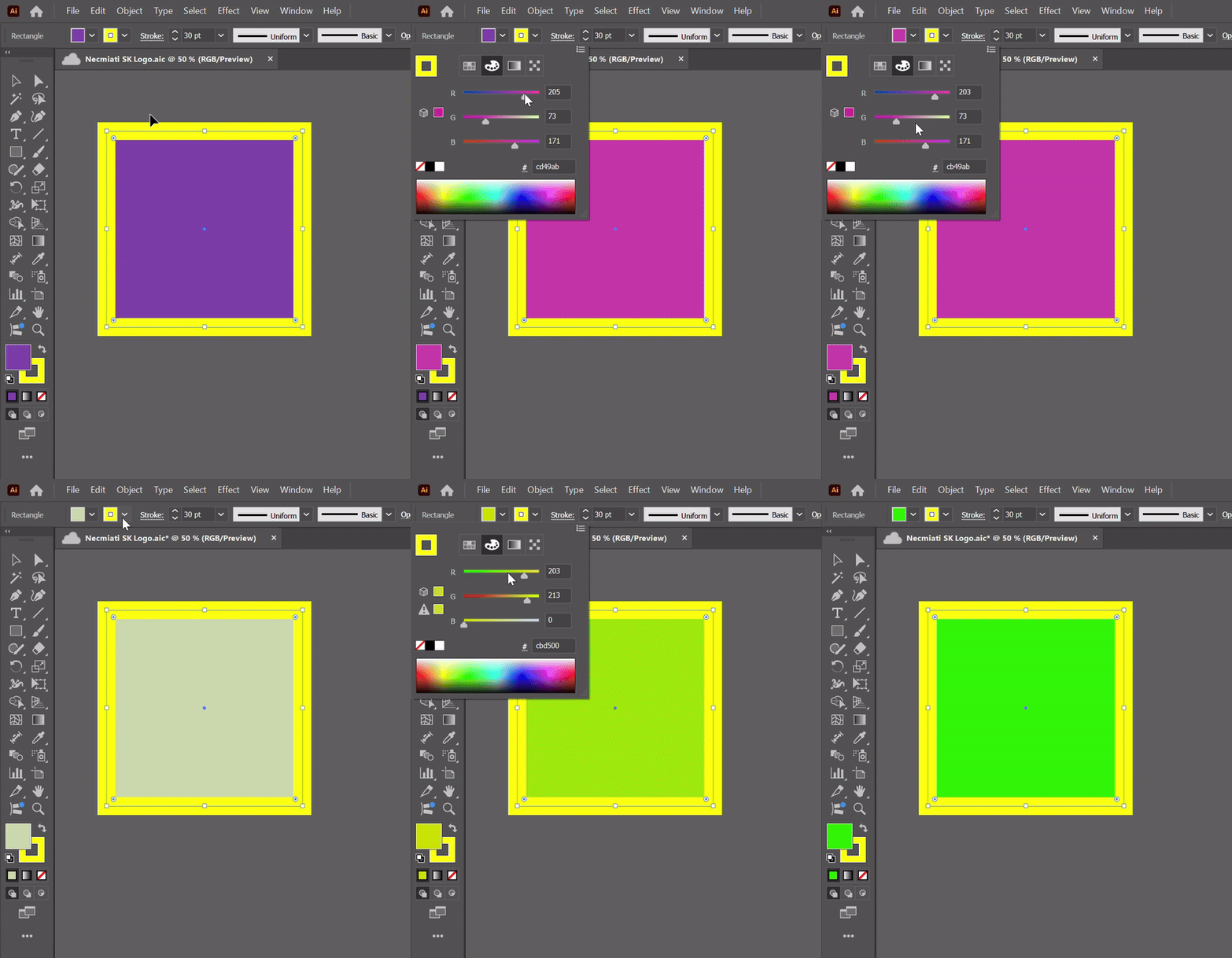


This topic has been closed for replies.

6 replies

Participant
December 14, 2024

I'm also have this issue, it's trying me mad...

Community Manager
December 20, 2024

Hello everyone,

Our team has tried fixing this in the latest beta release of Illustrator. Would you mind installing Illustrator (beta) and letting us know if it helps resolve the problem?

Looking forward to hearing from you.


Anubhav

Participant
December 3, 2024

I am having this same issue and have tried everything to fix it. Nothing is working. Has anyone found a way to resolve this yet?

Doug A Roberts
Community Expert
Community Expert
December 3, 2024

The issue is only with the drop-downs in the control bar and Properties panels. You can still change fill or stroke by making one or the other active and using the colour or swatches panels.

Participant
December 13, 2024

how long are we gnna have to wait for an actual fix? this is crazy

Known Participant
November 14, 2024

In the color panel it seems to be OK
just switch the option in the color panel to what you want to modify.
It doesn't change the fact that it's a bug

Participant
November 15, 2024

Yes, I was getting crazy since the last update.

When you select a path and wat to change the inside color or the path color, it doesn't matter which one you select, it will only change the one that is active (in front).


What I do is after opening the color I want to change (stroke or innside), on the top part you have 4 icons (samples, color mix, gradient,...). The one selected by default is Color Mix but if you press another and then return to Color Mix, you will have now selected the one you want to change.

Not the best solution, but hope it may help until Adobe fix this bug.


Participating Frequently
November 15, 2024
Participating Frequently
November 14, 2024
Known Participant
November 14, 2024

let them take care of it

Doug A Roberts
Community Expert
Community Expert
November 13, 2024

I can replicate in 29.0.1 on Windows 10. Colour sliders only in the control bar seem to only control the active appearance; other options (swatches etc.) work normally. I would say it's a bug.


Can you post a uservoice and share it here?

https://illustrator.uservoice.com/

Participant
November 13, 2024

I don't know if it's a new feature or bug, but I can confirm this. Very annoying indeed.

Doug A Roberts
Community Expert
Community Expert
November 13, 2024

It's a bug. For all other modes, selecting a stroke or fill from the control bar menu changes the active appearance. When using sliders, it doesn't.

Monika Gause
Community Expert
Community Expert
November 5, 2024

I cannot reproduce that (on Mac OS)

Did you already reboot the system?


Participating Frequently
November 5, 2024

Yes i did.

Monika Gause
Community Expert
Community Expert
November 5, 2024

Maybe you need to reset the preferences.

This will erase your custom settings: https://helpx.adobe.com/illustrator/using/setting-preferences.html
