


Vectorgeek@work
Inspiring
October 4, 2022
Question

Illustrator 3D Ray Trace Render display error

  • October 4, 2022
  • 2 replies
  • 877 views

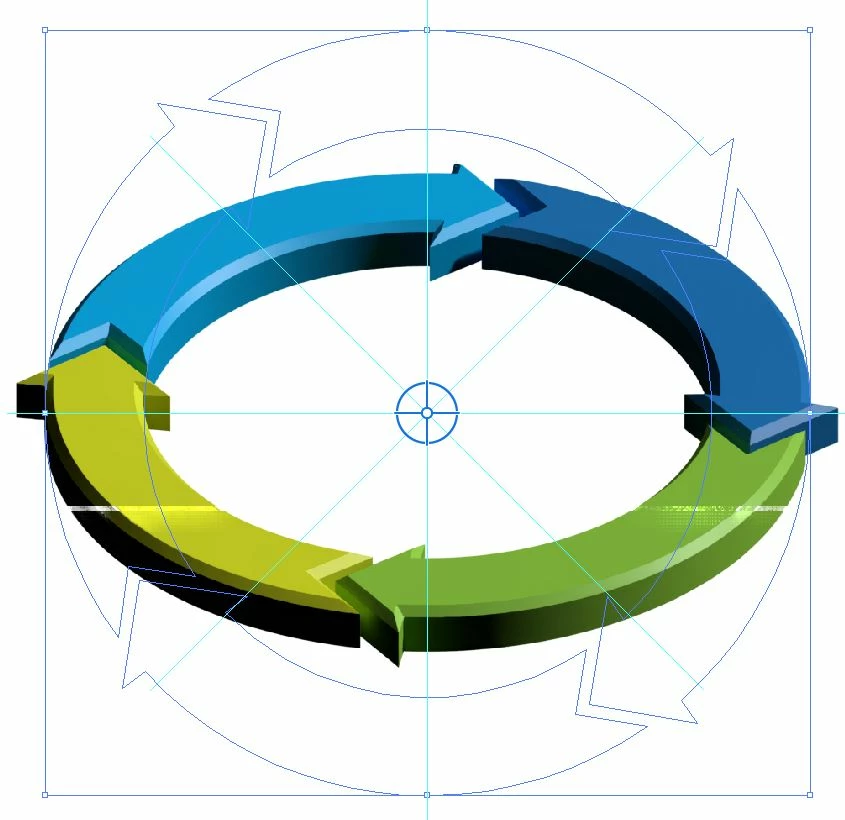
I have a compatible video card (Nvidia Quadro P4000). Yesterday my art rendered fine with ray tracing on. Today I opened the same document and the ray trace is not displaying correctly. It has a raster line running accross the whole art. Any ideas? Document is RGB, 72dpi, 1024x1024 pixels.
This topic has been closed for replies.

2 replies

Vectorgeek@work
Inspiring
October 5, 2022

My workstation has a Nvidia Quadro P4000 and I think that is the issue. Going to try to update drivers.

My laptop has an Nvidia GeForce RTX 3060 and it displays correctly.

Mylenium
Legend
October 4, 2022

Are you running other apps on the side that may steal resources? Anything from another Adobe program to a video chat. Your artwork generally looks un-antialiased, which would further indicate that soemthing is not working. Also have you tried to re-create the artwork from scratch?


Mylenium

Vectorgeek@work
Inspiring
October 4, 2022

I tried a bunch of different things including rebooting; recreating the art; changing document color modes; raster settings, and turning on and off GPU rendering. So far nothing works. Nothing else was running. Just Illustrator.