


Derek Holiman
Known Participant
June 16, 2019
Question

Illustrator CC 2019 Document window size on open

  • June 16, 2019
  • 4 replies
  • 5447 views

Looking into this again. I cannot possibly be the only one on the planet experiencing this.

Anyone have any issues with their document window opening in a narrow strip? Always narrow width full height.

Every document. Every time.

Multiple documents stack inside this narrow window.

Documents set to open in tabs.

Same regardless if Illustrator is opened first or opens with document.

Documents on external drives and local machine.

Like so:
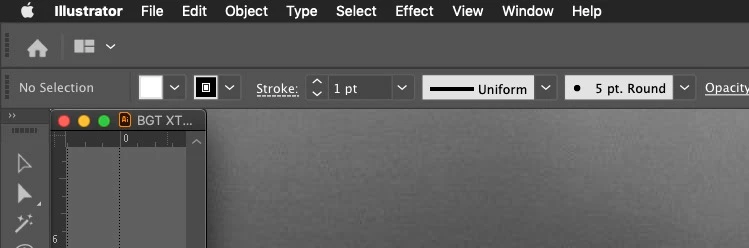
2016 MacBook Pro 15-inch 16 GB RAM

Mid-2015 MacBook Pro Retina 15-inch 16 GB RAM

MacOS Mojave (current)

Mac Illustrator CC 2019 (current)

Application Frame turned off. (with frame turned on things work differently... fine)

Both built in display and 32-inch 4k.

Only started this when I upgraded to 2019.

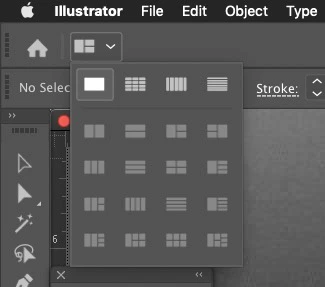
Clicking here expands the window too it's original, correct size.
Reset preferences.

Uninstalled Illustrator and files. Caches, etc.

Reset workspaces. Changed Workspaces.

Happens on both of my machines. I do not run any third-party plugins or extensions, so all is basically stock across machines.

Any ideas?

4 replies

Derek Holiman
Known Participant
September 17, 2025

Well, well... here we are.  It's 2025 and we're still dealing with this AND... Apple's new MacOS Tahoe made it worse. At least I'm sure that's how Adobe will look at it.


Now when the Illustrator window fails to open to it's proper width, the file name in the window's menu bar covers the window controls in the upper-left corner. So you cannot click the green button to expand. One has to drag the window out to the right, far enough, so that the file title moves off of the window controls and THEN... you can click the green button. Like I have been doing since 2019.


Talk about insanity.


Community Manager
September 19, 2025

Hello @Derek Holiman,

I was able to successfully replicate the problem on my end and have logged a bug with the product team for further investigation. I will update this thread as I have more info for the same.

Feel free to reach out if you have more questions or need assistance. We'd be happy to help.
Anubhav

Derek Holiman
Known Participant
September 22, 2025

Hi Anubhav


Cool. Thank you so much for digging into it.


Hope they can finally sort it out.


Derek

Derek Holiman
Known Participant
January 31, 2022

It's an all new year. 2022!


Have two new Macs. M1's with fresh new OS installs. Yay.


New, clean install of Adobe CC. All up to date.


Newest version of Illustrator 2022 version 26... like that's not confusing.


Even got a new credit card to pay the Adobe CC monthly subscription with.


Everything's new except the same old problem with Illustrator and its inability to open a god dmn window corectly.


However, did not get the new covid.

Derek Holiman
Known Participant
October 16, 2024

Well, well... here we are.

2024... adobe released the shiny new version of Illustrator. Illustrator 2025 version 29. 

It still cannot manage to open the document with it's expanded document window position.

Still annoying!

But hey, just keep hoping. What with all that AI technology they have.

Maybe next year.

You guys have a good one.

D.


[abuse removed by moderator]

Community Manager
October 16, 2024

Hello @Derek Holiman,

I am sorry to hear about your experience. Would you mind resetting your Workspace or switching to a different one to check if it helps?

If the problem persists, kindly try manually resetting Illustrator's preferences and sharing your observations:


For macOS

• Close all Adobe applications.

• Go to the following locations

• ~/Library/Caches

• ~/Library/Application Support/Adobe

• ~/Library/Preferences

• Rename Adobe Illustrator, com.adobe.illustrator and Adobe Illustrator 28 Settings folders to Adobe Illustrator.old, com.adobe.illustrator.old and Adobe Illustrator 28 Settings.old

• Launch Illustrator from the Creative Cloud.


Note: Location starting with this "~" sign indicates the User Library, which is hidden. So, you need to copy & paste the exact path in spotlight search or from Finder Menu > Go > Go to Folder > Paste the location in the dialog box like this:

Image


For Windows

- Close all Adobe applications.

- Go to Location C:\Users\%USERPROFILE%\AppData\Roaming\Adobe

- Rename Adobe Illustrator and Adobe Illustrator 28 Settings folders to Adobe Illustrator.old and Adobe Illustrator - 28 Settings.old

- Relaunch Illustrator from Creative Cloud


Disclaimer: Please note that renaming preferences folders will remove all the custom settings, and Illustrator will launch with default settings. You can also save a backup of the folders, the location of which is mentioned above.

Looking forward to hearing from you.


Anubhav

Participant
March 8, 2021

Same for me..  Crazy annoying. 

Derek Holiman
Known Participant
October 27, 2021

Hi everybody. Another year passed. Here it is 2021 about to end. I got a shiny new version of Illustrator... 2022... version 26... I couldn't find another number to put with it so we will just have to deal 2021 2022 v26.


I also have it running on the fancy new MacOS 12 Monterey. Awesome cool!


So, eager to see life with the fixed document window opening to its full width and not in that annoying, narrow little strip that has been going on for 2-3 years.


Guess what... it's like living the same damn year over and over again. Bill Murray style.


Every time I open a document the initial open state of that document window (multiple documents in tabs as well) will be this narrow little strip. Maybe 150 pixels or so wide.

Well done Adobe. I am looking so forward to using that new sharing feature to let my colleagues check out the art in their narrow little window too.


FYI... this year I did figure out that it has to do with what the width of the document window is when saved. Anything narrower than around 3200 pixels or so and the document will reopen to that width each time. Once you drag the window width out wider to 3250-something and save... boom... that document will reopen in the narrow little strip document window. I have been able to replicate this on any Mac I try.


Spent 2 weeks trying to explain this to adobe "engineers" and finally got, "we are done with this, move along".


Anyway, I need to go pay this months Adobe bill now.


Until next year. Be cool.


D.

Participant
October 27, 2021

Yes. That thing is still opening documents in narrow window. Wildly annoying. 

Steve Werner
Community Expert
Community Expert
June 16, 2019

I think you need to turn on the Application Frame to retain the window positions. I don't think there's another way. This also happens in InDesign CC.

Derek Holiman
Known Participant
January 21, 2020

Tanks Steve, great advice.


However it's wrong. (not when all is working properly)


Use InDesign every day, have never seen it happen. I have InDesign and Photoshop as well set up essentilaly the same as I do Illustrator.


Illustrator is the only one that opens documents without fully expanding the document window.


I have been sitting, waiting to do a full clean install of MacOS Catalina and reinstall all of Adobe CC. Perhaps it is on my end.


It wasn't. Again. Two separate Macs, both clean installs of Catalina, both clean installs of Adobe CC. No third-party plugins. Local and externally stored documents. Native or EPS, PDF, etc. Palette windows docked to sides.


Took a couple of days or so for the behavior to return, but it did.


Yes, with application frame turned off. Do not want it turned on. Do not work that way. There were no issues before application frames were introduced and none when it first appesred.


Not one other Illustrator user on this planet has this happen?


This is annoying.

Participant
April 1, 2020

I have the same problem, and yes, i agree that it's very annoying.