New Participant
February 21, 2020
Answered

illustrator cc 2020 Arabic Text direction!

  • February 21, 2020
  • 6 replies
  • 64790 views

Hello! 


In the new update of the New illustrator cc 2020 versions, the Text Direction feature been removed, that supports the Arabic language! any idea's on how to activate this feature?


Having said that it's still working in the 2019 version. Text Direction feature is quite helpful when writing in both English and Arabic text in the same paragraph. 


Correct answer Zaid Al Hilali

Hi Zaid,

My Illustrator version is 25.4.1

I made sure before installing it to meet the choie (English يدعم اللغة العربية)

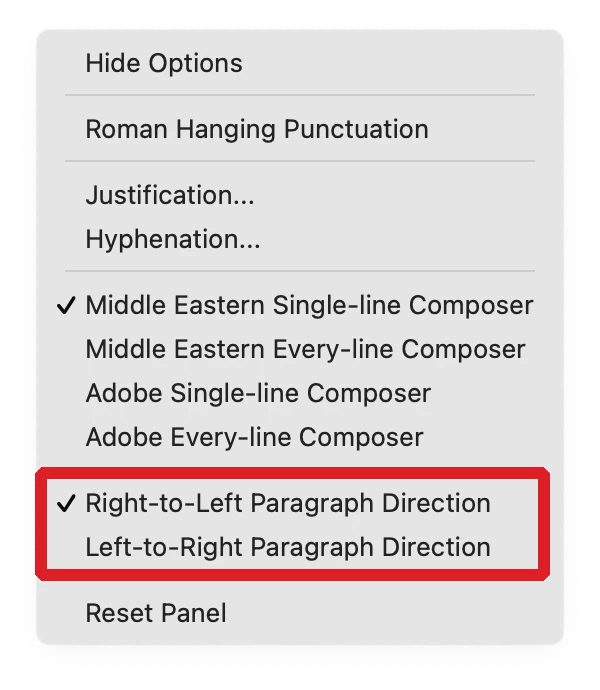
but I don't see the prargraph directions option.

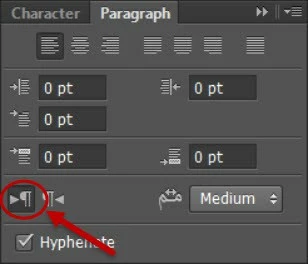
However, Photoshop is providing RTL & LTR choice.

Also I noticed that Photoshp has the Arabic Language package, but Illustrator don't.
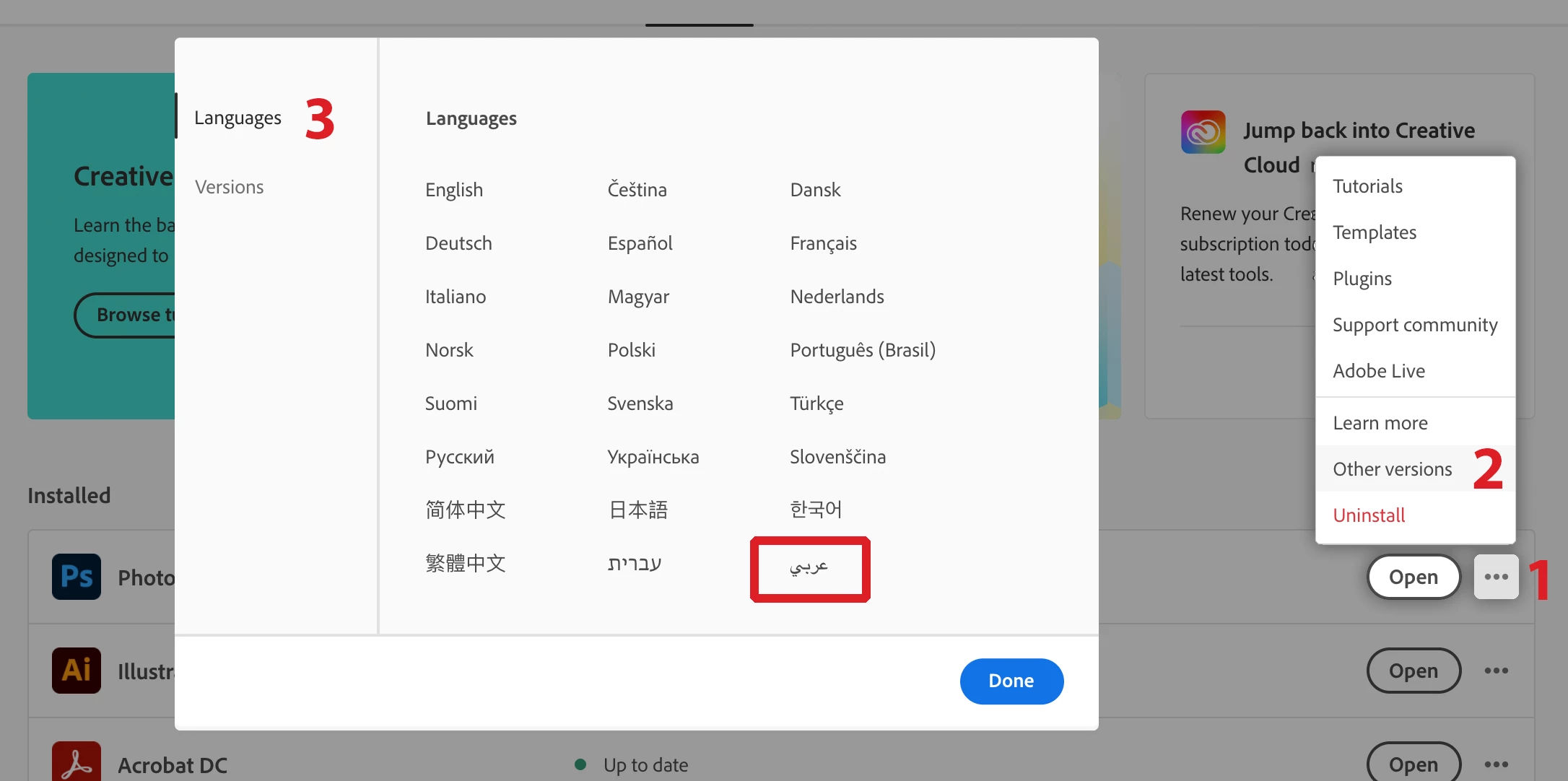
 

Both of them installed them the same Creative Cloude application with the same language prefrences option.


Is this depending to my English OS language ? so I don't see these options?


 Dear Waseem, 

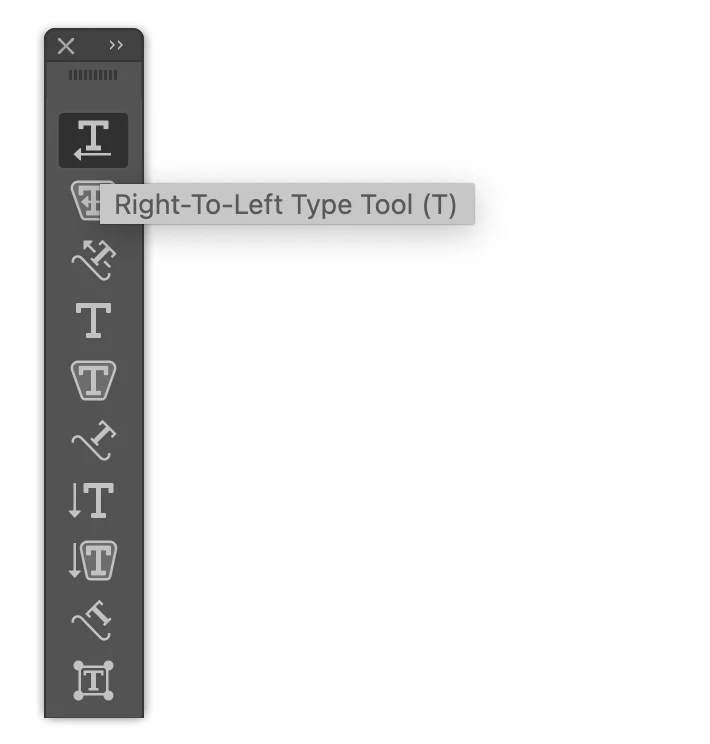
In order to be 100% sure you downloaded Middle Eastern copy of Illustrato, please check the Type Tool in your tools panel, do you see the "Right-to-Left type tool"?

If not, then you missed an installation step somewhere and my advise to you is that you uninstall current Illustrator, and make sure to remove existing Preferences when it ask you, then make sure the Language in your Creative Cloud application is English يدعم العربية. then Re-install Illustrator.

6 replies

New Participant
January 29, 2025

My Text Direction feature Tool It does not appear to me, although I did all the steps, even deleting Illustrator and downloading it again

New Participant
July 28, 2024

Hello friend, I'm from Iran so my language is Persian/Farsi. I had this problem with version 2020 too, but I installed 2024 V. my problem solved. 

New Participant
March 3, 2021

I don't know if you are having the same issue as I was, but mine was resolved rather simply. You do not need to uninstall and reinstall, nor change your language settings.


Simply go into Preferences / Type // and click // Show Indic Options


I found the answer here:

https://helpx.adobe.com/ca/illustrator/user-guide.html/ca/illustrator/using/arabic-hebrew.ug.html


Hope this helps,


Take care.


Dawood


Zaid Al Hilali
Community Expert
March 3, 2021

Salam Dawood, Adobe provided a dedicated version of Adobe Illustrator for Arabic/Farsi/Urdu users that gives full Right-to-Left control not only for typing basic Arabic Language. Those who produce Arabic Newspapers, magazines, and books for example would require such full control.

When you download and install the Middle Eastern version, there is no such thing as switching between text engines you mentioned, check my Illustrator 2021 v.25.2…

waseem103
Inspiring
September 9, 2021

Hi Zaid,

My Illustrator version is 25.4.1

I made sure before installing it to meet the choie (English يدعم اللغة العربية)

but I don't see the prargraph directions option.

However, Photoshop is providing RTL & LTR choice.

Also I noticed that Photoshp has the Arabic Language package, but Illustrator don't.
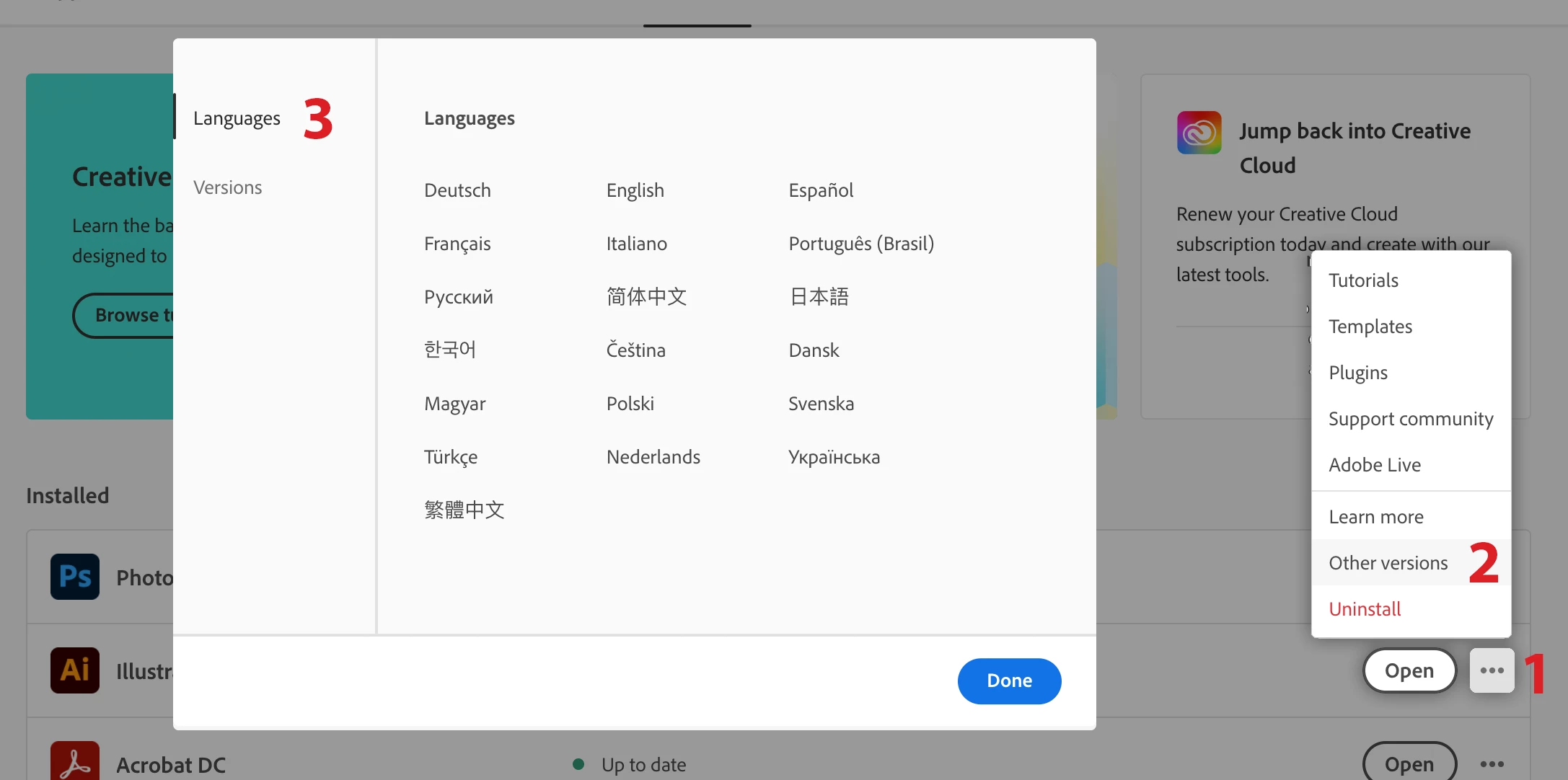
 

Both of them installed them the same Creative Cloude application with the same language prefrences option.


Is this depending to my English OS language ? so I don't see these options?
shamsprepress
New Participant
February 6, 2021

thank you so much. from Qatar

New Participant
November 24, 2020

I'm having a problem with my new 2021 Illustrator update and not being able to write in Arabic and English correctly. Is anyone having issues or can someone help walk me through this? Iv tried re installing a brand new Illustrator 2021 - Verison 25.0. I have packaging and user manuals to write.  @Zaid Al Hilali - do you maybe have any solutions? 

Zaid Al Hilali
Community Expert
November 25, 2020

@stacied69718486 

Apparently, you don't have the Middle Eastern features in the current version, it seems that for some users, during the update process, an English version is downloaded not the English يدعم العربية that supports Arabic.

Anyhow, please follow the below steps if you want to remove existing copy of Illustrator from your machine and download a fresh one with Arabic support…

  1. From the Adobe Creative Cloud Desktop menu, click on All Apps to view a list of installed Adobe applications
  2. Click the three ellipses shown beside each installed application
  3. Choose Uninstall to remove the non-Arabic application
  4. Once ALL installed applications have been uninstalled/removed, click on the “Account” icon found on the top right-corner of the Creative Cloud desktop application and choose “Preferences”
  5. In the newly opened Preferences dialogue window, click on “Apps” in the left pane
  6. Scroll down to the bottom of the window, from the “Default install Language” drop menu choose English يدعم العربية in order to have Arabic support in Adobe applications, then click the “Done” button.

Now you may proceed to install Adobe applications once again.


Alternatively, you may download another copy of Illustrator that supports Arabic besides the existing copy…

Follow steps 4,5, & 6 as in above to change the language for the application(s) you're going to install now, then

1. Click on the three ellipses on the right most of the Illustrator application

2. Choose "Other versions"

3. From the small pop up window, choose an older copy of Illustrator since you cannot have two copies of the same version,

New Participant
November 25, 2020

@Zaid Al Hilali THANK YOU SO SO MUCH!!!!!! I followed everything and it worked perfectly for me now. I did have to downgrade, but to get it to work, I'm 100% fine with that.  You're a complete lifesaver on this! Thank you so much for your quick response and help! 

Zaid Al Hilali
Community Expert
February 21, 2020

It is still there in 2020, as you said, this feature is a vital feature for RTL.


Apparently, when you downloaded Illustrator 2020, you missed the language setting. All you need is simply uninstall Illustrator 2020, then change the language to "English يدعم العربية" and re-install a new copy of the latest Illustrator.

New Participant
June 5, 2020

So, you mean that in order to use any type of RTL text in my compositions, I HAVE TO install Illustrator in English-Arabic ?

Sorry but that doesn't make any sense at all.

I don't want to have Illustrator interface in English or Arabic, i only want to be able to use RTL texts.


Proper (awfully complex) solution is :

  1. Go to Edit > Preferences > Type
  2. Check "Show Indic Options", then validate
  3. Select your text, then in Paragraph panel, in the dropdown menu, select "Middle-Eastern and South Asian Composer" (Single or Multiple Line depending on your need)
  4. Create a new paragraph style, and in its options, Advanced character format, select your RTL language (e.g. Arabic)
  5. Apply that Paragraph style to your text.
Zaid Al Hilali
Community Expert
June 8, 2020

The solution you posted works well for a minor job of Arabic or any RTL language if however, you want full control on RTL for a newspaper, magazine, or a book perhaps, I would strongly recommend that you install another copy of Photoshop, InDesign and Illustrator that Adobe providing specifically under "English يدعم العربية"