


Illustrator Image Tracing in High Fidelity Photo returns Low Quality Results
Hello,
I am new to this forum and relatively new to Illustrator but I've got a good grip on it I think.
I have been scanning artwork in to Photoshop to fine tune, and then saving as a TIFF file to place in illustrator (my graphics are for fabric printing). Then I've been making an Image Trace using High Fidelity Photo and this has worked well previously. Today however I'm working with smaller elements and I don't think the result is particularly good. The trace is far removed from the original, yet I know it is possible to look almost exactly the same because I have experienced this (and seen people on youtube having very detailed results using High Fidelity Photo to Image Trace watercolours).
Both the PS and AI files are set to 300ppi, both using CMYK colours.
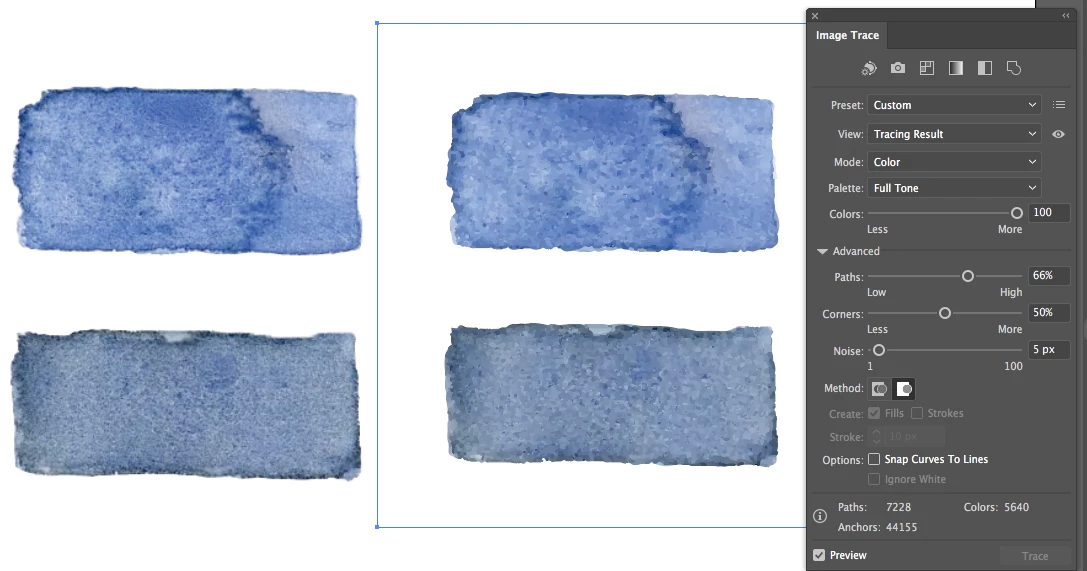
I've attached screenshots of an example of my problem, as well as the Image Trace panel so you can see my issue.
The left images are the original watercolour taken from PS as a TIFF file.
The right images is the Image Trace I get using High Fidelity Photo
I have increased the colours to 100 because I hoped it would give the definition I needed (hence the Preset is 'Custom')
I have enlarged the images here from the original (maybe 150%), but I would have thought the Image Trace would hold up better. The TIFF seems more scaleable without losing clarity, than the Image Trace. Should this be?
Lastly, as I'm going to be using illustrator to create patterns and graphics for print, using hand painted originals scanned in to PS originally, is it best practice to create an Image trace in AI for each graphic? Or is it an option to just work with the imported TIFF elements and create patterns from those? I'm not scaling the prints massively in AI, but I want to keep the clarity if I do.
Any help would be massively appreciated!
 AdChoices