


Participating Frequently
July 20, 2012
Answered

Illustrator is Automatically Embedding my Linked Images

  • July 20, 2012
  • 6 replies
  • 44486 views

Is there some sort of "Auto Embed" feature that will embed your linked images?

I have a document that is embedding most of the linked images. It's not happening in all my documents, just one
    Correct answer Larry G. Schneider

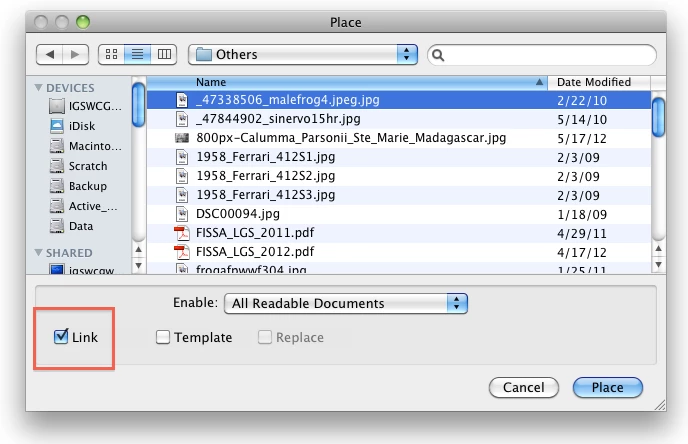
    Did you check this

    on Placing the file and then do this

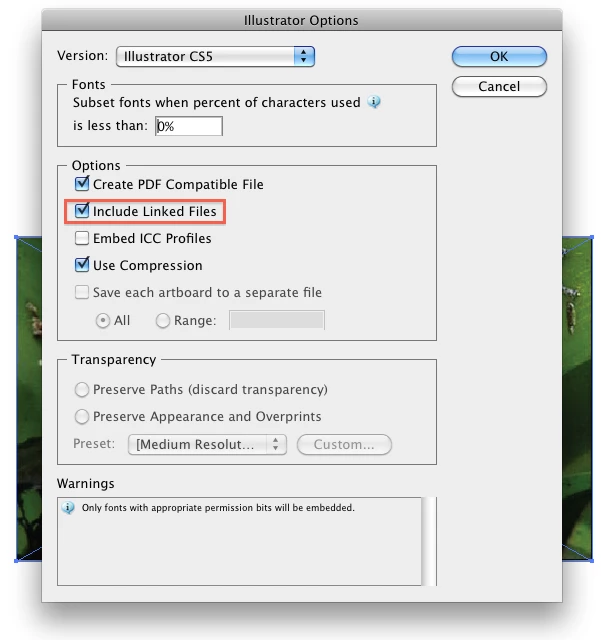
    on Saving? If you did, it will embed the file.

    6 replies

    Participating Frequently
    September 25, 2025

    I unchecked the "Include Linked Files" box when saving out a copy and the file was still the same size. What I realized is that the "Create PDF Compatible File" box was checked and that was embedding the images, so I unchecked that as well and my file went from 300MB down to 5MB.

    Ton Frederiks
    Braniac
    September 25, 2025

    That is correct, images will always be embedded if there is a PDF part in the file, depending on the compression settings they can make the file large. But when you want to use the Illustrator file in Photoshop or InDesign, you will have to use the "Create PDF Compatible File" option.

    ronp35049786
    New Participant
    September 6, 2023

    Was there ever a solution aside from the fairly obvious ones that are seen in this thread? Illustrator vet, never had this issue before. I feel like I've saved my illustrator file every way possible. And every time I close and re-open the file, the images that were linked have become embedded. Updated Illustrator (27.8.1), restarted my computer, same result.

    Monika Gause
    Braniac
    September 6, 2023

    Where are the images located?

    Are they just placed in the file or did you do anything with them?

    Where do you save the file? And is there any error when opening it? Does the layer structure look OK?

    WHat kind of files are they?


    You are sure that you have not check that include links option?

    New Participant
    September 27, 2023

    I had this same issue when I had a freelancer working on files for us. This is what I did to resolve it. I had to REPLACE all of the images. When placing the images make sure you have the “Link” box CHECKED when placing file. THEN, you have to go to "Save As" and make sure that “Include linked file” is UNCHECKED. Hope that helps!

    bárbaram32055869
    Participating Frequently
    December 7, 2020

    Hello,

    I have this issue aswell and its very nerve wrecking to work like this...
    Everytime i save any file i make sure the "include link files" is selected and even so everytime i open any file the are all embed and i have to relink everything everytime.


    Also when i create a new file the "include link files" is now automatically selected but when i do select it is the same as if i didn't.


    Please help! How do i fix this??

    Monika Gause
    Braniac
    December 7, 2020

    Don't check "Include linked files".

    Just don't do it if you don't want to embed them, because that is what it does.

    New Participant
    December 15, 2020

    I am having the same issues.

    When I replace a linked image, it embeds the new one. 


    Even though the "Include Linked Files" is uncheched.


    When I go to "Unembed" in the Links panel, it flattens the PSD image...
    It is very frustrating, please help!

    Or if a new thread has been started with a solution for this, please share the link.
    Thank you!


    GraphicsGirl56
    New Participant
    May 14, 2019

    The screen shots provided in the "correct answer" are misleading.

    Braniac
    May 14, 2019

    What aspect is misleading? What do yours show?

    Known Participant
    February 24, 2019

    I did make sure the linked box is checked, and it is still doing it.  Please advise.  Thanks.

    Larry G. Schneider
    Inspiring
    February 24, 2019

    Just make sure that the Include Linked Files is unchecked in the Save dialog.

    Known Participant
    February 24, 2019

    Hi Larry, thanks for replying.  I have never run into this problem in illustrator ever!  when I place the file in illustrator, the "linked" box is checked, and it doesn't work.  I have tried it with the "linked" box unchecked, and it still embeds the file.  I is hit or miss; some of my files are ok. It is driving me crazy.  I wonder if it has to do with the recently 2019 CC upgrade.  FYI: I have a mac. Cheers!

    Larry G. Schneider
    Larry G. SchneiderCorrect answer
    Inspiring
    July 20, 2012

    Did you check this

    on Placing the file and then do this

    on Saving? If you did, it will embed the file.

    BarryRowell
    Known Participant
    December 11, 2023

    WOW: that's the opposite of what I thought that choice meant! I kept making sure it was checked because I wanted to make sure it preserved the links to the images; obviously, Illustrator meant (as I would say it) "embed image files". It makes sense but I think my interpretation of those words made sense, too. Thank you.