


NathanOdellin
Known Participant
September 16, 2020
Question

Illustrator Javascript - Render Swatch Legend - LAB Colour Values Incorrect

  • September 16, 2020
  • 11 replies
  • 53997 views

Hi All!

So, a question regarding the failry well known fab Script written by John Wundes:

renderSwatchLegend.jsx 

I need to create a chart that specifies just the LAB values underneith the swatches that the script creates, but curiously, the LAB values that the script produces are always wrong - they're always out by a digit and I don't know why. 


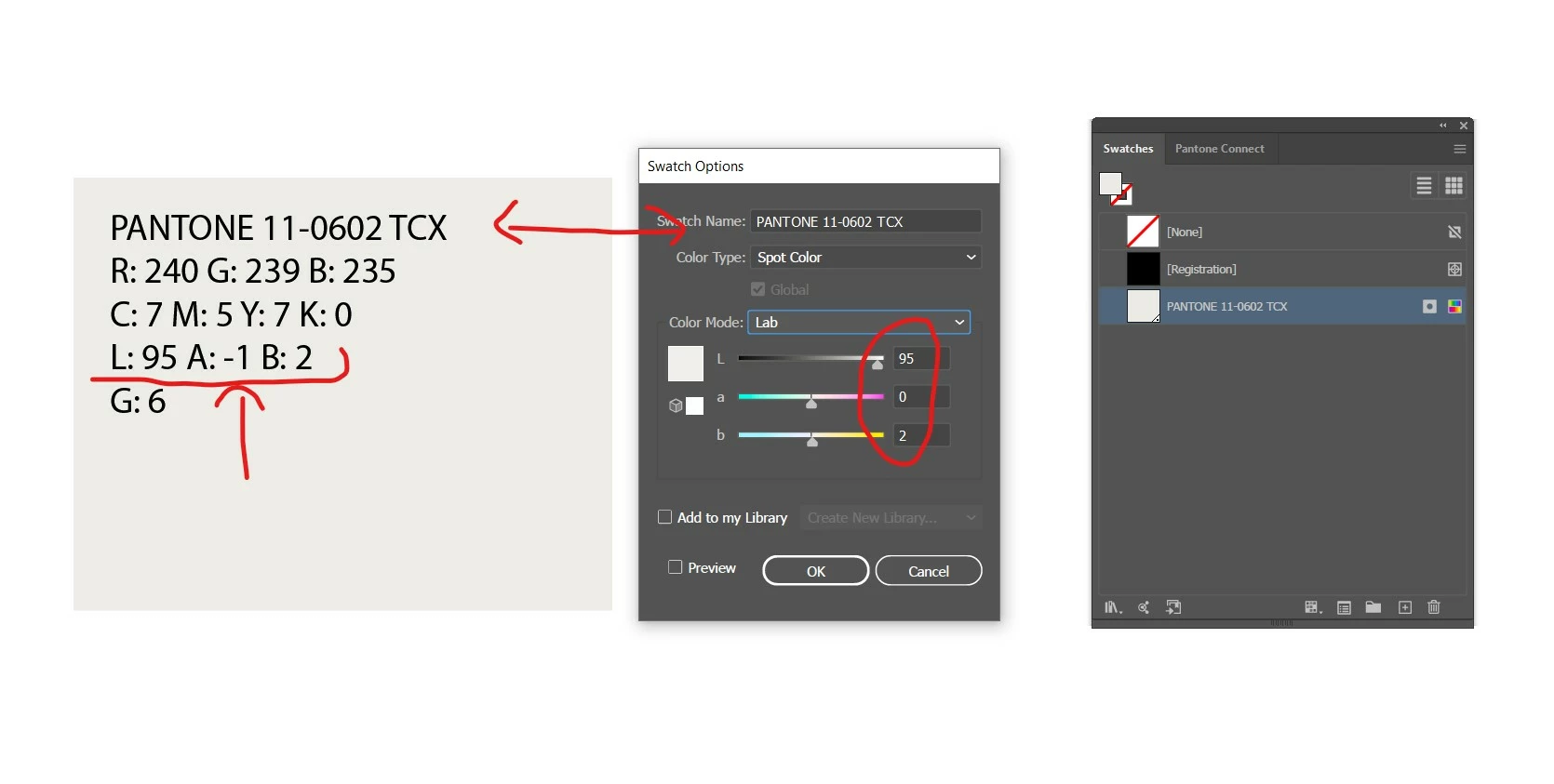
If I double click the swatch in the swatch palette, the LAB value is correct/as it should be, it is just the text that the script produces and lays onto the artboard that is incorrect. Please see following image. Any ideas why this glitch is happening?


This glitch happens consistently on every single import - the lab value that the script generates onto the artboard is never the correct value. Help! 


11 replies

New Participant
June 25, 2024

I'm having problems using this too, before the last update on illustrator it worked totally fine, but now it doesn't I've tried all of the others in this thread but none worked 😓

schroef
Inspiring
September 18, 2024

@Matheus3825881488n1 


which version of the script are you using and do you get any error or dialog when running it?

Participating Frequently
March 19, 2025

Hey @schroef, you definitely have added some great functionality to this amazing script by John Wun. Any chance you could allow the HEX value to be outputted as "#:XXXXXX", meaning hash sign and all caps with no spaces? I know I'm being picky but I think this would allow people to copy paste the HEX codes more easily. This script should be made a feature inside AI, for real!

New Participant
March 14, 2024

I tried to use this script but nothing happened for me. Please help me too

CarlosCanto
Adobe Expert
March 14, 2024

do you have any error messages?


try the first script to see if it works

New Participant
March 17, 2024

I had tried the script too. Nothing happened. Please help me

schroef
Inspiring
July 26, 2022

in the script you can find it uses ```Math.round(outputColors[i][j])```. you can replace it by this ```outputColors[i][j].

.toPrecision(4)```

Now it will return values with 2 decimals. You need to make the w-150 to 160 otherwise text gets broken off.

New Participant
September 22, 2023

Hello, does anyone have the latest script the can send, I am wondering if it is possibel to include COLORO color numbers as well?

schroef
Inspiring
September 22, 2023

What is coloro? Is that a search library?

This script concerts existing colors into color components.

If you have the full color library and its lab values. It can be implemented.


Edit

Just tried a quick Google. Not much info about if printers actually use this. Wonder if it's worth all the time to implement if I'm honest

CarlosCanto
Adobe Expert
September 16, 2020

try this updated version


/////////////////////////////////////////////////////////////////
// Render Swatch Legend v1.3 -- CC
//>=--------------------------------------
//
//  This script will generate a legend of rectangles for every swatch in the main swatches palette.
//  You can configure spacing and value display by configuring the variables at the top
//  of the script.
//   update: v1.1 now tests color brightness and renders a white label if the color is dark.
//   update: v1.2 uses adobe colour converter, rather than rgb colour conversion for a closer match.
//   update: v1.3 adds multiple colour space values based on array printColors.

// LAB values by Carlos Canto - 09/16/2020
// reference: https://community.adobe.com/t5/illustrator/illustrator-javascript-render-swatch-legend-lab-colour-values-incorrect/m-p/11438710?page=2#M244722
//>=--------------------------------------
// JS code (c) copyright: John Wundes ( john@wundes.com ) www.wundes.com
// copyright full text here:  http://www.wundes.com/js4ai/copyright.txt
//
// Edits by Adam Green (@wrokred) www.wrokred.com

//////////////////////////////////////////////////////////////////
doc = activeDocument,
    swatches = doc.swatches,
    cols = 4, // number of columns in group
    displayAs = "RGBColor", //or "CMYKColor"
    printColors = ["RGB", "CMYK", "LAB", "GrayScale"], // RGB, CMYK, LAB and/or GrayScale
    colorSeparator = " ", // Character used to separate the colours eg "|" output = R: XXX|G: XXX|B: XXX
    textSize = 10, // output text size value in points
    rectRef = null,
    textRectRef = null,
    textRef = null,
    swatchColor = null,
    w = 150;
h = 120,
    h_pad = 10,
    v_pad = 10,
    t_h_pad = 10,
    t_v_pad = 10,
    x = null,
    y = null,
    black = new GrayColor(),
    white = new GrayColor();
black.gray = 100;
white.gray = 0;
activeDocument.layers[0].locked = false;
var newGroup = doc.groupItems.add();
newGroup.name = "NewGroup";
newGroup.move(doc, ElementPlacement.PLACEATBEGINNING);
for (var c = 2, len = swatches.length; c < len; c++) {
    var swatchGroup = doc.groupItems.add();
    swatchGroup.name = swatches[c].name;
    x = (w + h_pad) * ((c - 2) % cols);
    y = (h + v_pad) * (Math.round(((c) + .03) / cols)) * -1;
    rectRef = doc.pathItems.rectangle(y, x, w, h);
    swatchColor = swatches[c].color;
    rectRef.fillColor = swatchColor;
    textRectRef = doc.pathItems.rectangle(y - t_v_pad, x + t_h_pad, w - (2 * t_h_pad), h - (2 * t_v_pad));
    textRef = doc.textFrames.areaText(textRectRef);
    textRef.contents = swatches[c].name + "\r" + getColorValues(swatchColor);
    textRef.textRange.fillColor = is_dark(swatchColor) ? white : black;
    textRef.textRange.size = textSize;
    rectRef.move(swatchGroup, ElementPlacement.PLACEATBEGINNING);
    textRef.move(swatchGroup, ElementPlacement.PLACEATBEGINNING);
    swatchGroup.move(newGroup, ElementPlacement.PLACEATEND);
}

function getColorValues(c, spot) {
    if (c.typename) {
        if (c.typename == "SpotColor") {
            return getColorValues(c.spot.color, c.spot);
        };
        switch (c.typename) {
            case "RGBColor":
                sourceSpace = ImageColorSpace.RGB;
                colorComponents = [c.red, c.green, c.blue];
                break;
            case "CMYKColor":
                sourceSpace = ImageColorSpace.CMYK;
                colorComponents = [c.cyan, c.magenta, c.yellow, c.black];
                break;
            case "LabColor":
                sourceSpace = ImageColorSpace.LAB;
                colorComponents = [c.l, c.a, c.b];
                break;
            case "GrayColor":
                sourceSpace = ImageColorSpace.GrayScale;
                colorComponents = [c.gray];
                break;
        }
        var outputColors = new Array();
        for (var i = printColors.length - 1; i >= 0; i--) {
            targetSpace = ImageColorSpace[printColors[i]];
            
            if (printColors[i] == 'LAB' && spot && spot.spotKind == 'SpotColorKind.SPOTLAB') {
                outputColors[i] = spot.getInternalColor();
            }
            else {
                outputColors[i] = app.convertSampleColor(sourceSpace, colorComponents, targetSpace, ColorConvertPurpose.previewpurpose);
            }
            for (var j = outputColors[i].length - 1; j >= 0; j--) {
                outputColors[i][j] = printColors[i].charAt(j) + ": " + Math.round(outputColors[i][j]);
                if (j == outputColors[i].length - 1) {
                    outputColors[i][j] += "\r";
                };
            };
            outputColors[i] = outputColors[i].join(colorSeparator);
        };
        return outputColors.join("");
    }
    return "Non Standard Color Type";
}

function is_dark(c) {
    if (c.typename) {
        switch (c.typename) {
            case "CMYKColor":
                return (c.black > 50 || (c.cyan > 50 && c.magenta > 50)) ? true : false;
            case "RGBColor":
                return (c.red < 100 && c.green < 100) ? true : false;
            case "GrayColor":
                return c.gray > 50 ? true : false;
            case "SpotColor":
                return is_dark(c.spot.color);
                return false;
        }
    }
}
Ton Frederiks
Adobe Expert
September 16, 2020

You did it! 

The Lab values are exactly the same as the ones from the Pantone swatch.

And in an RGB document the RGB colors are the same as the conversion you see when you select RGB in the Color panel or in the Swatch options.

Same for the CMYK conversion in a CMYK document.

But CMYK or Gray numbers are totally different from the conversion you would expect when you selected them in an RGB document and RGB and Gray are different in a CMYK document. I wonder where that comes from.

NathanOdellin
Known Participant
September 17, 2020

Hi Ton thanks so much for your input and testing, it's so helpful.


what do you mean exactly in your last sentence there? Could you possibly do a screen shot to explain? 

thanks in advance 

CarlosCanto
Adobe Expert
September 16, 2020

hmmm. there might be hope, let me make some testing...The plot thickens!

Ton Frederiks
Adobe Expert
September 16, 2020

Yes, the plot is getting very thick!

Let me add to my latest reply: the RGB values that the script gives you are the same values you would get when you open the Pantone swatch and manually switch to RGB: In an RGB document.

Ton Frederiks
Adobe Expert
September 16, 2020

Knowing what we know now, the script will only give correct values for CMYK swatches in a CMYK document an RGB swatches in an RGB document. All other values are calculated using the current color settings.

NathanOdellin
Known Participant
September 16, 2020

The plot thickens!


My problem is that I download my pantones from Pantone Colour Manager as 'LAB' swatches - I can only download as either LAB or sRGB and this is for textile printing. 

My file is set up using Adobe RGB space as I'm digitally printing fabric. 

Long story short, the LAB value that the script creates and writes out is never going to be precise, so in my user case, I'll just have to use the RGB values that the script writes out - if I'm thinking this through correctly, those RGB values the script writes out should be correct? 

Ton Frederiks
Adobe Expert
September 16, 2020

Yes as far as I can conclude, the RGB values that the script gives you are the same values you would get when you open the Pantone swatch and manually switch to RGB. 

CarlosCanto
Adobe Expert
September 16, 2020

it's been clear since the very start Nathan, what I'm trying to tell you is that the LAB values you see in the UI are not accessible to scripting. The Scripting API provides a conversion method, we get the values in CMYK or RGB then we convert them to LAB. That's where the rounding comes from.

NathanOdellin
Known Participant
September 16, 2020

Hi Carlos, yes sorry - all is clear now, I understand what is happening. 

I've never understood why Illustrator doesn't display LAB natively, but this is obviously why the script is needing to take the cmyk/RGB data and then produce the Lab value (That is slightly different). 

Makes sense to me now, thank you for explaining and repeating this to me. 


CarlosCanto
Adobe Expert
September 16, 2020

It comes down to rounding, decimals get lost from Pantone to CMYK (or RGB) then to LAB.

NathanOdellin
Known Participant
September 16, 2020

I’m not sure that is correct. Rounding would make sense if there were half values etc but this isn’t the case.

On every single imported swatch - I.e on every swatch the script runs through and presents on the art board, the values are always one digit more out, without fail. The L value often remains the same, but the A B Values are always off by one digit. This isn’t rounding, there’s something going wrong.

CarlosCanto
Adobe Expert
September 16, 2020

we don't have access to LAB values in the scripting API, that's the reason conversion was needed

Ton Frederiks
Adobe Expert
September 16, 2020

An Book Color, Carlos, is that available in scripting?

CarlosCanto
Adobe Expert
September 16, 2020

The Scripting API recognizes Pantone Colors as SpotLAB, but when we dig down to get the actual color values we get either CMYK or RGB according to your Document Color Mode.

Ton Frederiks
Adobe Expert
September 16, 2020

I don't think the script is correct in showing the Lab values.

It looks like it is showing the Lab values of the color when it is converted to CMYK.

NathanOdellin
Known Participant
September 16, 2020

Argh! IF so, that is super frustrating. LAB values are the most accurate print values there are, so it's crucial they match. 


What is puzzling to me though, is that the script does any conversions at all - WHY???????

It should just be extracting the actual data from the swatch, so why is it changing numerical values at all? 


The actual swatch values are exacting, certainly from Pantones. So why does the script then start to ínterpret' them? Makes no sense at all.