


Inspiring
June 21, 2021
Answered

Illustrator on Windows 10, not enough ram/memory issue

  • June 21, 2021
  • 2 replies
  • 1004 views

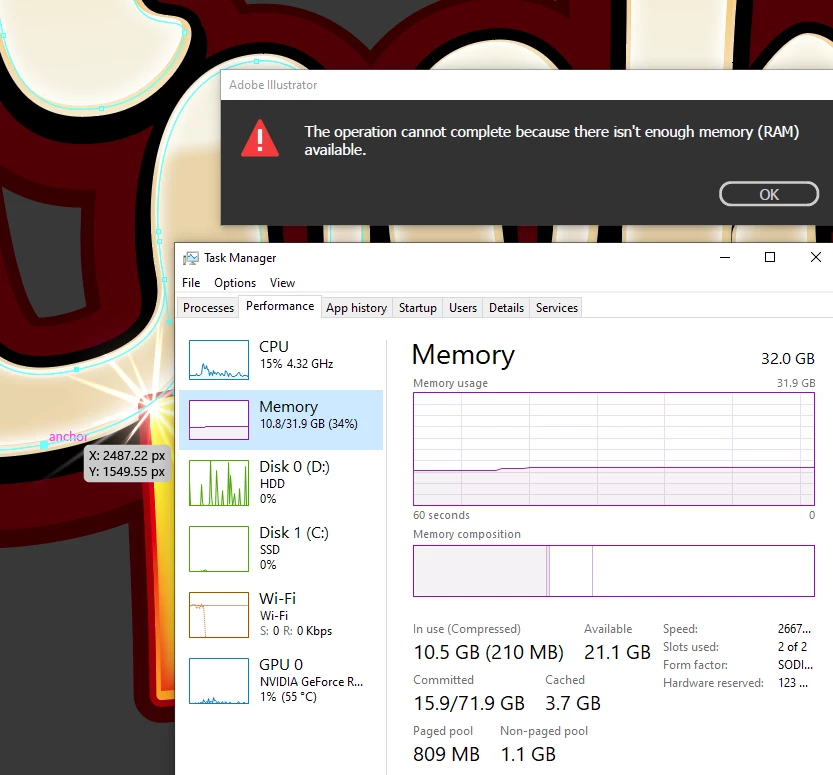
Keep getting this error when working on a small illustrator logo. I use the apperance palette and have multiple fills and strokes with multiple transforms and offsets...but nothing heavy. I am on a HP Omen laptop with an i9 and Geforce RTX2080 with a Wacom tablet  and 2 external monitors (one is a cintiq). I have 32 GB of ram and only illustrator and slack running. I have over 1 tb free on both my c and d drives and restarted and all my apps and drivers are up to date. I see this was a problem back in 2018...but nothing recent. It occurs when i try to move points on the shape.

Also once this happens it take quite a few minutes to close that window, hitting ok does nothing.


{Renamed by MOD}

This topic has been closed for replies.
Correct answer Anshul_Saini

Hello Chris, 
 
I am sorry to hear about your experience. In addition to the question asked by @Mike_Gondek10189183, I would request you to share some more information like: 

  • OS and version of Illustrator. 
  • Are you using the latest OS and application? If not, please update to the latest version for both OS and application. 
  • Is the issue related to a specific document? If yes, could you please share the document with us and then upload it to the Creative Cloud (https://helpx.adobe.com/in/creative-cloud/help/share.html) and share the download link. 
  • Where are you saving the files (Network Drive/ System HDD/ Shared Folder on System /External HDD)? 
  • Have you tried cleaning your clipboard, temp files and cache? 
  • Did you check if there is any heavy software running in the background? 
  • When did this start happening? Are there any recent changes made to your system? For example, any antivirus, system updates or web extensions installed recently. 
  • Does resetting Illustrator Preferences (https://helpx.adobe.com/in/illustrator/using/setting-preferences.html) help to resolve the issue?  
  • Have you tried toggling GPU Performance under Preferences > Performance? 

Additionally, you may try the suggestions given herehttps://community.adobe.com/t5/illustrator/resolve-slow-performance-and-unexpected-behaviors-in-illustrator/td-p/11561981 
I hope this helps. 

Looking forward to your response


Thanks, 
Anshul Saini 

2 replies

Anshul_Saini
Community Manager
Anshul_SainiCommunity ManagerCorrect answer
Community Manager
June 22, 2021

Hello Chris, 
 
I am sorry to hear about your experience. In addition to the question asked by @Mike_Gondek10189183, I would request you to share some more information like: 

  • OS and version of Illustrator. 
  • Are you using the latest OS and application? If not, please update to the latest version for both OS and application. 
  • Is the issue related to a specific document? If yes, could you please share the document with us and then upload it to the Creative Cloud (https://helpx.adobe.com/in/creative-cloud/help/share.html) and share the download link. 
  • Where are you saving the files (Network Drive/ System HDD/ Shared Folder on System /External HDD)? 
  • Have you tried cleaning your clipboard, temp files and cache? 
  • Did you check if there is any heavy software running in the background? 
  • When did this start happening? Are there any recent changes made to your system? For example, any antivirus, system updates or web extensions installed recently. 
  • Does resetting Illustrator Preferences (https://helpx.adobe.com/in/illustrator/using/setting-preferences.html) help to resolve the issue?  
  • Have you tried toggling GPU Performance under Preferences > Performance? 

Additionally, you may try the suggestions given herehttps://community.adobe.com/t5/illustrator/resolve-slow-performance-and-unexpected-behaviors-in-illustrator/td-p/11561981 
I hope this helps. 

Looking forward to your response


Thanks, 
Anshul Saini 

Mike_Gondek10189183
Community Expert
Community Expert
June 21, 2021

Does this error show up often, or only for this one shape you are trying to transfomr? Where did this shape come from did it possible get pasted from another program, or did you draw the sheep originally? Might be a corrupted shape.

what happens if you effects > Document Raster Effects Settings >> and choose 72?

Inspiring
June 23, 2021

It hads happened a couple of times with different files. IT seems to have something to do with adding multiple fills to shapes with offset path and transform fxs applied. Sent the file to someone else (on a MAC) and they experienced the same error.  I turned off using my GPU and the error went away.