


March 17, 2022
Answered

Illustrator: Pinch-zoom does not work on touchpad on Windows

  • March 17, 2022
  • 1 reply
  • 12889 views

Hi:


I noticed that the pinch-zoom gesture works for Illustrator on Mac but not on Windows. I was using a Macbook Pro15 (mid-2018) before and an HP ZBook 17 now with Windows. The pinch-zoom works fine for the other apps (e.g. InkScape).


Any suggestions?


Thank you,


QZ
Correct answer Anubhav M

Hello @23625029,


Sorry to hear about the problem. In order to use Pinch-Zoom gestures in Illustrator using the touchpad, you will need to hold down the [Alt] modifier key on your keyboard and then try pinching in or out to zoom.


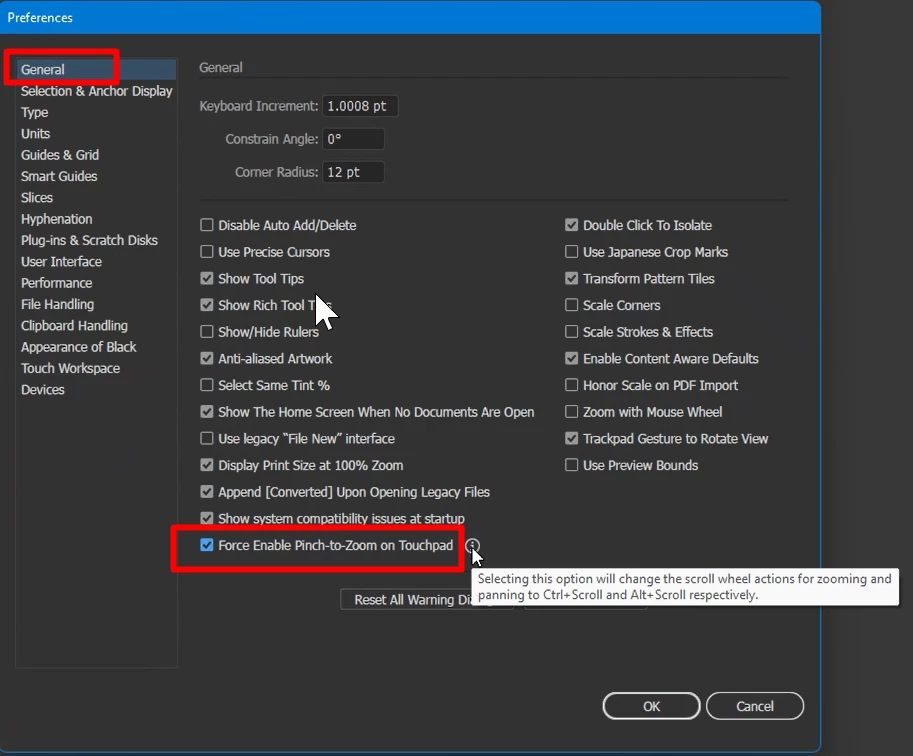
Alternatively, you may enable Force Enable Pinch-to-Zoom on Touchpad under the General preferences for Illustrator. Doing so will remove the need to hold down the modifier key while zooming.

Note: Selecting this option will change the scroll wheel actions for zooming and panning to Ctrl+Scroll and Alt+Scroll respectively.


Kindly update this thread if you need further help. We'd be happy to assist.


Thanks,

Anubhav

1 reply

Anubhav MCommunity ManagerCorrect answer
Community Manager
April 19, 2022

Hello @23625029,


Sorry to hear about the problem. In order to use Pinch-Zoom gestures in Illustrator using the touchpad, you will need to hold down the [Alt] modifier key on your keyboard and then try pinching in or out to zoom.


Alternatively, you may enable Force Enable Pinch-to-Zoom on Touchpad under the General preferences for Illustrator. Doing so will remove the need to hold down the modifier key while zooming.

Note: Selecting this option will change the scroll wheel actions for zooming and panning to Ctrl+Scroll and Alt+Scroll respectively.


Kindly update this thread if you need further help. We'd be happy to assist.


Thanks,

Anubhav

New Participant
April 19, 2022

Dear Anubhav:


Thank you for your tip! Worked like a charm.


Best,


QZ

Community Manager
April 21, 2022

We are glad to hear that!


Please feel free to reach out if you run into any issues or queries in the future. We'd be happy to help.


Thanks,

Anubhav