Participant
August 3, 2023
Answered

Illustrator problem: UKCO - unknown error

  • August 3, 2023
  • 21 replies
  • 5260 views

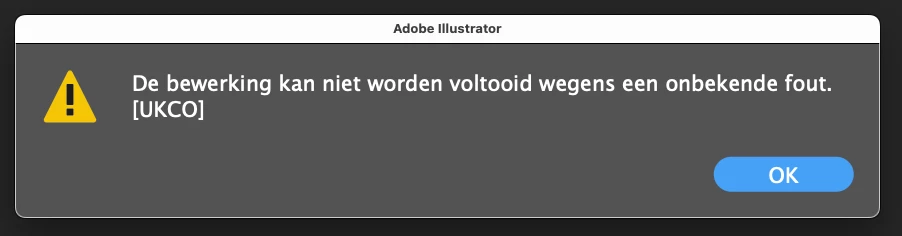
Today Illustrator gives many errors: UKCO unknown. It happens with each step which I take. Newest version Mac, 27.8  So I cannot proceed. I saw in earlier posts (february) that this happened as well. Any solutions? Translation: the operation could not be completed due to an unknown error
This topic has been closed for replies.
Correct answer Anubhav M

Hello everyone,


Thanks for your patience. Our team has made some improvements in the latest version of Illustrator v27.8.1, which should help alleviate the trouble you're having with Illustrator. Would you mind trying to update to the latest Illustrator version and sharing your observations?


Looking forward to hearing from you.


Thanks,

Anubhav

21 replies

FranWillett
Participating Frequently
August 6, 2023

I have the same issue today, very frustrating! Illustrator wont even open without this error appearing. Will try reinstalling previous version as suggested here. 

MaartenBAuthor
Participant
August 6, 2023

Yess! I went back to 27.7 and Illustrator works again! Many thanks to Nicola314etcetc. On PC, well... nobody is perfect.

Adobe is very quiet at the moment...


Nicky Magpie
Participating Frequently
August 6, 2023

so glad you are able to work again! I must change my name from the one adobe gave me, haha!

Adobe - the silence is deafening!

Participant
August 6, 2023

ok, so Illustrator versions 26.5.3 and 27.7 both work (but not 27.8)... using MacOS Ventura 13.4.1 .... now seeing that there's an update to 13.5 

Will update my mac and see if Illustrator 27.8 will work

Nicky Magpie
Participating Frequently
August 6, 2023

good luck, hope that fixes it, im on a PC ( dont judge, haha!) 

Participant
August 6, 2023

hahahahah -  updating my Mac did not fix it 

Participant
August 6, 2023

mine too. Can't use it at all (have tried uninstalling then re-installing - doesn't help). The older version of adobe does work, so using that... and following this thread for any solutions.

Nicky Magpie
Participating Frequently
August 6, 2023

YES, VERY FRUSTRATING - mine still worked but I had to press the clear error every 2 seconds so a terrible way to work, pressing the clear button every time! I reinstalled illustrator and tried lots of things then saw an unrelated post for another error that recommended installing the old version - so this worked.

Nicky Magpie
Participating Frequently
August 6, 2023

If you go to your creative cloud and press the three dots on the right of Illustrator you can re-install the previous version ( 27.7) it is working for me now with this. But Adobe need to fix this error in the  27.8 version - adobe - are you going to fix this?

Sacha Yazoka
Participating Frequently
August 7, 2023

Thanks! Same problem here. This works, for now. 


Nicky Magpie
Participating Frequently
August 6, 2023

Ok, its the update - i have reinstalled the older version and the UKCO fault is now gone. But it means I am paying for a service that I cannot use the updates..

Participant
August 8, 2023

Thank you so much!

Nicky Magpie
Participating Frequently
August 6, 2023

Me too - the same thing - CC installed the latest app, maybe its that- I'm currently downloading the version before this one and will see..


Participant
August 5, 2023

I'm getting this message now too.I have been away for two weeks and have returned to work and Illustrator is unusable, due to this error. I an not using Image trace.

Alhadis
Participating Frequently
August 8, 2023

Delete the file named "Vectorizing Presets" in your settingss directory, as explained here.


Naturally, you'll lose any vectorisation presets that you've saved (if any), but the annoying error message seen in Illustrator 27.8 will finally disappear.

studiodionysien
Participant
August 8, 2023

Thanks a lot you saved me a lot of time and headaches.

ℑch
Participant
August 5, 2023

After the 27.8 update, this error dialog occours suddenly at Illustrator startup and every now and than.

I solved deleting the vectorizing preset file, which is located here:
/Users/*yourprofile*/Library/Preferences/Adobe Illustrator 27 Settings/en_GB/Vectorizing Presets

Be aware that you will loose all your vectorizing preset created.

Participant
August 4, 2023

I get this same error code everytime I do ANYTHING. Tried re installung and restarting but still get it at start up and with any click of the mouse!


Alhadis
Participating Frequently
August 4, 2023

When going through my preferences directory one file at a time, I noticed the startup error stops if I remove the file named "Vectorizing Presets". This might be the catalyst, or at least one of them. Try to delete (or move) the presets file and see if it makes a difference. Its location will depend on your operating system:


macOS: ~/Library/Preferences/Adobe Illustrator 27 Settings/en_GB/Vectorizing Presets

Windows: C:\Users\<user>\AppData\Roaming\Adobe\Adobe Illustrator 27 Settings\en_GB\Vectorizing Presets


(Make sure to substitute "en_GB" in the directory path with whatever locale you're actually using; e.g., en_US, etc).

ℑch
Participant
August 5, 2023

Sorry Alhadis, I did'nt notice your answer before posting mine.