- Home
- Illustrator
- Discussions
- Re: Illustrator saves files unusually large.
- Re: Illustrator saves files unusually large.
Illustrator saves files unusually large.

Copy link to clipboard
Copied
After updating to v29.1 version of Adobe Illustrator, the design files have become very large when saved, and I don't understand why. For example, I opened an old file that was about 500MB on an external hard drive, and when I saved it as a new file in the Documents folder, the size increased to over 4GB.
Yesterday, I was shocked when this software saved a file that reached 11GB and took about 30 minutes. As a result, my 32GB RAM is always full, constantly at 90-100% during the process. What should I do to fix this? Thank you everyone for reading!



Explore related tutorials & articles
 30
Replies
30
30
Replies
30


Copy link to clipboard
Copied
Hi @carson_3956,
Thanks for sharing the details. To assist you better, could you please confirm the operating system you're using (e.g., macOS or Windows)? Also, did you notice this file size issue only after updating to Illustrator v29.1, or was it happening before as well?
Additionally, is this happening with newly created files too? If you haven't tested it yet, please try creating and saving a new file to see if the issue persists, and let us know.
Here are a few steps to help resolve this:
1. If your file includes large, high-res images, try linking instead of embedding them (File > Place > Uncheck "Embed").
2. Try saving as an AI file instead of other formats (like EPS or PDF), as these can sometimes increase file size unnecessarily.
Let me know how it goes or if you need further assistance!
Best,
Abhishek Rao


Copy link to clipboard
Copied
If you copy the artwork to a new document then save it as Ai, are you getting the same huge file size ?

Copy link to clipboard
Copied
Hello,
I have the same issue. I copied the artwork to a new file and saved it, and it was the same size. 453MB.

Copy link to clipboard
Copied
@Thorsten5D59 schrieb:
Hello,
I have the same issue. I copied the artwork to a new file and saved it, and it was the same size. 453MB.
Without knowing what's in the file, nobody could say whether that is to be expected or not.

Copy link to clipboard
Copied
Hi, I am having the same issue with 29.7.1. I have a file that is 2.3gb. If i open it, update the links and save it, it saves as 3.15gb. Oddly, if my colleague (also using 29.7.1) saves it, it returns to original filesize. Also, if i resave in CC 2024 it returns to original file size. I have tried uninstalling and reinstalling the latest release but still have the issue of increased file sizes. I have even opened the file, delted lots of items and saved it and it still increases in size.
Very frustrating as I have a 2gb file size limit for uploading to my clients system, but I cant reduce the file sizes easily.

Copy link to clipboard
Copied
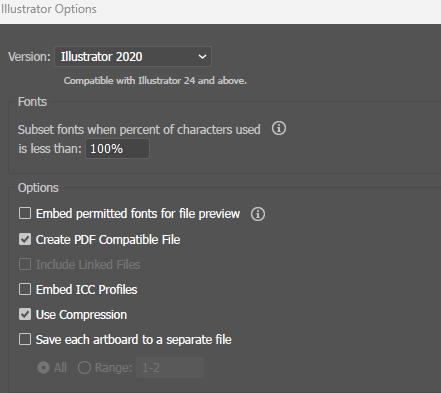
Do you save your .ai file with "Create PDF Compatible File" checked, that will add to the file size, but turning it of limits the use in InDesign, Acrobat and Photoshop.
Copy link to clipboard
Copied
Yes, but that was true of the original file too and also the the same settings my colleague is using. I am required to save with preview as the ai file will be and image placed into several ai documents.
If my colleague is using the same version of illustrator as I am and we are using the same settings, why am i getting much higher file sizes? Likewise between CC2024 and CC2025 on the same computer.
The only difference between my colleagues setup and mine is that I am using a macbook and he is using a desktop.

Copy link to clipboard
Copied
Reply to bump this because it become a major issue. Lately linked files have been "self embedding" when saving illustrator files. I have never had this issue before whatever the most recent update was. I see well you need to uncheck "Create PDF Compatible File". All well and good but that's always been checked without this issue. Now I have 4 GB files that used to be 20 MB. Slowing my computer to a crawl as it take forever to save.
And yes unchecking "Create PDF Compatible File" does create small file sizes but I can't preview the files in explorer or use the in Photoshop for product layouts and mock ups.
I look forward to being gaslit my Adobe moderators on this.

Copy link to clipboard
Copied
I am having the same issue as all above. I am trying to export multiple Ad sizes for web (in pixels) and when I try to bump up the ppi/dpi it resizes it to much larger than what the original artboard size is, when I adjust the dpi/ppi to 72 it comes out extremely pixelated. I have tried so many different ways fixing this and each time it comes out just as pixelated or increases the size of the Ad. How can I properly export my ads have it maintain good resolution (not turn out pixelated) and not increase size?

Copy link to clipboard
Copied
me too. files are very large now even turning off the compatibility feature. Auto embedding is happening at random. File sizes much larger. Windows 11. lots of HD space and RAM, but with these increased file sizes the drive is going to fill up faster than it should. There is no reason why it should be so large. if I have 5 linked images that total 25MB, and the rests of the content is text, the file should not reflect that as part of the file size. but it does and is even larger.

Copy link to clipboard
Copied
Hello @LauraFlowers,
Thanks for reaching out. Could you share a link to a sample AI and PDF file, along with screenshots of the export settings used after uploading them to a file-sharing service, so we can check it on our end?
Looking forward to hearing from you.
Anubhav

Copy link to clipboard
Copied
This recent version (30.0) has significately bloated our files sizes. I took a file that we saved out earily in the year with 29.0 and just resaved it (with no changes just saved it) with 30.0 and it is 6x larger. Turning off Create PDF Compatible File is not an option for us, we utilize this feature.
Copy link to clipboard
Copied
Can you check if Include Linked Files is unchecked?

Copy link to clipboard
Copied
Copy link to clipboard
Copied
That can mean 2 things, you have not used any images in your document or they are all embedded (which makes the file larger).
Copy link to clipboard
Copied
Yeah, I get that. That doesn't really solve the issue at hand (which we are seeing in all of our files). Nothing has changed in that file other than the version in which it was saved in. I have another file that was saved in version 30.0 that is a whopping 848,156kb. I just resaved it in version 29.0 (zero changes) 110,164kb.
Copy link to clipboard
Copied
I did some tests and in most cases the file was smaller when saved in 30.0.
But not by a large amount. Are there differences in version number? Recently there have not been changes to the file format, but there were between CC and 2020. And are you using Mac or Windows?
Copy link to clipboard
Copied
One run on version 29.8.3 the other version 30.0. Running on Windows 11.
This file size jump is happening to everyone on my team, we basically save with Illustrator default settings, since that is what works best for our workflow.
Copy link to clipboard
Copied
I can see a small increase when I have in Preferences in File Handling > Save in Background checked. Unchecked they become smaller.
Copy link to clipboard
Copied
I do have that setting unchecked already.
Copy link to clipboard
Copied
Maybe you can share some files with @Anubhav M so the Illustrator team can have a look at it.
Copy link to clipboard
Copied
Under NDA, I am unfortunately not able to share files.

Copy link to clipboard
Copied
Hi, I am having the same issue. What is Adobe doing? These updates are not helpful; they complicate our work. Moderators responses are also unhelpful. They think we are using Illustrator for the first time.
Copy link to clipboard
Copied
Unless you tell the forum, nobody can know how long you have been using Illustrator.

-
- 1
- 2

Get ready! An upgraded Adobe Community experience is coming in January.
Learn more
 AdChoices