


Known Participant
August 24, 2023
Question

Illustrator :: Script :: How to find Linked Images PPI Value

  • August 24, 2023
  • 1 reply
  • 1912 views

Hi All,


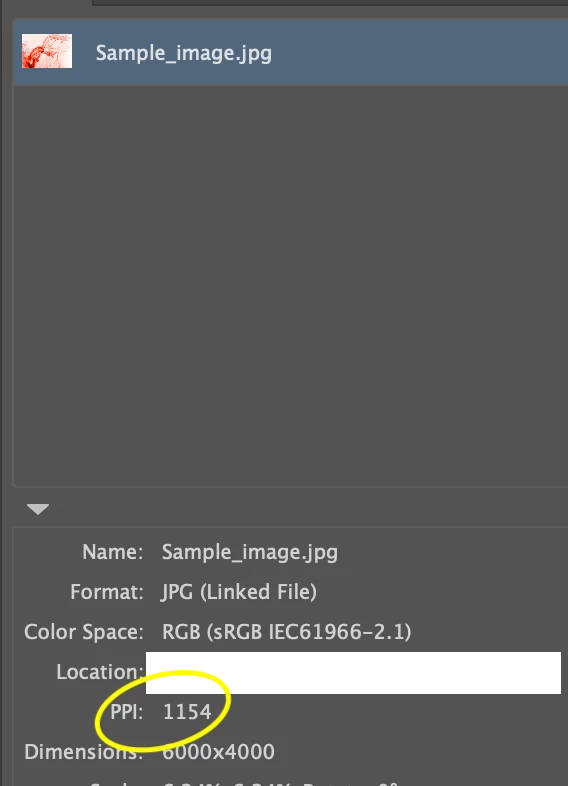
I am relatively new to this. I'm creating a script to get the PPI value for linked images in an illustrator file.


Please can any one help me to find this.


Thanks in advance!


Reference screenshot:
 

This topic has been closed for replies.

1 reply

CarlosCanto
Adobe Expert
August 24, 2023

try this script by Moluapple

alert(72/app.selection[0].matrix.mValueA);
alert(72/app.selection[0].matrix.mValueD);


more info here

https://community.adobe.com/t5/illustrator-discussions/resolution-check-in-illustrator/m-p/4254998#M152496

m1b
Brainiac
August 24, 2023

Hi, here is a functions I wrote that expands on this idea a bit.

/**
 * Displays the resolution (ppi) of the selected item.
 * @7111211 m1b
 * @discussion https://community.adobe.com/t5/illustrator-discussions/illustrator-script-how-to-find-linked-images-ppi-value/m-p/14034494
 */
(function () {

    var doc = app.activeDocument,
        item = doc.selection[0],
        ppi = getPPI(item);

    if (ppi)
        alert(ppi);

})();

/**
 * Returns resolution (ppi) of item.
 * Note: see known limitation in getLinkScaleAndRotation.
 * @9397041 {RasterItem|PlacedItem} item
 * @Returns {Array<Number>} [X-ppi, Y-ppi]
 */
function getPPI(item) {

    if (!(
        item.constructor.name == 'RasterItem'
        || item.constructor.name == 'PlacedItem'
    ))
        return;

    // get current scale and rotation
    var sr = getLinkScaleAndRotation(item),
        rotation = sr[2];

    // duplicate and "unrotate"
    var workingImage = item.duplicate();
    var tm = app.getRotationMatrix(-rotation);
    workingImage.transform(tm, true, true, true, true, true);

    // calculate ppi
    var ppi = [Math.abs(round(72 / app.selection[0].matrix.mValueA, 0)), Math.abs(round(-72 / app.selection[0].matrix.mValueD, 0))];

    // clean up
    workingImage.remove();

    return ppi;

};

/**
 * Return the scale, rotation and size of
 * a PlacedItem or RasterItem.
 * IMPORTANT: this relies on Illustrator's
 * 'BBAccumRotation' tag to determine rotation.
 * Files converted to Illustrator format from
 * other sources may not have this and will
 * show 0 rotation, and the ppi will be
 * incorrectly calculated.
 * @7111211 m1b
 * @version 2023-03-09
 * @9397041 {PlacedItem|RasterItem} item - an Illustrator item.
 * @9397041 {Boolean} round - whether to round numbers to nearest integer.
 * @Returns {Array} [scaleX%, scaleY%, rotation°, width, height]
 */
function getLinkScaleAndRotation(item, round) {

    if (item == undefined)
        return;

    var m = item.matrix,
        rotatedAmount,
        unrotatedMatrix,
        scaledAmount;

    var flipPlacedItem = (item.typename == 'PlacedItem') ? 1 : -1;

    try {
        rotatedAmount = item.tags.getByName('BBAccumRotation').value * 180 / Math.PI;
    } catch (error) {
        rotatedAmount = 0;
    }
    unrotatedMatrix = app.concatenateRotationMatrix(m, rotatedAmount * flipPlacedItem);

    if (
        unrotatedMatrix.mValueA == 0
        && unrotatedMatrix.mValueB !== 0
        && unrotatedMatrix.mValueC !== 0
        && unrotatedMatrix.mValueD == 0
    )
        scaledAmount = [unrotatedMatrix.mValueB * 100, unrotatedMatrix.mValueC * -100 * flipPlacedItem];
    else
        scaledAmount = [unrotatedMatrix.mValueA * 100, unrotatedMatrix.mValueD * -100 * flipPlacedItem];

    if (scaledAmount[0] == 0 || scaledAmount[1] == 0)
        return;

    if (round)
        return [round(scaledAmount[0]), round(scaledAmount[1]), round(rotatedAmount)];
    else
        return [scaledAmount[0], scaledAmount[1], rotatedAmount];

};

/**
 * Rounds `n` to `places` decimal places.
 * @9397041 {Number} n - the number to round
 * @9397041 {Number} places - number of decimal places, can be negative
 * @Returns {Number}
 */
function round(n, places) {
    var m = Math.pow(10, places != undefined ? places : 3);
    return Math.round(n * m) / m;
};


Known Participant
August 25, 2023

@m1b  Please find the attached Ai file.

And

please provide code for get Dimensions value.


@m1b PDF is attached.