


brianc31564954
Participating Frequently
March 15, 2017
Answered

Illustrator Transform Panel constraints cut off

  • March 15, 2017
  • 3 replies
  • 1565 views

Hi guys,

I'm having a random problem with the Transform panel is Illustrator CS5 in that it appears to be cut short to the right hand side so I am missing the constrain proportions symbol along with part of the drop down below it. It also won't let me resize the panel at all.

Apart from the swatches panel all the other panels aren't letting me resize them either.

Any help please would be much appreciated as I'm stumped and it's driving me potty!

Many thanks
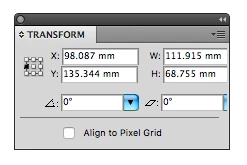
This topic has been closed for replies.
Correct answer Doug A Roberts

macOS Sierra Version 10.12.3


then it's possible this is one of those things we can attribute to CS5 and Sierra incompatibility.

3 replies

brianc31564954
Participating Frequently
March 16, 2017

A quick update, I've managed to work around the Transform panel problem by docking the Pantone panel to it, as I can resize this panel and so in turn it allows me to widen the Transform panel so I can see the constraints link.

If I remove either panel however the Transform panel cuts back off to how it was before, so still not sure why this is happening?

Doug A Roberts
Community Expert
Community Expert
March 16, 2017

what Mac OS version are you using?

brianc31564954
Participating Frequently
March 16, 2017

macOS Sierra Version 10.12.3

brianc31564954
Participating Frequently
March 15, 2017

Hi there,

I've tried Option+Command+Shift when opening Illustrator but nothing happening. Is there another way I can get there to delete the preferences and which bits should I be deleting.

Many thanks,

Om Nath Jha
Legend
March 15, 2017

Hi Brian,

You need to delete two folders as mentioned below :

1. Go to Mac HD > Library > Application Support > Adobe > delete "Adobe Illustrator 15" folder

2. Go to user library by Holding down the Alt (Option) key when using the Go menu. The user Library folder is listed below the current user's home directory. Then go to Preferences > delete "Adobe Illustrator 15 settings" folder.

Re launch Illustrator and check.

Thanks,

Om

brianc31564954
Participating Frequently
March 16, 2017

Hi Om,

Thanks for that. I've gone through those steps and there is no 'Adobe Illustrator 15' or 'Adobe Illustrator 15 settings' file listed in either of those locations.

Perhaps when I tried  Option+Command+Shift yesterday that worked after all to remove the file.

I still have the glitch with my panels though, so not sure what to try next?

Jeff Witchel, ACI
Community Expert
Community Expert
March 15, 2017

I wonder if your preferences are corrupted. Check out the following to reset your Preferences.

To restore preferences quickly using a keyboard shortcut

  • Press and hold Alt+Control+Shift (Windows) or Option+Command+Shift (macOS) as you start Illustrator. You are prompted to delete the current settings. The new preferences files are created the next time you start Illustrator.

Depending on the operating system that you are using, the Illustrator preferences file is available at the following location:

macOS

1

<OSDisk>/Users/<username>/Library/Preferences/Adobe Illustrator <version number> Settings/en_US*/Adobe Illustrator Prefs

Windows

1

<OSDisk>\Users\<username>\AppData\Roaming\Adobe\Adobe Illustrator <version number> Settings\en_US*\x64\Adobe Illustrator Prefs