Exit
  • Global community
    • Language:
      • Deutsch
      • English
      • Español
      • Français
      • Português
  • 日本語コミュニティ
  • 한국 커뮤니티
0

Illustrator Windows Display Scaling Issues

New Here ,
May 31, 2022 May 31, 2022

Hi!

I'm facing a bug when creating a new file in Illustrator. The drop down menu for Units doesn't work, so I can't select Centimeters or Meters, even if I scroll the mouse button. :o/

Screenshot 2022-05-31 152046.jpg

However, when I click on More Settings and go to the new window, it works.

Screenshot 2022-05-31 152212.jpg


Anyone have already faced it?

Thanks.


[Renamed by Mod]

TOPICS
Bug
519
Translate
Report
Community guidelines
Be kind and respectful, give credit to the original source of content, and search for duplicates before posting. Learn more
community guidelines

correct answers 1 Correct answer

Adobe Employee , May 31, 2022 May 31, 2022

Hello @Lilian Juzumas,


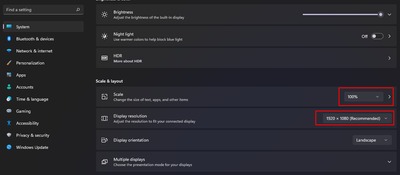
Sorry to hear about this experience. I would request you to try changing the display resolution and scaling under Windows Settings to the default and then re-launch Illustrator to check if it helps.

AnubhavMajumder_0-1654015776073.png


Looking forward to hearing from you.


Thanks,

Anubhav

Translate
Adobe
Adobe Employee ,
May 31, 2022 May 31, 2022

Hello @Lilian Juzumas,


Sorry to hear about this experience. I would request you to try changing the display resolution and scaling under Windows Settings to the default and then re-launch Illustrator to check if it helps.

AnubhavMajumder_0-1654015776073.png


Looking forward to hearing from you.


Thanks,

Anubhav

Translate
Report
Community guidelines
Be kind and respectful, give credit to the original source of content, and search for duplicates before posting. Learn more
community guidelines
New Here ,
Jun 02, 2022 Jun 02, 2022
LATEST

Thank you so much, Anubhav! It really worked!!!


Thanks! :o)

Translate
Report
Community guidelines
Be kind and respectful, give credit to the original source of content, and search for duplicates before posting. Learn more
community guidelines