


New Participant
June 8, 2021
Answered

IllustratorGc.jsx script error while launching Illustrator 25.3

  • June 8, 2021
  • 53 replies
  • 118095 views

Updated this morning to Illustrator 25.3 - as soon as the update was done this scripting error began appearing (every 30 seconds). .. Personally went back to 25.2.3 which has solved this issue. 
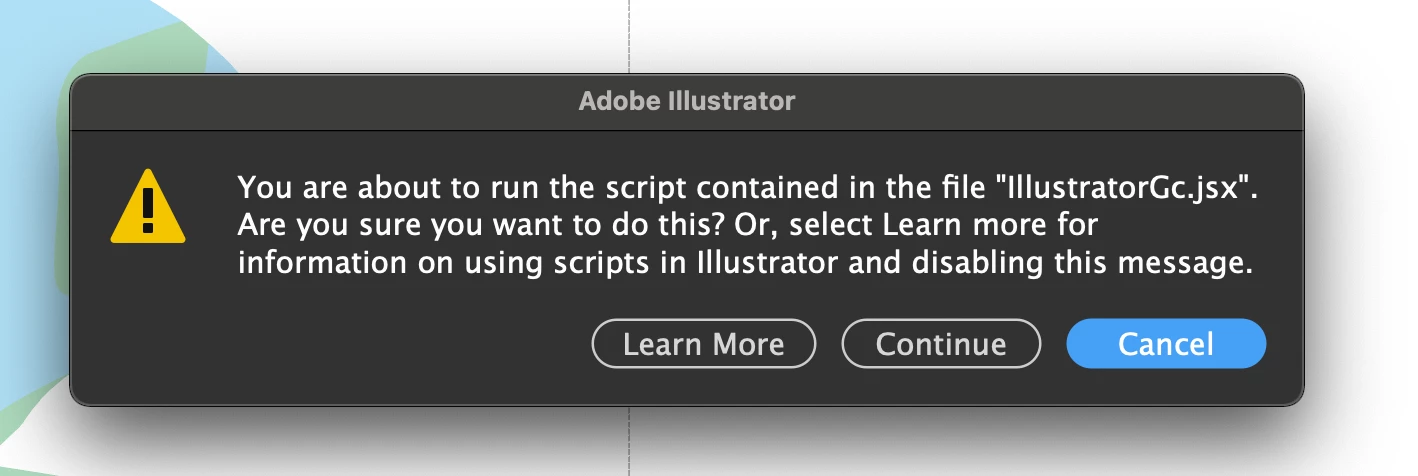


{Renamed by MOD}

Correct answer Srishti Bali

Hi all,


We hope the issue is resolved by now. If not, please update the logitech driver to latest version (9.40.75) and share your observations with us.


Regards,

Srishti

53 replies

New Participant
June 27, 2021

After the update I'm having this same issue to the point Illustrator is unusable. I can't move anything without the pop up happening. Adobe support keeps saying to update the Logi app, but that doesn't fix the issue. I haven't seen a solution yet to help this problem. 

I really hope this isn't another Adobe issue where they just pass the blame to another company. 

New Participant
June 27, 2021

On top of that, rolling back to the previous version erased all my workspace preference. 

New Participant
June 25, 2021

Can someone help? How to stop this pop-up?

New Participant
June 25, 2021

Hello community,


Thanks for the help sofar. Sadly am I still getting the popup. I will provide screenshots of the version of both Logi Options and Illustrator. 

PLEASE someone help me. This is my fulltime job and i can't work like this. I don't know what to do anymore. Even when i turn my mouse of i get the popup. It haunts me.


Kind reragrds,


Mandema

Participating Frequently
June 25, 2021

Hey man, I rolled back to the last version of Illustrator for now and I don't get the popup. I'm in the middle of a big sprint too and couldnt deal with this damn pop up. I swear, everytime they release a new version of Illustrator the program gets less and less stable.

Participating Frequently
June 25, 2021

Here's a screenshot of where to go to rollback to older versions.

Participating Frequently
June 24, 2021

Dear Comunity, 


since a few days I receive that message from illustrator everytime I switch tabs and go back. There is a link in the dialog box (https://helpx.adobe.com/de/illustrator/user-guide.html/illustrator/using/automation-scripts.ug.html), unfortunately it did not help either. Super frustrating, I cant work properly with that message popping up every second. 


The message says: 

You are about to run the script contained in the file "IllustratorCc.jsx. Are you sure you want to proceed? See "More information" to learn how to use scripts in Illustrator and disable this message.


thank you in advance 


Vincent

Ton Frederiks
Braniac
June 24, 2021
Participating Frequently
June 24, 2021

Damn it, of course! Thank you! 🙂

Participating Frequently
June 23, 2021

FYI, problem still not fixed in 25.3.1

I was hopeful there for a second...

seansmith25
New Participant
June 23, 2021

Updated to 25.3.1 and latest Logi options and am still getting this error dialog constantly... this is very frustrating to try and get work done with. 


Adobe could you please acknowledge that you are still working on this? Your answer stickied to this page doesn't work.

seansmith25
New Participant
June 23, 2021

Ok, I tried the Beta Logitech Software... it worked! 
https://www.logitech.com/en-gb/software/logi-options-plus.html

New Participant
June 22, 2021

FOR ANYONE STILL GETTING THIS PROBLEM...


Please refer to my previous post: https://community.adobe.com/t5/illustrator/illustratorgc-jsx-script-error-while-launching-illustrator-25-3/m-p/12116812#M279693


I updated to the last version of everything and had the error so had to disable application specific settings in Logi Options, which fixed it. Hopefully that will work for others in the same situation.

rickpirman
New Participant
June 22, 2021

Help! how do i disable this from popping up everytime i open an illustrator file! it's crazy. If you hit "Cancel" it pops right back up in a few seconds.


Rob Sollom
Participating Frequently
June 22, 2021

Hi,


I keep getting the dialogue box in the screen shot attached. This happens (sometimes) when I switch tools with keyboard shortcuts and paste objects... it mostly seems to be random but always when I perform some action.


Any help would be much appreciated!


Thanks,


Rob

GerssonDelgado
Inspiring
June 22, 2021
Participating Frequently
June 22, 2021

Since the most recent update (25.3) I've been getting this alert message constantly, like about once a minute:

Hitting "continue" or "cancel" does nothing. I've searched my Mac for existence of this script file and it's nowhere to be found. But it's knackering Illustrator for me. It's become unusable. Have uninstalled and reinstalled and still the same. Any help would be great.

Doug A Roberts
Braniac
June 22, 2021

Have a read of this thread and see if updating Logi Options works out for you.


https://community.adobe.com/t5/illustrator/illustratorgc-jsx-script-error-while-launching-illustrator-25-3/td-p/12099399

Participating Frequently
June 22, 2021

Yep that seems to have sorted it. Thanks Doug

D

New Participant
June 22, 2021

after upgrading to versions 25.3 and versions 25.3.1, a window appears in the program and no actions other than returning to the old version


help.

Ashutosh_Mishra
Inspiring
June 22, 2021

Hi there,


Sorry to hear about your experience. This error is caused by older version of Logitech software. In addition to the suggestions given earlier, please try the troubleshooting steps given on this help article(https://helpx.adobe.com/illustrator/kb/fix-scripting-error.html) & let us know if they help.


Regards,

Ashutosh