


New Participant
June 8, 2021
Answered

IllustratorGc.jsx script error while launching Illustrator 25.3

  • June 8, 2021
  • 53 replies
  • 118099 views

Updated this morning to Illustrator 25.3 - as soon as the update was done this scripting error began appearing (every 30 seconds). .. Personally went back to 25.2.3 which has solved this issue. 
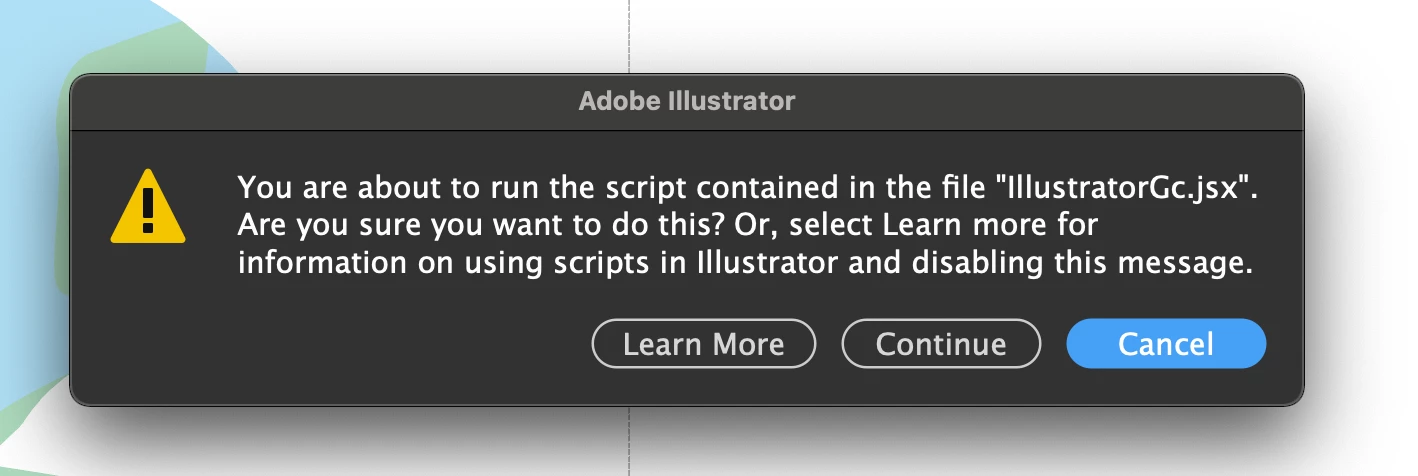


{Renamed by MOD}

Correct answer Srishti Bali

Hi all,


We hope the issue is resolved by now. If not, please update the logitech driver to latest version (9.40.75) and share your observations with us.


Regards,

Srishti

53 replies

New Participant
August 20, 2021

Has anyone found a solution for this? It is driving me absolutely crazy! I can't get anything done!

New Participant
August 20, 2021

Use a versao Beta do logitech, para mim resolveu o problema.

https://www.logitech.com/en-gb/software/logi-options-plus.html

New Participant
August 18, 2021

This is extremely annoying...


Turning OFF the application specific settings is NOT a solution. That was one of the reasons why I and most likely everyone who bought this specific mouses or keyboards, had them in first place!


It's August 18th and this problem is still requiring solution.

Absolutely disgraceful, there's no way you can work with that notification popping every 10 seconds.

New Participant
August 16, 2021

I'm having the same issue running the latest versions of Adobe AI and logitch options and it's making Illustator impossible to use with this error message every 5 seconds. 


cloudninedesign
Participating Frequently
August 12, 2021

Don't mark this issue as "solved," because it is NOT. I am running current versions of both Illustrator and Logi Options. FIX THIS, ADOBE.

Participating Frequently
August 12, 2021

Same situation, I am running latest versions of each and its NOT FIXED, only way I have seen reported as a fix is to install the new Logi Options+ Beta  software https://www.logitech.com/en-gb/software/logi-options-plus.html 

Not tried it yet, but is that as good as it gets to resolve, dump the exisitng Logi Options and go with a Beta version?

New Participant
August 17, 2021

Me parece que a versão Beta resolveu o problema.

lsmithbarbri
Participating Frequently
August 10, 2021

Yup, updated Illustrator and was able to turn all applications back on in Logi with no errors. 

soulforge
Participating Frequently
August 10, 2021

Glad it worked for you, I on the other hand updated 2 days ago ... didn't do anything .. still have the error and everything is the NEWEST thing on the books for all parties involved. MacOS, Logitech, and Adobe Illustrator.

Srishti Bali
Community Manager
Community Manager
August 10, 2021

Hi all,


Those whose are still facing this issue, we need to your help to investigate this issue further. I would request if you could share the following details:

  1. Screen recording of the issue.
  2. Logitech options app or web cam installed.
  3. Logitech driver version.


Regards!

soulforge
Participating Frequently
August 10, 2021

I've included a video ... the cycle happens about every 8 seconds whether there's a file open or not. on my intel 2021 i9 MBP it only happen when a file is open. This clip is recorded on an M1 MAc Mini 16GB model running MacOS 12 Monteray Beta 4. 


The easy fix is thanks for the warning 'stop excuting this script' then in prefs give us place to unblock a script if it gets fixed ... just saying


My UX wisdom for the day ... 🙂

soulforge
Participating Frequently
August 10, 2021

Before you ask, I updated 2 days ago ... didn't do anything .. still have the error and everything is the NEWEST thing on the books for all parties involved. MacOS, Logitech, and Adobe Illustrator. 😕😕

Srishti Bali
Community Manager
Community Manager
August 9, 2021

Hi all,


We're sorry to hear that updating the Logitech drivers hasn't resolve this issue. We are totally aware of this situation and team is working on it.


While we are working on a fix to this issue, please feel free to upvote this issue here (https://illustrator.uservoice.com/forums/601447-illustrator-desktop-bugs/suggestions/43691253-scripting-window-keeps-appearing-and-no-way-to-rem ) and stay tuned for updates.


Regards,

Srishti


Doug A Roberts
Community Expert
August 9, 2021

Hi Srishti,

The uservoice post has been marked 'resolved' and locked. Users can no longer vote or comment on it.

Srishti Bali
Community Manager
Community Manager
August 9, 2021

Thanks for highlighting this, Doug! I have sent a request to unlock this thread.


Regards!

Participating Frequently
August 5, 2021

Hi, can we get a proper solution instead of marking this solved when it obviously is not?

These comments marked "solution" are justs workarounds (disabling features of other software) and generic troubleshooting?

Why is this marked solved when it isn't solved?

There's no other real avenue for support than here, you'd be forgiven for thinking this wasn't industry-standard paid software. Yes this is a support community, but it's no hidden truth that the official support reps just browse publically available information anyway.


Any updates on this?

Participating Frequently
August 5, 2021

Also, no way to edit posts. Brilliant.

Participating Frequently
August 5, 2021

Hi, can we get a proper solution instead of marking this solved when it obviously is not?

These comments marked "solution" are justs workarounds (disabling features of other software) and generic troubleshooting?

Why is this marked solved when it isn't solved?

There's no other real avenue for support than here, you'd be mistaken for thinking this wasn't industry-standard paid software. Yes this is a support community, but it's no hidden truth that the official support reps just browse publically available information anyway.


Any updates on this?

soulforge
Participating Frequently
August 3, 2021

This error is infuriating and the lack of a real solution is UTTERLY UNACCCEPTABLE! There is nothing that stops it. I pay way too much for this kind of crap to be an issue.

New Participant
August 23, 2021

Totally agree! Just sold my Craft keyboard and bought the MX version. Totally unaccepatble but needed a functionig keyboard in Illustrator...AND AND wond up buying a Loupedeck CT to replace the missing CROWN functions that I once had with the Craft! Why is this still an issue!!?! Looks poorly on both sides. AND AND even with this new MX keybaord it pops up the same error unless you turn off application features in the setup program.