Participant
March 1, 2023
Answered

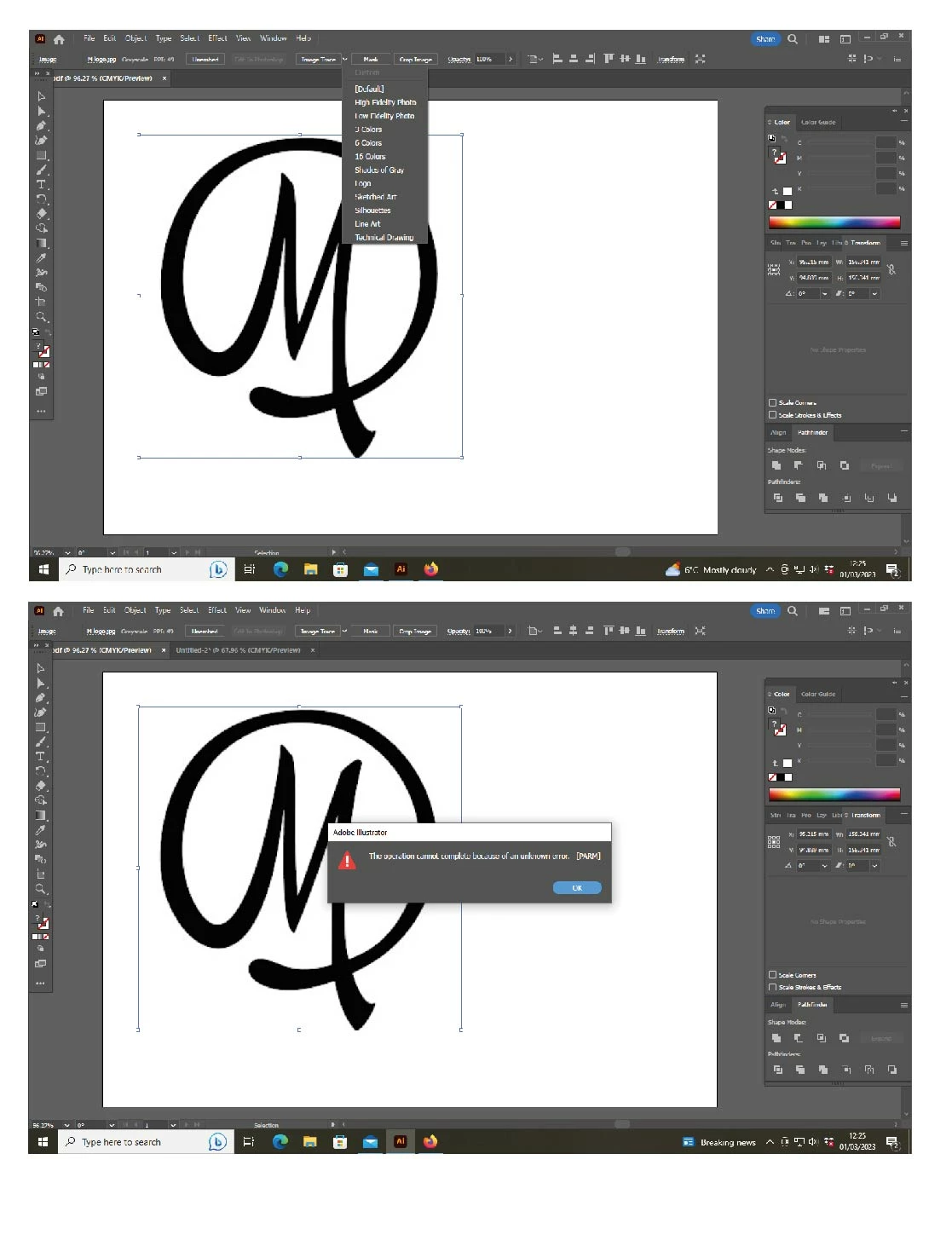
Image Trace Tool Unknown Error: the operation cannot complete because of unknown error [PARM]

  • March 1, 2023
  • 8 replies
  • 11914 views

I can no longer trace. The Black & White option has disappeared. Have tried others but this happens (see attached). Thanks in advance!

This topic has been closed for replies.
Correct answer dillydelly

I had the same problem, I had a complex design and trying to get as much detail out of the trace as I could, I made the image extremely large, and I think that was the issue... file was too big (2.8g) So I cut it into 4 so the image sizes were smaller, and then presto it worked, now just stitch the tiles back together.

8 replies

dillydellyCorrect answer
Participant
September 9, 2024

I had the same problem, I had a complex design and trying to get as much detail out of the trace as I could, I made the image extremely large, and I think that was the issue... file was too big (2.8g) So I cut it into 4 so the image sizes were smaller, and then presto it worked, now just stitch the tiles back together.

peter85793964
Participant
June 22, 2023

My tracing window goes blank after trying to open advanced tracing methods.

Ton Frederiks
Community Expert
Community Expert
June 22, 2023

Which Illustrator version do you have?

Participant
May 3, 2023

As usual, every Adobe update comes with problems and they take monts to address it.
I had the same problem. The only way to resolve it was to install an earlier version (27.2) I hope this helps!

Participant
April 18, 2023

Hi, it's all ok now. I just have to make sure I go to 'Window' - 'Image Trace' and then I can do it in black and white. Still not showing on tabs across the top though


Participant
April 14, 2023

I have Illustrator 27.4.1.

When I try to Image Trace, it says "An unknown error occured. Click MORE INFO and try some of the solutions to fix the issue." That leads to a generic "what to do when Illustrator crashes" page. I tried .png, .jpg, and .tif files. I also noticed that the drop down changed for Image Trace presets. It used to say "Black and White Logo" and now it just says "Logo."

I use Image Trace several times a day in my job. This error severely hobbles me. 

Inspiring
April 14, 2023

I'm not sure if I can share the actual file I was having the issue with. But today I made a simple black and white design in Photoshop. Exported that as JPEG and was able to use Image Trace. The original images that I was having issues with, I still cannot trace, getting the same error. So it isn't EVERY image that I'm having the issues with. And it doesn't seem to be a case where there is a image size threshold. 


My experience is the same as in your Screen Recording. 


Another detail.. currently the only image I'm having issues with is one that was originally a piece of printed material, scanned as anRGB PDF, emailed to me. I dropped it straight into Illustrator, cropped, embedded and tried to Image Trace. Got the error. Then I unembedded and saved as a PSD. Got the same error. Then I opened the PSD in Photoshop to simplify further to make it just black and white and as simple as possible. Got same error. Exported from Photoshop to a JPEG. Same error. Created a PSD from scratch. just a simple black and white design, exported as JPEG.. Trace worked fine. 

Inspiring
April 12, 2023

I can't use Image Trace at all. I'm using 27.4.1

Met1
Legend
April 12, 2023

Without any info we can help you.

Inspiring
April 12, 2023

What info will enable you to help me?


I'm using Illustrator 27.4.1.


Today I'm trying to use Image Trace. I've tried with a 1.5 MB PSD. I've tried with a 77 KB JPEG. When I click on Image Trace, I see "An unknown error occured. Clic MORE INFO and try some of the solutions..." the link takes me to a page to fix Illustrator from crashing. Illustrator is not crashing, only the Image Trace features isn't working.

Community Manager
March 1, 2023

Hello @lindsay28652329wl66,


We understand that encountering technical issues can be frustrating. Our product team has made an attempt to address the issue in the prerelease build v27.3.1_629. Would you mind trying the prerelease build and letting us know if the issue has been resolved for you?


To join the Illustrator pre-release program, please follow these steps:

  1. Click on this link (www.adobeprerelease.com/)
  2. Go to the "Available Program" section to join the Illustrator prerelease.
  3. Accept the Prerelease agreement.
  4. Install the Prerelease build v27.3.1_629 by closing Illustrator and going to the Creative Cloud Desktop app > Prerelease section under apps > click on install. Please note that this will not replace the existing installation of the Release build of Illustrator.


If you don't mind, could you please follow the steps and share your observations with us? We appreciate your time and effort in helping us resolve this issue.


Thanks,

Anubhav

Participant
March 1, 2023

I have done what was advised. Shut down programme, re-launched, and Black and White still isn't in the tracing presets. I can access it via 'window - image trace' though

Ton Frederiks
Community Expert
Community Expert
March 1, 2023

What version do you have (you can find it in About Illustrator)?

Black and White is not in the presets, it is a Mode you can choose.

Ton Frederiks
Community Expert
Community Expert
March 1, 2023

There were tracing problems with the 27.3 update. There is a newer version; 27.3.1 that solves them.

Participating Frequently
March 17, 2023

Still having the issue