


Question
Import Dxf/Dwg with units
Hi,
Is it posibble import Dxf/Dwg with desired units?
Actually I need to do it silent, not with this dialog:
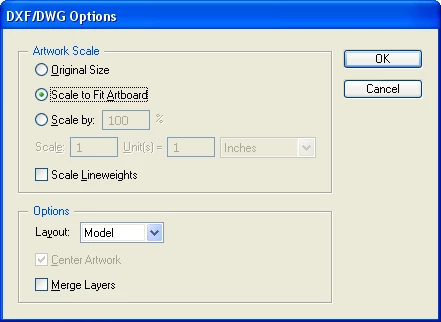
I need setup scaling factor and show in document.
In this code I can hide dialog, but can't setup. And also Ruller Units do not can scale imported document, it always scaled to Fit...
| result = sAIActionManager->AINewActionParamValue(&fActionParamValueRef); | ||||
| result = sAIActionManager->AIActionSetStringUS(fActionParamValueRef, kAINewDocumentNameKey, ai::UnicodeString(dwgFilePath.c_str())); | ||||
| result = sAIActionManager->AIActionSetInteger(fActionParamValueRef, kAINewDocumentColorModelKey, kDocCMYKColor); | ||||
| result = sAIActionManager->AIActionSetInteger(fActionParamValueRef, kAINewDocumentRulerUnitsKey, kADMInchUnits); | ||||
| result = sAIActionManager->PlayActionEvent(kAIOpenDocumentAction, kDialogOff, fActionParamValueRef); |
Also I've found AIDxfDwgPrefs.h header file, but I can't apply values for this prefs:
kDxfDwgDefaultImportGlobalScaleOption, kDxfDwgDefaultImportUnitScaleRatio etc.
Thanks!
 AdChoices