


Olivander12
Known Participant
February 1, 2018
Answered

InDesign and Illustrator UI too small

  • February 1, 2018
  • 13 replies
  • 91865 views

Hi guys,

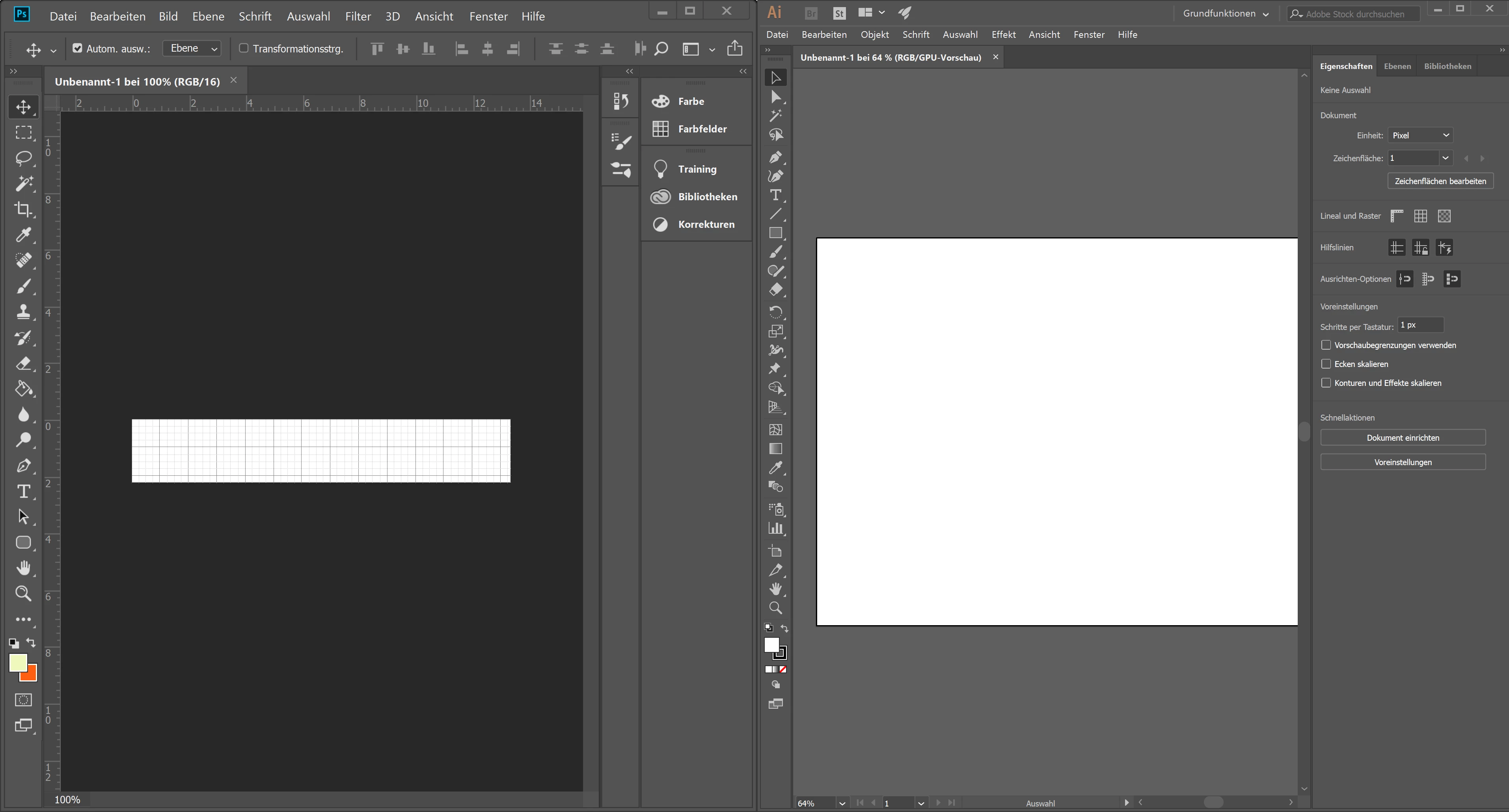
I have the problem that the UI of Illustrator and InDesign is too small. Photoshop and Muse scale the UI just fine, whereas InDesign's and Illustrator's interface is not usable. In the settings, the scaling is already set to the highest value, so I do not understand why the UI is still small. It is a very frustrating issue, since it is a real pain to work with these small icons.

I am on a Thinkpad T570 with a 4K-Panel, Windows 10 scaling is set to 250%. I added a screenshot where you can see the difference between the UI of PS and ID.
Thanks in advance for your help!
Correct answer Srishti Bali

No


Hi there,

We are glad to inform you that this has been addressed in our latest update released today. Please install and let us know if that helps

1) Do one of the following:

  • (Windows) Choose Edit > Preferences > User Interface.
  • (macOS) Choose Illustrator > Preferences > User Interface.

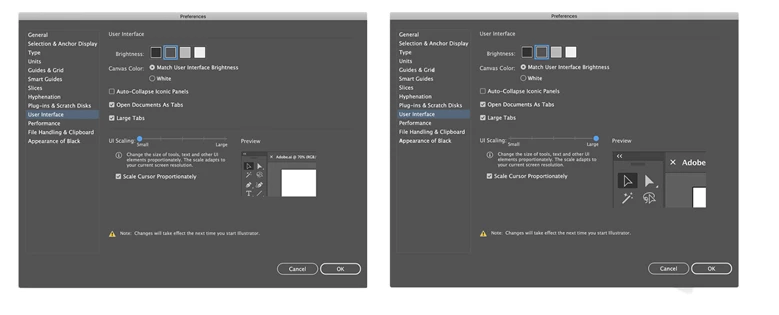
2) Adjust the UI Scaling slider. A preview of the scaled UI is displayed in the Preferences dialog box.

3) Select the Scale Cursor Proportionately option to scale the cursor icons in proportion to the UI.

4) To apply this setting, relaunch Illustrator. If you do not relaunch Illustrator, the changes will take effect the next time you launch Illustrator.

Here a few more features introduced in Illustrator 23.0: Introducing Illustrator CC 2019 | Adobe Blog

Regards,

Srishti

13 replies

New Participant
September 15, 2020

But will be able to enlarge InDesign's UI icons?

Also: is there a way to downsize the desktop space around the page(s)?

New Participant
August 27, 2020

Hi!

Do you have any updates on how this works? they seem to have chnages the menu 

eugeneb49604842
New Participant
February 17, 2020

I am still pulling my hair our over this. I have downloaded and installed the latest CSS updates and still do not see the UI slider in  Edit/Preferences/User Interface in Adobe Illustrator CS6. These tiny icons are making this software unusable. Windows 10, latestest Adobe updates. Any assistance warmly appreciated. 

Srishti Bali
Community Manager
Community Manager
February 20, 2020

Hi Eugene,


So sorry about this frustration. This feature was added in version 2019 and is unavailable for any version before that. We strongly recommend upgrading your software to a newer version that is supported. That way, we can provide you access to the latest updates and bug fixes. I apologize for the frustration. Please let me know if you have any questions.


Regards,

Srishti


deezieee1
New Participant
February 10, 2020

i dont seem to haVE that option


Daniel saxton
Monika Gause
Community Expert
February 10, 2020

Which version of Illustrator is it?

New Participant
February 10, 2020

I've seen the "solution" answer below: a slider to adjust the scaling on the UI, but mine doesn't have that slider (it only has a light/dark slider but not a size one. What's the deal, it looks like this bug hasn't been fixed for at least 2 years?

Monika Gause
Community Expert
February 10, 2020

Which version of Illustrator is it?


New Participant
January 31, 2020

I dont have the UI Scaling slider under (macOS) Choose Illustrator > Preferences > User Interface. Its missing.

Monika Gause
Community Expert
January 31, 2020

Which version of Illustrator is it?

Kevin Weiner
New Participant
February 3, 2019

This issue seems resolved for the main User Interface, but it is unresolved for the User Interfaces that open within the workflow. For example, with a path selected if I go to "Effect" --> "Sketch" --> "Chalk & Charcoal" the User Interface that opens for that workflow contains system text and system icons that are too small to be understood. This is repeatable for many workflow user interfaces. This is a usability bug and should been at the very top of the developers focus.

Thanks,

Kevin

Kevin Weiner
New Participant
February 4, 2019
New Participant
September 15, 2020

Hello, InDesign's interface is just as small. How do we tell Adobe?

Inspiring
January 18, 2019

Glad has been addressed in Illustrator. What about InDesign? (In original question)

Srishti Bali
Community Manager
Community Manager
January 18, 2019

Hi Barb,

Sorry about the inconvenience. Please share your feedback/ suggestion here: Adobe InDesign Feedback. This is the best way of communicating with the Engineering and Product Management teams regarding issues and suggestions so they can be implemented in future releases.

Regards,

Srishti

Inspiring
January 23, 2019

Thank you Srishti -- I did search and found the UI adjustment option has been requested. Not a lot of votes, but added mine. If anyone else would like to see, please add your vote too! Thank you -- Barbara

ccu_de
New Participant
October 18, 2018

Hi,

The solution for Win10 or for any such software running under Win10 is pretty straight-forward.

Right click on the .exe file for the app, Go to Compatibility > Settings > Change high DPI Settings > Change Program DPI Settings and set High DPI Scaling override to 'System'.

Best,

Cem

New Participant
October 31, 2018

Hi ccu.de​,

This setting indeed scales the UI properly but it looks blurry, so still not an ideal solution.

New Participant
September 20, 2018

I have this same issue on a Dell Inspiron 7559. How do we fix it?