


KlausKi
Inspiring
September 23, 2017
Answered

Is there a Contour tool in Illustrator

  • September 23, 2017
  • 3 replies
  • 30868 views

Migrating from CorelDRAW to Adobe Illustrator I wonder how I can add a contour to an object (i.e. text).

In CorelDRAW, to add a 3-step contour to a text, I would use the Contour tool with the following parameters (I added a red ellipse to highlight the parameters I set:
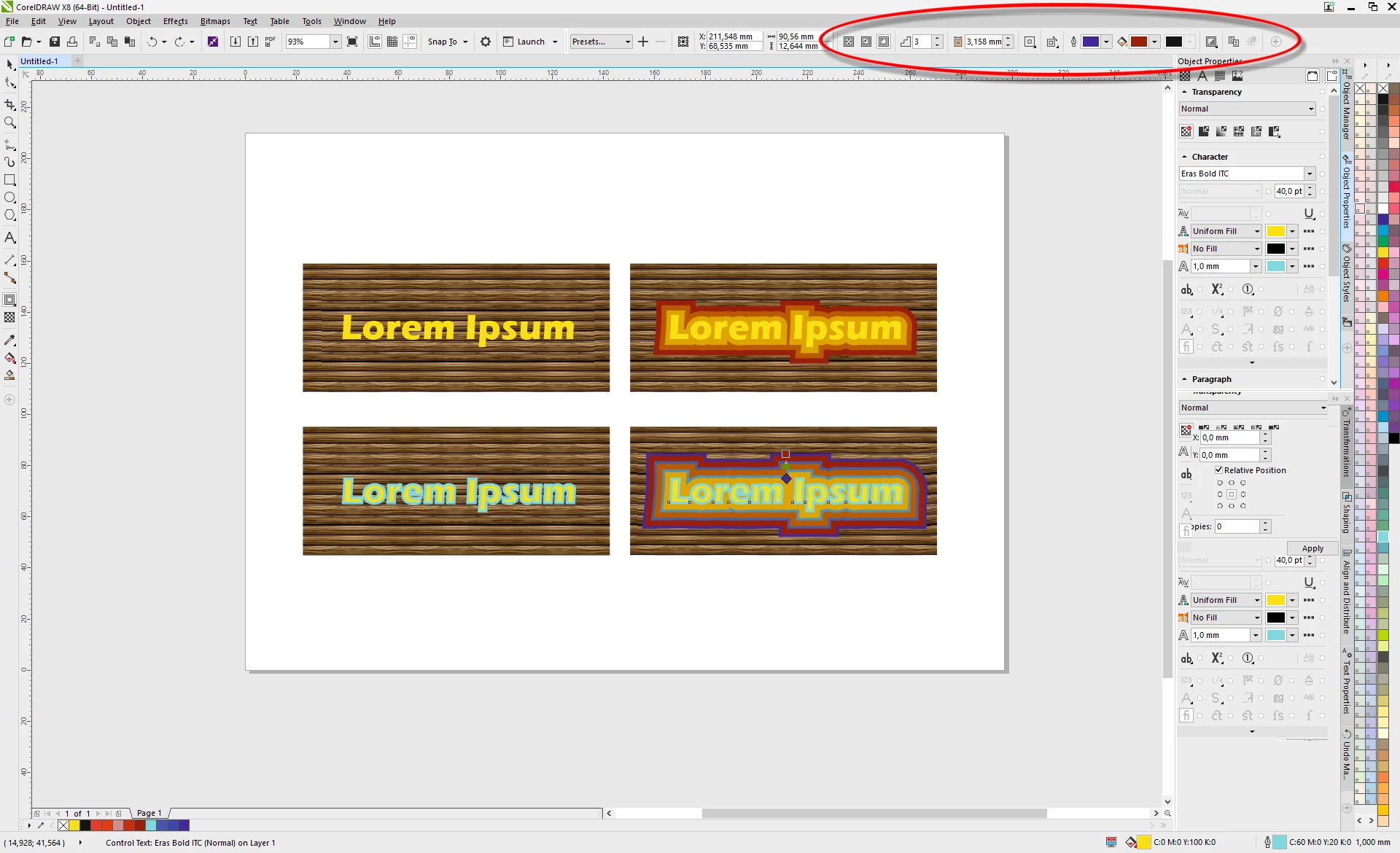
The upper row applies a contour to a text object having no outline, the lower row applies a contour to a text object having an outline.

Your help is appreciated!

Correct answer angie_taylor

This would be a Stroke in Illustrator. the Appearance panel allows you to add multiple strokes. You can also adjust the dimensions, blending options and stating order of strokes in the Appearance panel. Here's a little tutorial I did about the Appearance panel;

The Appearance Panel in Illustrator - YouTube

3 replies

ErdoganDZ
New Participant
August 4, 2019

I think taht the quick and easy alternative, is the "Offset Path"
I work with cc 2019 and i have no idea if it exists in previous versions

Monika Gause
Community Expert
August 4, 2019

erdogandz  schrieb

I think taht the quick and easy alternative, is the "Offset Path"

It's not. At least not when you want to adjust the text after applying the effect (which you will probably have to do, at least adjust the tracking)

But of course Offset path existed in precious versions.

Kurt Gold
Community Expert
September 23, 2017

In AI you can do that by applying multiple strokes in the Appearance palette (below the Type item).

See Font/object outline option "behind object"?

KlausKi
KlausKiAuthor
Inspiring
September 24, 2017

Excellent. Thanks a lot for pointing me to the right direction!

(Though, currently, after fiddling around a bit, the CorelDRAW Contour tool seems much faster and more intuitive to me as you can change the contour's appearance by dragging handles. The AI way seems quite cerebral to me. But perhaps this may change over time.)

angie_taylor
angie_taylorCorrect answer
Brainiac
September 23, 2017

This would be a Stroke in Illustrator. the Appearance panel allows you to add multiple strokes. You can also adjust the dimensions, blending options and stating order of strokes in the Appearance panel. Here's a little tutorial I did about the Appearance panel;

The Appearance Panel in Illustrator - YouTube