New Participant
May 5, 2025
Answered

Is there a way to create outline texts with offset path with no gaps?

  • May 5, 2025
  • 1 reply
  • 334 views

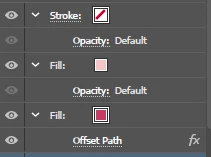
Hi! I hope that someone would be able to help me with this. I have an outlined text created with offset path like the screenshot shown here but it left some pesky gaps in between but I don't want to increase the thickness of the outline. So is there a way to get rid of the gap? (Without a workaround like putting a same color shape behind it or convert to outline and use shape builder... I mean a way to do it but I can still edit the text later on) Thank you!

Correct answer Monika Gause

This is one text object?


Then do the following:

open the Offset path effect and increase the offset to the point where the inside is filled.

Then apply the Pathfinder effect "Unite" afterwards

After the pathfinder effect apply another Offset path effect where you reduce the offset.

1 reply

Monika Gause
Monika GauseCorrect answer
Community Expert
May 5, 2025

This is one text object?


Then do the following:

open the Offset path effect and increase the offset to the point where the inside is filled.

Then apply the Pathfinder effect "Unite" afterwards

After the pathfinder effect apply another Offset path effect where you reduce the offset.

New Participant
May 5, 2025

I will try that! Thank youu