Hi @Ronald5C40,
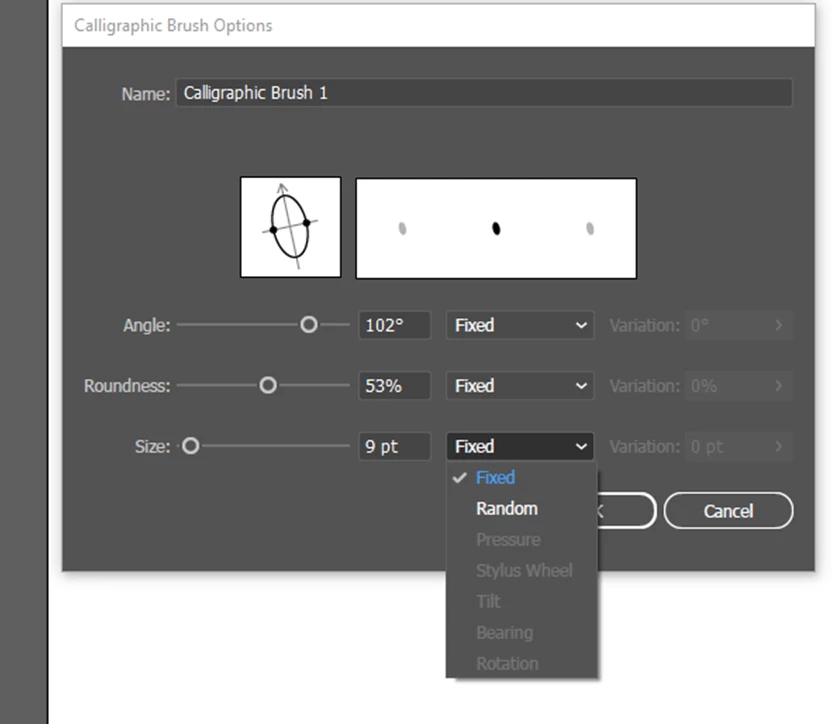
Thanks for reaching out. It seems like the options you are looking for when creating a new Calligraphic Brush are currently unavailable. This issue may be related to your tablet or stylus setup.
The settings you mentioned, such as pressure and angle, are typically used with pressure-sensitive stylus tablets like those from Wacom. If you do not have a compatible tablet or if the necessary drivers are not installed correctly, these options may appear grayed out or unavailable.
Here are a few steps you can take to address this issue:
-
Ensure that you have a compatible tablet device (e.g., Wacom) connected to your computer. Make sure the tablet's drivers are up-to-date and installed correctly. Sometimes, outdated or incompatible drivers can cause issues with pressure-sensitive features.
-
Confirm that your tablet is compatible with Adobe Illustrator. Some tablets may not fully support all of Illustrator's features.
-
Close and reopen Illustrator after verifying your tablet setup. Sometimes, a fresh start can help the program recognize your tablet's capabilities.
-
In Illustrator, you can go to Edit > Preferences > Devices (Windows) or Illustrator > Preferences > Devices (macOS). Ensure that "Tablet Input" is enabled.
-
If you have a tablet with pen pressure sensitivity, you should see options for controlling pressure in the Calligraphic Brush settings. If these options are still grayed out, it could be related to tablet-specific settings.
If the issue persists after checking these steps, it's advisable to consult the manufacturer's support resources for your tablet for further assistance. They may be able to provide guidance on how to configure your tablet settings to work seamlessly with Illustrator.
Best,
Anshul Saini



 AdChoices