brian_p_dts
Community Expert
Community Expert
January 28, 2023
Answered

[JSX] Parm error when setting characterAttributes.size of Story.textRange

  • January 28, 2023
  • 2 replies
  • 644 views

Considering the following snippet, I get the error: Error setting point size: Error: an Illustrator error occurred: 1346458189 ('PARM')


When I try to maunally select the text frame and run a lower part of this snippet, sometimes it works, if the text frame item is highlighted as well as selected in the layer panel. Trying to figure out what I'm doing wrong. Thanks. There doesn't seem to be rhyme or reason to it. 


var pmText = "Hello World";
    var pmVal = "tf1";
    var pmPI = activeDocument.textFrames.getByName(pmVal);
    //I tried adding select to see if that would solve
    //tfr.select();
    var pmps = pmPI.story;
    var tfr = pmps.textRange;
    tfr.contents = pmText;
    while(pmps.lines.length > 1) {
    try {
        tfr.characterAttributes.size -= .5;
    } catch(e) {
        $.writeln("Error setting point size: " + e);
    }
    }


This topic has been closed for replies.
Correct answer m1b

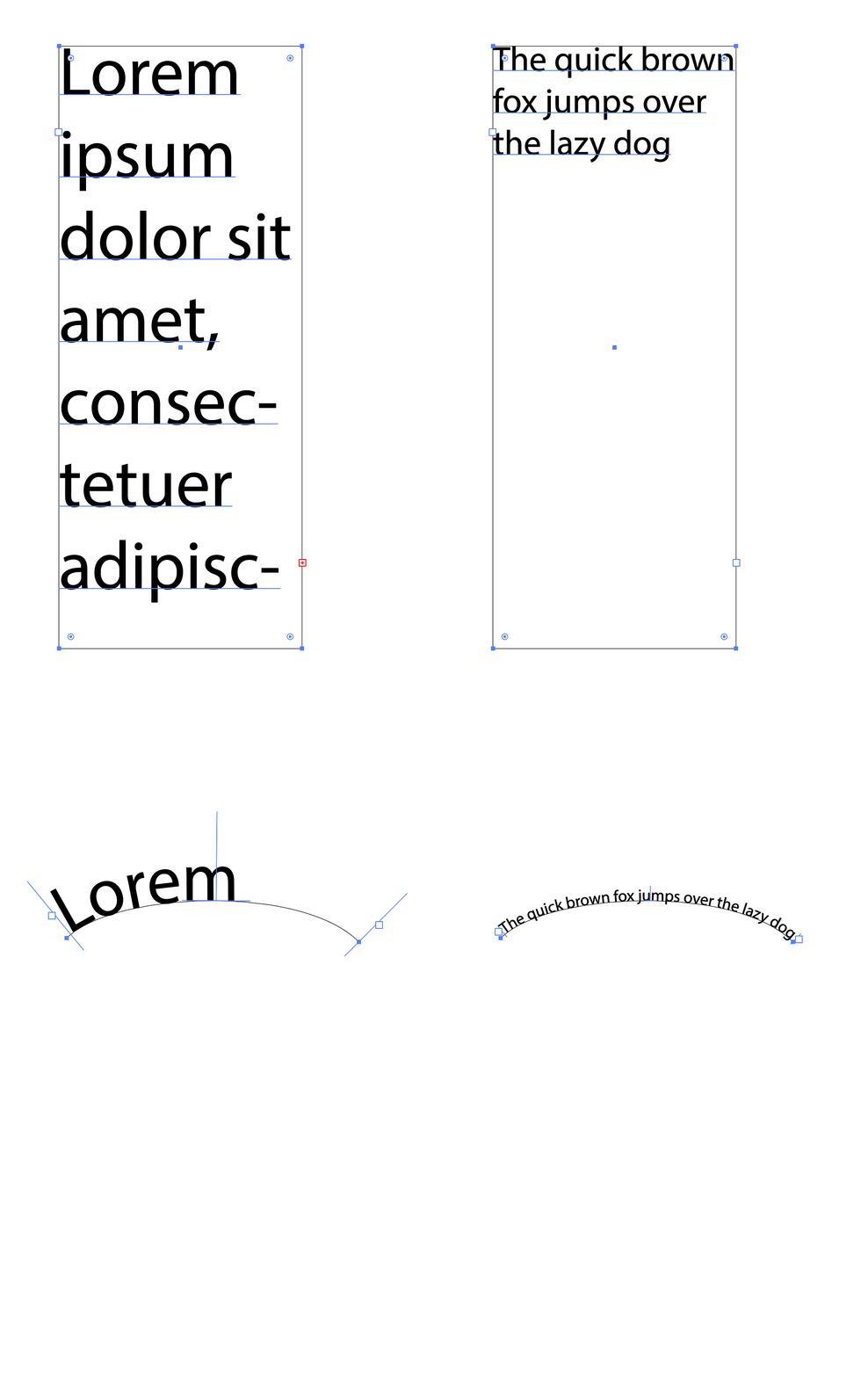
@brian_p_dts, I had a bit of a play and wrote a function "fitText" that aims to fit text to a given textFrame and also takes a maxLineCount parameter, so you can specify that you want, say, 3 lines and if there are more than 3 lines it will reduce point size further. (maxLineCount only works in area text—on path text you just get one line no matter what.) It's a quick script so will definitely fail in edge cases. See what you think.

- Mark
/**
 * Fit text to text frame
 * @discussion https://community.adobe.com/t5/illustrator-discussions/jsx-parm-error-when-setting-characterattributes-size-of-story-textrange/m-p/13535839
 */
(function () {

    var doc = app.activeDocument,
        tf = doc.selection[0];

    if (tf == undefined) {
        alert('Please select a text frame and try again.');
        return;
    }

    // some example text
    tf.textRange.contents = 'The quick brown fox jumps over the lazy dog';

    // fit the text, specifying number of lines
    fitText(tf, 3);


    /**
     * Fits text to an area text frame or path text.
     * @author m1b
     * @version 2023-01-29
     * @param {TextFrame} textFrame - an Illustrator TextFrame (area text or path text).
     * @param {Number} [maxLineCount] - the maximum number of lines of the final text (default: no limit). This is ignored for path text.
     * @param {Number} [increment] - the increment of size changing; the precision of the fit (default: 0.05).
     */
    function fitText(textFrame, maxLineCount, increment) {

        maxLineCount = maxLineCount || Infinity;
        increment = increment || 0.05;

        if (textFrame.kind == TextType.POINTTEXT)
            // "fitting" makes no sense with point text
            return;

        var text = textFrame.textRange.contents,
            size = textFrame.textRange.characterAttributes.size,

            // make an overflow text frame
            overflowTextFrame = addOverflowTextFrame(textFrame);

        // reapply the text contents
        textFrame.textRange.contents = text;

        // first enlarge text
        while (
            overflowTextFrame.words.length === 0
            && textFrame.lines.length !== 0
        ) {
            size += increment;
            sizeBothTextFrames(size);
        }

        // now reduce the text size to fit
        while (
            overflowTextFrame.words.length > 0
            || textFrame.lines.length > maxLineCount
        ) {
            size -= increment;
            sizeBothTextFrames(size);
        }

        // cleanup
        overflowTextFrame.remove();

        // helper function
        function sizeBothTextFrames(size) {
            textFrame.textRange.characterAttributes.size = size;
            overflowTextFrame.textRange.characterAttributes.size = size;
        }

    };


    /**
     * Adds a linked area text frame to the given text frame.
     * @author m1b
     * @version 2023-01-29
     * @param {TextFrame} textFrame - an Illustrator TextFrame (area text or path text).
     * @returns {TextFrame} - the overflow textFrame
     */
    function addOverflowTextFrame(textFrame) {

        try {

            var doc = getParentDocument(textFrame);

            // make the overflow text frame
            return doc.textFrames.areaText(doc.pathItems.rectangle(0, 150, 1000, 1000), TextOrientation.HORIZONTAL, textFrame);

        } catch (error) { }

    };


    /**
     * Returns the item's document, if possible.
     * @author m1b
     * @version 2022-05-29
     * @param {PageItem} item - an Illustrator page item.
     * @returns {Document}
     */
    function getParentDocument(item) {

        while (
            item.hasOwnProperty('parent')
            && item.constructor.name != 'Document'
        )
            item = item.parent;

        return item;

    };


})();


 

2 replies

m1b
Community Expert
m1bCommunity ExpertCorrect answer
Community Expert
January 28, 2023

@brian_p_dts, I had a bit of a play and wrote a function "fitText" that aims to fit text to a given textFrame and also takes a maxLineCount parameter, so you can specify that you want, say, 3 lines and if there are more than 3 lines it will reduce point size further. (maxLineCount only works in area text—on path text you just get one line no matter what.) It's a quick script so will definitely fail in edge cases. See what you think.

- Mark

/**
 * Fit text to text frame
 * @discussion https://community.adobe.com/t5/illustrator-discussions/jsx-parm-error-when-setting-characterattributes-size-of-story-textrange/m-p/13535839
 */
(function () {

    var doc = app.activeDocument,
        tf = doc.selection[0];

    if (tf == undefined) {
        alert('Please select a text frame and try again.');
        return;
    }

    // some example text
    tf.textRange.contents = 'The quick brown fox jumps over the lazy dog';

    // fit the text, specifying number of lines
    fitText(tf, 3);


    /**
     * Fits text to an area text frame or path text.
     * @author m1b
     * @version 2023-01-29
     * @param {TextFrame} textFrame - an Illustrator TextFrame (area text or path text).
     * @param {Number} [maxLineCount] - the maximum number of lines of the final text (default: no limit). This is ignored for path text.
     * @param {Number} [increment] - the increment of size changing; the precision of the fit (default: 0.05).
     */
    function fitText(textFrame, maxLineCount, increment) {

        maxLineCount = maxLineCount || Infinity;
        increment = increment || 0.05;

        if (textFrame.kind == TextType.POINTTEXT)
            // "fitting" makes no sense with point text
            return;

        var text = textFrame.textRange.contents,
            size = textFrame.textRange.characterAttributes.size,

            // make an overflow text frame
            overflowTextFrame = addOverflowTextFrame(textFrame);

        // reapply the text contents
        textFrame.textRange.contents = text;

        // first enlarge text
        while (
            overflowTextFrame.words.length === 0
            && textFrame.lines.length !== 0
        ) {
            size += increment;
            sizeBothTextFrames(size);
        }

        // now reduce the text size to fit
        while (
            overflowTextFrame.words.length > 0
            || textFrame.lines.length > maxLineCount
        ) {
            size -= increment;
            sizeBothTextFrames(size);
        }

        // cleanup
        overflowTextFrame.remove();

        // helper function
        function sizeBothTextFrames(size) {
            textFrame.textRange.characterAttributes.size = size;
            overflowTextFrame.textRange.characterAttributes.size = size;
        }

    };


    /**
     * Adds a linked area text frame to the given text frame.
     * @author m1b
     * @version 2023-01-29
     * @param {TextFrame} textFrame - an Illustrator TextFrame (area text or path text).
     * @returns {TextFrame} - the overflow textFrame
     */
    function addOverflowTextFrame(textFrame) {

        try {

            var doc = getParentDocument(textFrame);

            // make the overflow text frame
            return doc.textFrames.areaText(doc.pathItems.rectangle(0, 150, 1000, 1000), TextOrientation.HORIZONTAL, textFrame);

        } catch (error) { }

    };


    /**
     * Returns the item's document, if possible.
     * @author m1b
     * @version 2022-05-29
     * @param {PageItem} item - an Illustrator page item.
     * @returns {Document}
     */
    function getParentDocument(item) {

        while (
            item.hasOwnProperty('parent')
            && item.constructor.name != 'Document'
        )
            item = item.parent;

        return item;

    };


})();

 

brian_p_dts
Community Expert
Community Expert
January 29, 2023

Thanks, @m1b it works a treat! I think that the missing piece in what I was working on was drawing out the overflow flame to measure; I was trying to change point size on overset text. Much appreciated! 

m1b
Community Expert
Community Expert
January 28, 2023

Hi @brian_p_dts, you can do it like this:

var pmText = "Hello World";
var pmVal = "tf1";

var pmPI = activeDocument.textFrames.getByName(pmVal);
var tfr = pmPI.textRange;
tfr.contents = pmText;

while (tfr.lines.length > 1) {
    try {
        tfr.characterAttributes.size -= .5;
    } catch (e) {
        $.writeln("Error setting point size: " + e);
    }
}

I've never used a Story in Illustrator. It exists in the API, but it definitely doesn't work the same as in Indesign.


I wondered if you were trying to fit the text to a path? That will be a bit different I think because it doesn't show >1 lines when the text is overset.

- Mark